
Any Display: Second Monitor
Productivity
Second screen, pen tablet, webcam & Control Pad for Mac and Windows.
- Downloads
- 2.6K+
- on Google Play
- Price
- Free
- No in-app purchases
- Updated
- Oct 8
- 2026 · v1.8.8
Screenshots


About Any Display: Second Monitor
Turn your tablet or Android tablet into more than a second screen. Use it as an extended monitor, a drawing tablet with pen input, a webcam, a customizable Control Pad, or an supported phone or tablet screen mirror for your Mac or Windows computer.
SECOND MONITOR
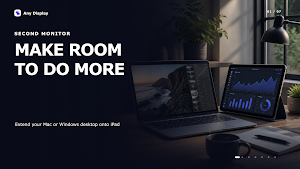
• Extend your desktop for documents, tools, chat, reference material, and timelines
• Mirror the full screen for presentations, demonstrations, and remote control
• Mirror an individual app window when you want to keep the rest of your desktop private
• Enjoy sharp HiDPI and Retina resolution
• Play computer audio through the connected tablet
• Use automatic rotation, frame-rate controls, and adaptive quality
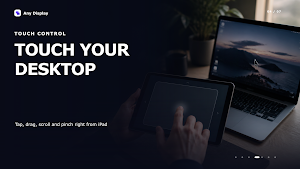
TOUCH & TRACKPAD CONTROL
• Control your computer directly from the tablet
• Choose touch gestures or trackpad-style control
• Scroll, click, drag, zoom, and navigate naturally
• Work from the tablet without constantly reaching for a mouse
DRAWING TABLET
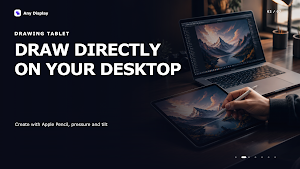
• Use Apple Pencil or S Pen for drawing, handwriting, signatures, and photo editing
• Send pressure, tilt, and pen movement to compatible desktop apps
• Adjust pen-pressure sensitivity for your preferred feel
• Palm rejection helps you draw more comfortably
MOBILE CAMERA WEBCAM
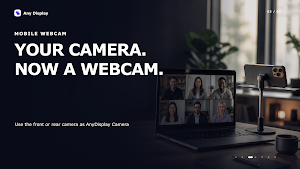
• Use the camera on an phone, tablet, or Android device as a Mac or Windows webcam
• Select AnyDisplay Camera in video meetings, streaming, and recording apps
• Switch between front and rear cameras
• Choose resolution, frame rate, mirroring, and orientation
• Continue using the device as a display while using its camera
CONTROL PAD
• Turn your tablet into a customizable Control Pad for desktop shortcuts, apps, media, and supported plugins
• Configure buttons and profiles in the Any Display desktop app
• Use Control Pad alongside an extended or mirrored display
MOBILE SCREEN MIRRORING
• Mirror an phone or tablet screen to a compatible Mac or Windows computer
• On Mac, Bluetooth and accessibility input features can also enable input from the computer
SIMPLE LOCAL CONNECTION
Install the free desktop app from anydisplay.app. Any Display automatically finds your computer on the same Wi-Fi network, or you can connect directly with USB for a stable, low-latency experience. Screen, audio, camera, and input data are transferred locally through your network or USB connection.
Give an old tablet a useful new role for portable dual-screen work, creative projects, presentations, meetings, and recording.
SECOND MONITOR
• Extend your desktop for documents, tools, chat, reference material, and timelines
• Mirror the full screen for presentations, demonstrations, and remote control
• Mirror an individual app window when you want to keep the rest of your desktop private
• Enjoy sharp HiDPI and Retina resolution
• Play computer audio through the connected tablet
• Use automatic rotation, frame-rate controls, and adaptive quality
TOUCH & TRACKPAD CONTROL
• Control your computer directly from the tablet
• Choose touch gestures or trackpad-style control
• Scroll, click, drag, zoom, and navigate naturally
• Work from the tablet without constantly reaching for a mouse
DRAWING TABLET
• Use Apple Pencil or S Pen for drawing, handwriting, signatures, and photo editing
• Send pressure, tilt, and pen movement to compatible desktop apps
• Adjust pen-pressure sensitivity for your preferred feel
• Palm rejection helps you draw more comfortably
MOBILE CAMERA WEBCAM
• Use the camera on an phone, tablet, or Android device as a Mac or Windows webcam
• Select AnyDisplay Camera in video meetings, streaming, and recording apps
• Switch between front and rear cameras
• Choose resolution, frame rate, mirroring, and orientation
• Continue using the device as a display while using its camera
CONTROL PAD
• Turn your tablet into a customizable Control Pad for desktop shortcuts, apps, media, and supported plugins
• Configure buttons and profiles in the Any Display desktop app
• Use Control Pad alongside an extended or mirrored display
MOBILE SCREEN MIRRORING
• Mirror an phone or tablet screen to a compatible Mac or Windows computer
• On Mac, Bluetooth and accessibility input features can also enable input from the computer
SIMPLE LOCAL CONNECTION
Install the free desktop app from anydisplay.app. Any Display automatically finds your computer on the same Wi-Fi network, or you can connect directly with USB for a stable, low-latency experience. Screen, audio, camera, and input data are transferred locally through your network or USB connection.
Give an old tablet a useful new role for portable dual-screen work, creative projects, presentations, meetings, and recording.
What’s new
Version 1.8.8 · Updated October 8, 2026
Fixed the busy and connection-failed messages disappearing at once. Fixed the screen freezing and not coming back; it now recovers on its own. Remote connections are steadier, and the Wi-Fi Direct list shows the computer's license correctly.
User reviews

bro its very fast and cheap as compare to other alternatives also the latency is very low satisfied with the purchase
Alternatives to Any Display: Second Monitor
Looking for apps like Any Display: Second Monitor? Here are 3 similar Android apps on Google Play. All of them are free to download.


| App | Rating | Price | Installs | Last updated | Compare |
|---|---|---|---|---|---|
| Any Display: Second Monitor | – | Free | 1,000+ | Oct 8, 2026 | |
| BebeNote | – | Free | 10+ | – | Compare |
| Smart Coin: Crypto Signals | – | Free | 10,000+ | Aug 22, 2026 | Compare |
| 스마트공시 - 다트공시 푸시 알림, 증권사리포트, 주식 | – | Free | 5,000+ | – | Compare |