

Document Pro
Tools
JPG to PDF, QR Scanner And Genrator,Image/PDF size reducer & Pixel Resizer
- Downloads
- 128+
- on Google Play
- Price
- Free
- No in-app purchases
- Updated
- Sep 30
- 2026 · v11.6.8
Screenshots


About Document Pro
Document Pro: The Ultimate Document & Utility Powerhouse
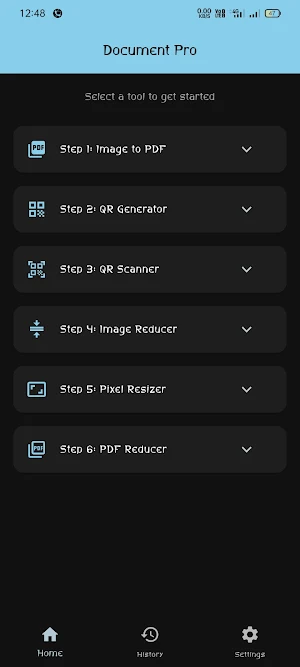
Tired of downloading five different apps for simple daily tasks? Meet Document Pro, a high-performance, lightweight utility application designed for speed, privacy, and efficiency. Built with a strict "No-Backend" philosophy, your data stays entirely on your device, ensuring maximum security and lightning-fast processing at up to 120 FPS.
We have combined essential digital tools into a single, sleek interface using native Material Design. Whether you need to convert an image to a PDF for an assignment or compress a heavy document for a portal upload, Document Pro handles it all with super-smooth animations.
🚀 Key Features (6 Powerful Steps):
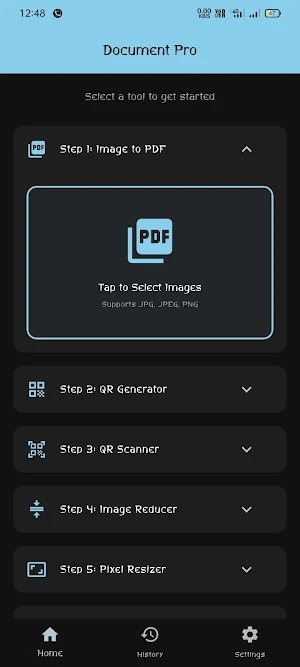
1. Fast JPG to PDF Converter
Instant Conversion: Select your photos (JPG, PNG) and instantly convert them into a high-quality PDF document.
Perfect for Students & Pros: Ideal for submitting assignments, sharing notes, or compiling official documents.
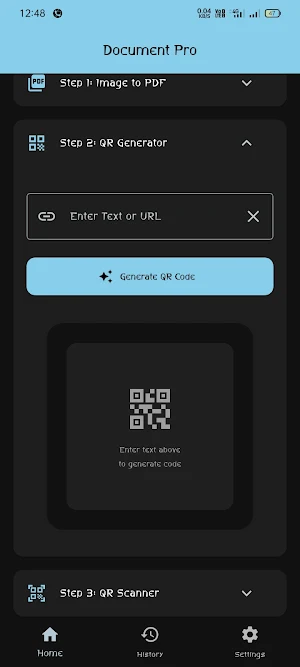
2. Pro QR Generator
Create high-quality custom QR codes for text, URLs, or contact info in seconds. Share them instantly from the app.
3. Native QR Scanner
A super-fast, built-in scanner to decode any QR code using your phone’s live camera. You can also pick and scan QR images directly from your gallery.
4. Advanced Image Reducer
Shrink File Size: Reduce image file size (from MB to KB) seamlessly.
Maintain Clarity: Perfect for strict government forms and official online portals where size limits apply.
5. Precision Pixel Resizer
Custom Dimensions: Input accurate pixel width and height for professional-grade resizing.
Total Control: Ensure your photos fit perfectly for any platform requirement.
6. Powerful PDF Reducer
Compress Documents: Easily shrink the size of heavy PDF files.
Quick Sharing: Make your PDFs lightweight enough to share via email or messaging apps without data limits holding you back.
💎 Premium User Experience:
Fluid Performance: Optimized to support 60 FPS to 120 FPS, providing a "butter-smooth" feel on all modern Android devices.
Native UI: Built with clean native icons and modern accents for a professional look.
Adaptive Theme: Full support for system Dark Mode and Light Mode to reduce eye strain.
Ultra-Lightweight: We’ve optimized our libraries to ensure the app runs flawlessly even on budget smartphones.
Privacy First: No Login, No Authentication, and No Backend. Your files and data never leave your phone!
🛠️ How to use Document Pro:
Home: Access all 6 core steps directly from the main dashboard.
History: Track, edit, and manage your past conversions and scans with our timestamped History Screen.
Settings: Toggle themes, clear history, or leave us a review to help us grow.
Document Pro is built for users who value their time, privacy, and storage space. Download now and experience the smoothest utility app ever made!
Keywords: JPG to PDF, PDF Compressor, QR Scanner, QR Generator, Image Compressor, Image Resizer, Fast PDF Maker, Offline Document Tool, Indian Utility App, Pixel Accurate Resizer.
Tired of downloading five different apps for simple daily tasks? Meet Document Pro, a high-performance, lightweight utility application designed for speed, privacy, and efficiency. Built with a strict "No-Backend" philosophy, your data stays entirely on your device, ensuring maximum security and lightning-fast processing at up to 120 FPS.
We have combined essential digital tools into a single, sleek interface using native Material Design. Whether you need to convert an image to a PDF for an assignment or compress a heavy document for a portal upload, Document Pro handles it all with super-smooth animations.
🚀 Key Features (6 Powerful Steps):
1. Fast JPG to PDF Converter
Instant Conversion: Select your photos (JPG, PNG) and instantly convert them into a high-quality PDF document.
Perfect for Students & Pros: Ideal for submitting assignments, sharing notes, or compiling official documents.
2. Pro QR Generator
Create high-quality custom QR codes for text, URLs, or contact info in seconds. Share them instantly from the app.
3. Native QR Scanner
A super-fast, built-in scanner to decode any QR code using your phone’s live camera. You can also pick and scan QR images directly from your gallery.
4. Advanced Image Reducer
Shrink File Size: Reduce image file size (from MB to KB) seamlessly.
Maintain Clarity: Perfect for strict government forms and official online portals where size limits apply.
5. Precision Pixel Resizer
Custom Dimensions: Input accurate pixel width and height for professional-grade resizing.
Total Control: Ensure your photos fit perfectly for any platform requirement.
6. Powerful PDF Reducer
Compress Documents: Easily shrink the size of heavy PDF files.
Quick Sharing: Make your PDFs lightweight enough to share via email or messaging apps without data limits holding you back.
💎 Premium User Experience:
Fluid Performance: Optimized to support 60 FPS to 120 FPS, providing a "butter-smooth" feel on all modern Android devices.
Native UI: Built with clean native icons and modern accents for a professional look.
Adaptive Theme: Full support for system Dark Mode and Light Mode to reduce eye strain.
Ultra-Lightweight: We’ve optimized our libraries to ensure the app runs flawlessly even on budget smartphones.
Privacy First: No Login, No Authentication, and No Backend. Your files and data never leave your phone!
🛠️ How to use Document Pro:
Home: Access all 6 core steps directly from the main dashboard.
History: Track, edit, and manage your past conversions and scans with our timestamped History Screen.
Settings: Toggle themes, clear history, or leave us a review to help us grow.
Document Pro is built for users who value their time, privacy, and storage space. Download now and experience the smoothest utility app ever made!
Keywords: JPG to PDF, PDF Compressor, QR Scanner, QR Generator, Image Compressor, Image Resizer, Fast PDF Maker, Offline Document Tool, Indian Utility App, Pixel Accurate Resizer.
What’s new
Version 11.6.8 · Updated September 30, 2026
DOWNLOAD ALL IN ONE UTILITY TOOLS HERE NO ADS FULLY PREMIUM LIKE FILL APPS JPG TO PDF CONVERTER , QR SCANNER AND GENRATOR ,IMAGE REDUCER , PIXEL RESIXER ,PDF REDUCER ALL TOOLS IS HERE GO TO DOWNLOAD AND INSTALL FOR FREE APPS.
User reviews

very good

nice work 👍

This Is Good Apps

aap is must butifull

good work this application

it's a good tool app and very helpful
Alternatives to Document Pro
Looking for apps like Document Pro? Here are 6 similar Android apps on Google Play. The highest rated is Touch Lock: Block Touch Screen (4.6/5), and all 6 are free to download.
-
TimeStamp Camera
-
FOL Camera
-
Touch Lock: Block Touch Screen 4.6
-
ScamLens: AI Scam Detector
-
Wind Meter: Anemometer
-
Voltage Drop Calculator
| App | Rating | Price | Installs | Last updated | Compare |
|---|---|---|---|---|---|
| Document Pro | – | Free | 100+ | Sep 30, 2026 | |
| TimeStamp Camera | – | Free | 100+ | Oct 19, 2026 | Compare |
| FOL Camera | – | Free | 1,000+ | Sep 7, 2026 | Compare |
| Touch Lock: Block Touch Screen | 4.6 / 5 | Free | 10,000+ | Oct 22, 2026 | Compare |
| ScamLens: AI Scam Detector | – | Free | 50+ | – | Compare |
| Wind Meter: Anemometer | – | Free | 5,000+ | Oct 22, 2026 | Compare |
| Voltage Drop Calculator | – | Free | 50+ | Sep 14, 2026 | Compare |
Compare Document Pro with the top alternatives: ratings, updates, ASO score and keyword gaps →
Similar apps on Google Play
- TimeStamp Camera
- FOL Camera
- Touch Lock: Block Touch Screen
- ScamLens: AI Scam Detector
- Wind Meter: Anemometer
- Voltage Drop Calculator
- KeepLink: Links kept quiet
- Boring Auto Clicker: Auto Tap
- Music AI Editor: Audio Maker
- My Tiny URL: Link Shortener QR
- VitalTrack - Blood Pressure
- PM Lite
- Sufuri Tracker
- Junk Truck Cleaner
- Constellations NocAdmin
- Cipher Fast Let Jaguar
- Dice Roller 3D - Random Picker
- Contigo SJ
- Optical Mineral Identifier
- Video To Audio
- AfterCall
- TubeMap – Smart Rack Mapping
- RAPIDPOWER AI
- Infinipaste
- IO Scanner: Invitación Online