

수출돋보기AI
Lifestyle Contains ads
Scan products and documents to check export markets, certifications, recalls, and industry data.
- Downloads
- 6+
- on Google Play
- Price
- Free
- No in-app purchases
- Updated
- Jul 24
- 2026 · v0.2.16
Screenshots


About 수출돋보기AI
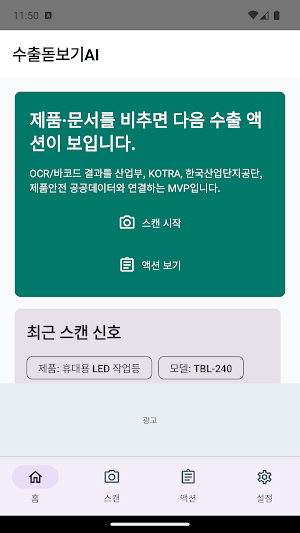
Export Magnifier is an Android app designed to help local small and medium-sized manufacturing companies, export beginners, and product safety and certification managers check public data clues necessary for export preparation in one place by scanning product labels, catalogs, certificates, business cards, and QR/barcodes, or by entering them directly.
Key Features
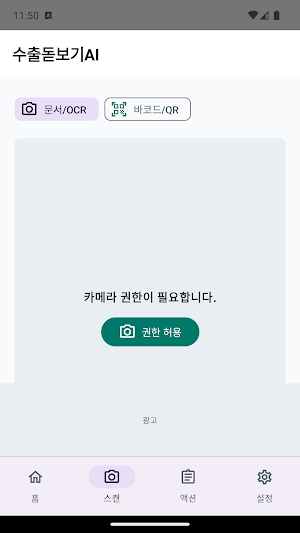
- Extracts product names, model names, company names, certification numbers, barcodes, etc., using camera OCR/barcode recognition.
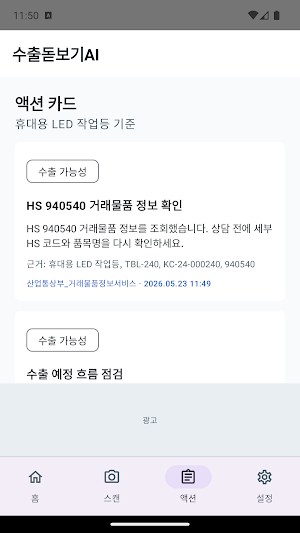
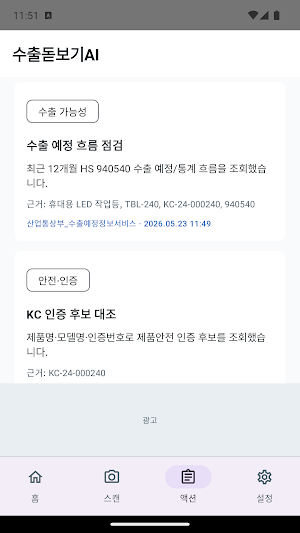
- Organizes potential export markets, overseas market news, product safety certification/recall clues, industrial complex production trends, and next consultation questions into cards by referencing data from the Ministry of Trade, Industry and Energy, KOTRA, industrial complexes, product safety, and customs.
- When the network is unstable or the API is unresponsive, it displays the basic flow using the device's cache and sample data.
- Captured images are analyzed internally on the device by default and are not uploaded or stored on the developer's server.
- Users can directly download the on-device AI model to organize consultation questions and verification order.
Important Notice
Export Magnifier is an unofficial app created by the private developer "DaySeaMoonNight." This app is not produced, operated, sponsored, or approved by government agencies, public institutions, or official services such as the Ministry of Trade, Industry and Energy, KOTRA, the Korea Industrial Complex Corporation, the Korean Agency for Technology and Standards, the Korea Customs Service, the Public Data Portal, Google, Kakao, or Hugging Face.
The data within this app is reference information restructured to allow users to easily verify responses from public APIs and public data; it does not act as an agent for official civil complaints, export declarations, certification applications, customs clearance, recall responses, or support program applications. Before making important decisions, please be sure to check the latest information on each agency's official website and through the relevant contact points.
Data and Technology Sources
- Public Data Portal: https://www.data.go.kr/
- Ministry of Trade, Industry and Energy_Trading Goods Information Service: https://www.data.go.kr/data/15001809/openapi.do
- Ministry of Trade, Industry and Energy_Export Schedule Information Service: https://www.data.go.kr/data/15001810/openapi.do
- Ministry of Trade, Industry and Energy Korean Agency for Technology and Standards_Product Safety Certification and Recall Information: https://www.data.go.kr/data/15116894/openapi.do
- Product Safety Information Center Open API: https://www.safetykorea.kr/release/openapi
- Korea Industrial Complex Corporation_Factory Registration Production Information Inquiry Service: https://www.data.go.kr/data/15087611/openapi.do
- Korea Industrial Complex Corporation_Industry Trend Survey Statistics Inquiry Service: https://www.data.go.kr/data/15152884/openapi.do
- KOTRA Country Information: https://www.data.go.kr/data/15034830/openapi.do
- KOTRA Country List: https://www.data.go.kr/data/15116876/openapi.do
- KOTRA Overseas Market News: https://www.data.go.kr/data/15034831/openapi.do
- KOTRA Product DB: https://www.data.go.kr/data/15034958/openapi.do
- Korea Customs Service_Import/Export General (GW): https://www.data.go.kr/data/15102108/openapi.do
Personal Information and Permissions
Camera permission is used only for scanning products, documents, and QR/barcodes. Currently, the app does not request location or notification permissions. To provide advertisements, the Kakao AdFit SDK may process information necessary for ad delivery, such as Android ad IDs and device/network information.
Privacy Policy:
https://programmers.pe.kr/tradeboost-lens-privacy-policy.html
Key Features
- Extracts product names, model names, company names, certification numbers, barcodes, etc., using camera OCR/barcode recognition.
- Organizes potential export markets, overseas market news, product safety certification/recall clues, industrial complex production trends, and next consultation questions into cards by referencing data from the Ministry of Trade, Industry and Energy, KOTRA, industrial complexes, product safety, and customs.
- When the network is unstable or the API is unresponsive, it displays the basic flow using the device's cache and sample data.
- Captured images are analyzed internally on the device by default and are not uploaded or stored on the developer's server.
- Users can directly download the on-device AI model to organize consultation questions and verification order.
Important Notice
Export Magnifier is an unofficial app created by the private developer "DaySeaMoonNight." This app is not produced, operated, sponsored, or approved by government agencies, public institutions, or official services such as the Ministry of Trade, Industry and Energy, KOTRA, the Korea Industrial Complex Corporation, the Korean Agency for Technology and Standards, the Korea Customs Service, the Public Data Portal, Google, Kakao, or Hugging Face.
The data within this app is reference information restructured to allow users to easily verify responses from public APIs and public data; it does not act as an agent for official civil complaints, export declarations, certification applications, customs clearance, recall responses, or support program applications. Before making important decisions, please be sure to check the latest information on each agency's official website and through the relevant contact points.
Data and Technology Sources
- Public Data Portal: https://www.data.go.kr/
- Ministry of Trade, Industry and Energy_Trading Goods Information Service: https://www.data.go.kr/data/15001809/openapi.do
- Ministry of Trade, Industry and Energy_Export Schedule Information Service: https://www.data.go.kr/data/15001810/openapi.do
- Ministry of Trade, Industry and Energy Korean Agency for Technology and Standards_Product Safety Certification and Recall Information: https://www.data.go.kr/data/15116894/openapi.do
- Product Safety Information Center Open API: https://www.safetykorea.kr/release/openapi
- Korea Industrial Complex Corporation_Factory Registration Production Information Inquiry Service: https://www.data.go.kr/data/15087611/openapi.do
- Korea Industrial Complex Corporation_Industry Trend Survey Statistics Inquiry Service: https://www.data.go.kr/data/15152884/openapi.do
- KOTRA Country Information: https://www.data.go.kr/data/15034830/openapi.do
- KOTRA Country List: https://www.data.go.kr/data/15116876/openapi.do
- KOTRA Overseas Market News: https://www.data.go.kr/data/15034831/openapi.do
- KOTRA Product DB: https://www.data.go.kr/data/15034958/openapi.do
- Korea Customs Service_Import/Export General (GW): https://www.data.go.kr/data/15102108/openapi.do
Personal Information and Permissions
Camera permission is used only for scanning products, documents, and QR/barcodes. Currently, the app does not request location or notification permissions. To provide advertisements, the Kakao AdFit SDK may process information necessary for ad delivery, such as Android ad IDs and device/network information.
Privacy Policy:
https://programmers.pe.kr/tradeboost-lens-privacy-policy.html
What’s new
Version 0.2.16 · Updated July 24, 2026
Updated the app for the latest Android 16 (API 36) so it keeps receiving updates smoothly. Refined the top and bottom screen insets and large-font display so buttons and menus stay reliable across more devices. As before, scanned images and location data are processed only on your device and are never sent to a server.
Alternatives to 수출돋보기AI
Looking for apps like 수출돋보기AI? Here are 6 similar Android apps on Google Play. All of them are free to download.
-
손비서 AI
-
Zen 3x3 Hoops: Street Ball
-
우리말 겨루기
-
Stick Arena: Zombie Rush
-
신비한 AR 책 탐험대
-
Monster Glass AR Adventure
| App | Rating | Price | Installs | Last updated | Compare |
|---|---|---|---|---|---|
| 수출돋보기AI | – | Free | 5+ | Jul 24, 2026 | |
| 손비서 AI | – | Free | 5+ | Sep 28, 2026 | Compare |
| Zen 3x3 Hoops: Street Ball | – | Free | 10+ | Aug 5, 2026 | Compare |
| 우리말 겨루기 | – | Free | 100+ | Oct 15, 2026 | Compare |
| Stick Arena: Zombie Rush | – | Free | 10+ | Aug 23, 2026 | Compare |
| 신비한 AR 책 탐험대 | – | Free | 1+ | Sep 21, 2026 | Compare |
| Monster Glass AR Adventure | – | Free | 10+ | Oct 5, 2026 | Compare |
Compare 수출돋보기AI with the top alternatives: ratings, updates, ASO score and keyword gaps →