

Multi-Color Picker
Art & Design Contains ads
This is a app that allows you to create colors in a variety of ways.
- Downloads
- 100+
- on Google Play
- Price
- Free
- No in-app purchases
- Updated
- Jun 14
- 2023 · v4.4
Screenshots


About Multi-Color Picker
★★★★ "Multi-Color Picker" features ★★★★
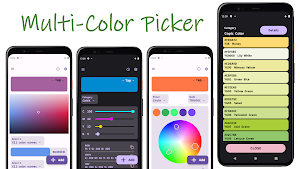
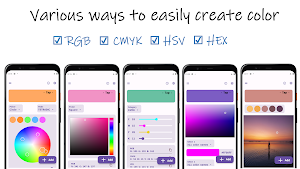
■ Create/extract colors in various ways
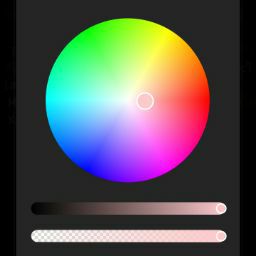
・Color picker (circle and square) can create colors sensuously.
・Color can be created from numerical values with the Seek bar.
・Extract colors from a photo.
・Create a gradient from two different colors and extract colors from it.
・Create colors randomly (pastel and vivid colors are supported).
■ Easy to check created/extracted colors
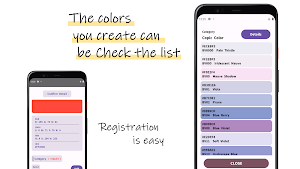
・The created/extracted colors can be easily saved.
・When saving, categories and notes can be specified, making it easy to manage.
・When saving, you can specify categories and notes, making it easy to manage.
■ Split screen can be created with created/extracted colors.
・Create split screens from 2 to 4 different colors.
■ Always perform conversion of color values
・Always convert and display RGB, HEX, CMYK, and HSV.
・Color values can be easily copied.
・Complementary and opposite colors can be displayed.
■ Easy-to-use features
・Supports about 10 languages.
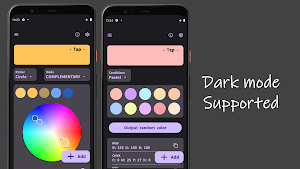
・Supports dark mode.
★★★★ Precautions ★★★★
・Color conversions are subject to theoretical errors.
★★★★ From the developer of "Multi-Color Picker" ★★★★
Thank you for taking a look at the application description.
I often draw pictures as a hobby, but I often have a hard time deciding which colors to use, so I decided to create an app that would be easy for me to use.
I wanted to create an app that would be easy to use, so I decided to create an app that would be easy for me to use. This app allows you to create colors in a variety of ways, and I believe it will help you make decisions about colors through the color split screen and list of saved colors.
Since I created this app on my own, I would be very grateful if you could give me a review saying "I want this kind of function" or "This function is easy to use". I would also appreciate it if you could recommend it to your acquaintances and various people through social networking sites.
★★★★ Supported Languages ★★★★ ]
・English
・日本語
・简体中文
・繁體中文
・Español
・Français
・हिन्दी
・Português
・Indonesia
・Italiano
・Türkçe
・Tiếng Việt
・Deutsch
■ Create/extract colors in various ways
・Color picker (circle and square) can create colors sensuously.
・Color can be created from numerical values with the Seek bar.
・Extract colors from a photo.
・Create a gradient from two different colors and extract colors from it.
・Create colors randomly (pastel and vivid colors are supported).
■ Easy to check created/extracted colors
・The created/extracted colors can be easily saved.
・When saving, categories and notes can be specified, making it easy to manage.
・When saving, you can specify categories and notes, making it easy to manage.
■ Split screen can be created with created/extracted colors.
・Create split screens from 2 to 4 different colors.
■ Always perform conversion of color values
・Always convert and display RGB, HEX, CMYK, and HSV.
・Color values can be easily copied.
・Complementary and opposite colors can be displayed.
■ Easy-to-use features
・Supports about 10 languages.
・Supports dark mode.
★★★★ Precautions ★★★★
・Color conversions are subject to theoretical errors.
★★★★ From the developer of "Multi-Color Picker" ★★★★
Thank you for taking a look at the application description.
I often draw pictures as a hobby, but I often have a hard time deciding which colors to use, so I decided to create an app that would be easy for me to use.
I wanted to create an app that would be easy to use, so I decided to create an app that would be easy for me to use. This app allows you to create colors in a variety of ways, and I believe it will help you make decisions about colors through the color split screen and list of saved colors.
Since I created this app on my own, I would be very grateful if you could give me a review saying "I want this kind of function" or "This function is easy to use". I would also appreciate it if you could recommend it to your acquaintances and various people through social networking sites.
★★★★ Supported Languages ★★★★ ]
・English
・日本語
・简体中文
・繁體中文
・Español
・Français
・हिन्दी
・Português
・Indonesia
・Italiano
・Türkçe
・Tiếng Việt
・Deutsch
What’s new
Version 4.4 · Updated June 14, 2023
Design changes were made.
User reviews
Nice app
Alternatives to Multi-Color Picker
Looking for apps like Multi-Color Picker? Here are 6 similar Android apps on Google Play. All of them are free to download.
-
Hiragana Converter
-
Easy Compound Interest Calc
-
Period Since Birth
-
Simple Emergency Kits
-
Interest Rate Conversion
-
Reward Memo
| App | Rating | Price | Installs | Last updated | Compare |
|---|---|---|---|---|---|
| Multi-Color Picker | – | Free | 100+ | Jun 14, 2023 | |
| Hiragana Converter | – | Free | 1,000+ | Aug 14, 2023 | Compare |
| Easy Compound Interest Calc | – | Free | 10,000+ | May 9, 2026 | Compare |
| Period Since Birth | – | Free | 5+ | Feb 23, 2023 | Compare |
| Simple Emergency Kits | – | Free | 50+ | Sep 29, 2022 | Compare |
| Interest Rate Conversion | – | Free | 100+ | Sep 6, 2026 | Compare |
| Reward Memo | – | Free | 10+ | Aug 11, 2022 | Compare |
Compare Multi-Color Picker with the top alternatives: ratings, updates, ASO score and keyword gaps →