
Add Text & Emoji To Pictures 🤩
Rowan Saturnin Photography Contains ads
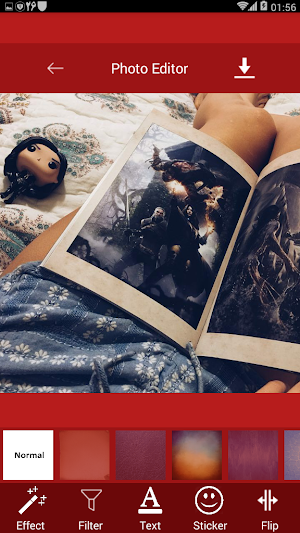
With this app you can add Effects, Filters, Emoji and Text to Photos.
- Downloads
- 100+
- on Google Play
- Price
- Free
- No in-app purchases
- Updated
- Aug 2
- 2018 · v1.2
Screenshots


About Add Text & Emoji To Pictures 🤩
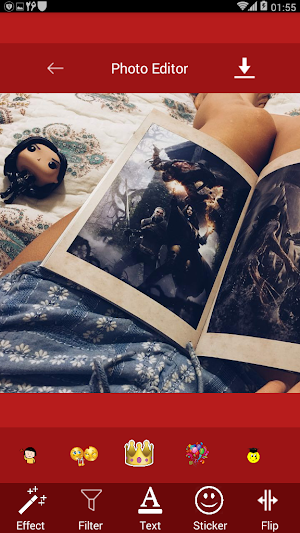
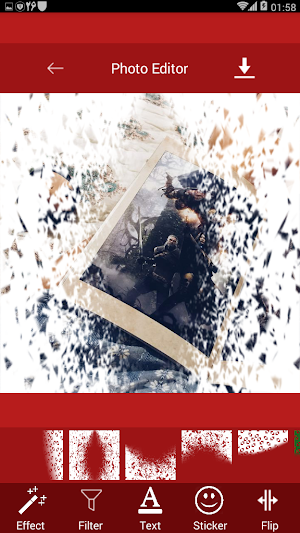
With Add Text & Emoji To Pictures 🤩 app you can add effects, filters, emoji and text to your photos.
Editing photos with Add Text & Emoji To Pictures 🤩 app is simple, just try it.
This free app helps you easily edit your photos or you can write text on your photos. You can also add stickers or emoji to your photos.
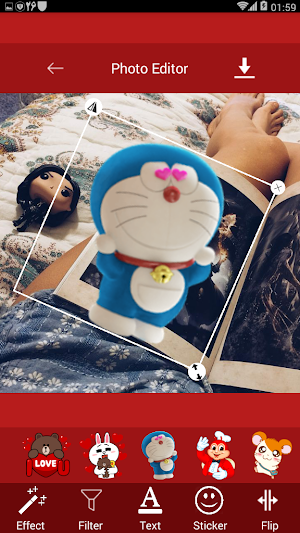
Add Text & Emoji To Pictures app includes a variety of beautiful stickers that you can add to your photos or edit your own photos.
Add Text & Emoji To Pictures app features:
* Add effects to photos
* Add filters to photos - Change the color of photos
* Add text to photos
* Add stickers (Emoji) to photos
* Share photos with others or social networks such as Facebook, Twitter , ect
Add Emoji To Pictures
This app is fun and interesting emoji that you can add to photos. You can do this with your creativity and create attractive photos and share with your friends.
Flipping photos
One of the tools for this app is Flipping Photos. If you use this tool, your photos will be displayed in reverse.
Crop the photos
If you want to crop your photos and edit part of it, use this tool. With this cropping tool, you can choose just one piece of your photo.
Rotate photos
You can do this too easily. Just select the photo you want and rotate it. Then you can edit the photo and save it later.
Add text to photo
Use this app if you want to write something about your photos. You can easily add text to a photo.
Add filter to photo
Filters are for making photos more beautiful, try different filters, and apply one to your photo.
Add Effect to Photo
The effects are the same as the filters for more beauty, try each one you want and choose one.
Finally, you can save edited photos or share them on social networks such as Facebook, Twitter, Instagram and more.
How to work with the Add Text & Emoji To Pictures 🤩 app:
1 - First, import the photo you want into the app
2 - You can crop or rotate the photo if you wish
3 - You can add effects, stitches (Emoji), or add text to photo.
4 - Save your picture in the end
Add Text & Emoji To Pictures 🤩 app with the ability to add text to photo, filter, effect and stick to photo.
Editing photos with Add Text & Emoji To Pictures 🤩 app is simple, just try it.
This free app helps you easily edit your photos or you can write text on your photos. You can also add stickers or emoji to your photos.
Add Text & Emoji To Pictures app includes a variety of beautiful stickers that you can add to your photos or edit your own photos.
Add Text & Emoji To Pictures app features:
* Add effects to photos
* Add filters to photos - Change the color of photos
* Add text to photos
* Add stickers (Emoji) to photos
* Share photos with others or social networks such as Facebook, Twitter , ect
Add Emoji To Pictures
This app is fun and interesting emoji that you can add to photos. You can do this with your creativity and create attractive photos and share with your friends.
Flipping photos
One of the tools for this app is Flipping Photos. If you use this tool, your photos will be displayed in reverse.
Crop the photos
If you want to crop your photos and edit part of it, use this tool. With this cropping tool, you can choose just one piece of your photo.
Rotate photos
You can do this too easily. Just select the photo you want and rotate it. Then you can edit the photo and save it later.
Add text to photo
Use this app if you want to write something about your photos. You can easily add text to a photo.
Add filter to photo
Filters are for making photos more beautiful, try different filters, and apply one to your photo.
Add Effect to Photo
The effects are the same as the filters for more beauty, try each one you want and choose one.
Finally, you can save edited photos or share them on social networks such as Facebook, Twitter, Instagram and more.
How to work with the Add Text & Emoji To Pictures 🤩 app:
1 - First, import the photo you want into the app
2 - You can crop or rotate the photo if you wish
3 - You can add effects, stitches (Emoji), or add text to photo.
4 - Save your picture in the end
Add Text & Emoji To Pictures 🤩 app with the ability to add text to photo, filter, effect and stick to photo.
Alternatives to Add Text & Emoji To Pictures 🤩
Looking for apps like Add Text & Emoji To Pictures 🤩? Here are 6 similar Android apps on Google Play. The highest rated is Video Compressor - Reduce Vide (3.4/5), and all 6 are free to download.
-
MP3 Tag Editor 2.4
-
Custom Wallpaper Maker
-
English-Spanish Dictionary - O
-
Fast Image to PDF Converter
-
Video Compressor - Reduce Vide 3.4
-
Photo Compressor & Resizer
| App | Rating | Price | Installs | Last updated | Compare |
|---|---|---|---|---|---|
| Add Text & Emoji To Pictures 🤩 | – | Free | 100+ | Aug 2, 2018 | |
| MP3 Tag Editor | 2.4 / 5 | Free | 50,000+ | Jan 14, 2020 | Compare |
| Custom Wallpaper Maker | – | Free | 100+ | Dec 26, 2022 | Compare |
| English-Spanish Dictionary - O | – | Free | 50+ | Aug 8, 2021 | Compare |
| Fast Image to PDF Converter | – | Free | 10+ | Aug 5, 2021 | Compare |
| Video Compressor - Reduce Vide | 3.4 / 5 | Free | 100,000+ | Oct 5, 2019 | Compare |
| Photo Compressor & Resizer | – | Free | 5,000+ | Jan 1, 2023 | Compare |
Similar apps on Google Play
- MP3 Tag Editor
- Custom Wallpaper Maker
- English-Spanish Dictionary - O
- Fast Image to PDF Converter
- Video Compressor - Reduce Vide
- Photo Compressor & Resizer
- Mp3 King
- Easily Make Ringtones
- Voice Recorder Free
- Background Eraser Assistant
- Nostalgic Car Racing
- Convert Video To Audio (Mp3)
- Text To Speech To MP3
- Date To Date Calculator
- Bulk Uninstall Apps
- Distance Calculator Between Tw
- Shoot Bow And Arrow 🎯
- Age Calculator
- Made in Where?