
Video Compressor: Reduce Video Size - Shrink Size
Rowan Saturnin Video Players & Editors Contains ads
Video Compressor: Reduce Video Size - compress videos and reduce video size.
- Rating
- 3.3
- 469 ratings
- Downloads
- 100K+
- on Google Play
- Price
- Free
- No in-app purchases
- Updated
- Oct 5
- 2019 · v1.7
Screenshots


About Video Compressor: Reduce Video Size - Shrink Size
Video Compressor: Reduce Video Size - Shrink Size Video
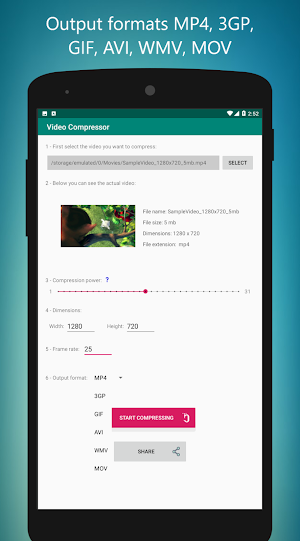
With this app you can compress video files and even convert to MP4, 3GP, GIF, AVI, WMV, MOV formats. Or you can even convert the video to GIF.
This app is designed for you to easily reduce the size of video files by compressing the video.
It is also possible to change the dimensions of the video to the desired dimensions.
Video Compressor App Features:
* Compress videos
* Changed video dimensions
* Convert video to gif
* Output formats MP4, 3GP, GIF, AVI, WMV, MOV
* Shared video compressed
* Simple and easy to work
Compress Video
This app helps you compress your video and reduce their file size.
This is the solution when you want to send a large video by e-mail, with this app you can compress the bulky video to get less space. As a result, sending and receiving videos will be faster.
Video Resizer
Changing the dimensions of the video is easy to do.
This tool is also for changing the dimensions of a video.
How To Compress Videos:
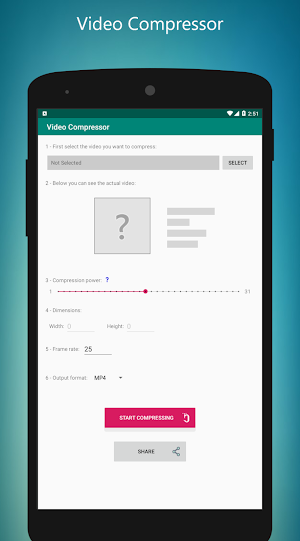
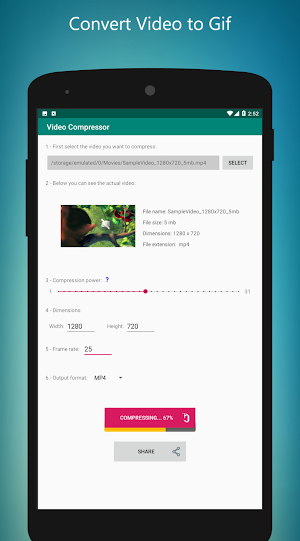
1 - First, add your video to app
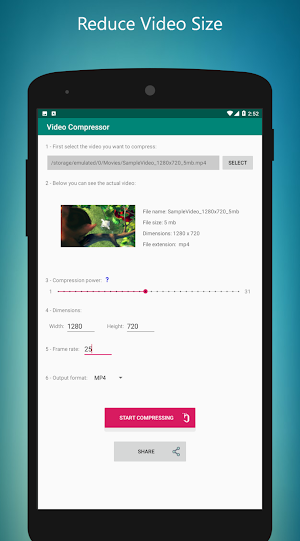
2 - In the "Compression Power" section, determine the compression rate.
3 - If you want in the "Dimensions" section, you can change the height and width of the video.
4 - Touch the "Start Compressing" button to save.
After you compress and save the video, you can share it with others or on social networks like Facebook, Instagram, Twitter.
Can video quality change after compression?
The answer is yes, but it's not much, it's actually related to compression strength. In general, the quality of the video should be reduced to reduce the size of the video file.
Can the dimensions of the video be changed after compression?
No, the quality of the video is decreasing by default.
You need this app to have low-volume videos. So download the video compressor app and always have it on your mobile.
This app can greatly compress or resize your video.
Working with this app is very simple. Try it yourself.
When you enter your video to app, the only thing you need to do is determine the power of compression. Then you can save your video.
As you can see, it's easy to resize videos. Compress your videos to reduce their size and save the video at the end.
Download and enjoy the Video Compressor app right now.
Possibility to Adjust Video Output Quality:
This app allows you to adjust the quality of the output video file, if you want the video file size to be low, then you need to lower the video quality.
Convert Video to Gif
With this app you can convert video files to animated image files in GIF format.
For example, you can convert mp4 video to gif.
Convert mp4 video to 3GP
With Video Compressor you can compress both video files as well as convert video formats to other formats.
For example, convert MP4 video to 3GP.
Set framerate
Another option you can do in this app is to change the output video frame. You can do this easily.
Supported output video formats
It supports MP4, 3GP, GIF, AVI, WMV, and MOV formats for output files.
Facebook: https://www.facebook.com/mehrganapps-308396635359/
Twitter: https://twitter.com/mehrganapps?lang=en
Instagram: https://instagram.com/mehrganapps/
With this app you can compress video files and even convert to MP4, 3GP, GIF, AVI, WMV, MOV formats. Or you can even convert the video to GIF.
This app is designed for you to easily reduce the size of video files by compressing the video.
It is also possible to change the dimensions of the video to the desired dimensions.
Video Compressor App Features:
* Compress videos
* Changed video dimensions
* Convert video to gif
* Output formats MP4, 3GP, GIF, AVI, WMV, MOV
* Shared video compressed
* Simple and easy to work
Compress Video
This app helps you compress your video and reduce their file size.
This is the solution when you want to send a large video by e-mail, with this app you can compress the bulky video to get less space. As a result, sending and receiving videos will be faster.
Video Resizer
Changing the dimensions of the video is easy to do.
This tool is also for changing the dimensions of a video.
How To Compress Videos:
1 - First, add your video to app
2 - In the "Compression Power" section, determine the compression rate.
3 - If you want in the "Dimensions" section, you can change the height and width of the video.
4 - Touch the "Start Compressing" button to save.
After you compress and save the video, you can share it with others or on social networks like Facebook, Instagram, Twitter.
Can video quality change after compression?
The answer is yes, but it's not much, it's actually related to compression strength. In general, the quality of the video should be reduced to reduce the size of the video file.
Can the dimensions of the video be changed after compression?
No, the quality of the video is decreasing by default.
You need this app to have low-volume videos. So download the video compressor app and always have it on your mobile.
This app can greatly compress or resize your video.
Working with this app is very simple. Try it yourself.
When you enter your video to app, the only thing you need to do is determine the power of compression. Then you can save your video.
As you can see, it's easy to resize videos. Compress your videos to reduce their size and save the video at the end.
Download and enjoy the Video Compressor app right now.
Possibility to Adjust Video Output Quality:
This app allows you to adjust the quality of the output video file, if you want the video file size to be low, then you need to lower the video quality.
Convert Video to Gif
With this app you can convert video files to animated image files in GIF format.
For example, you can convert mp4 video to gif.
Convert mp4 video to 3GP
With Video Compressor you can compress both video files as well as convert video formats to other formats.
For example, convert MP4 video to 3GP.
Set framerate
Another option you can do in this app is to change the output video frame. You can do this easily.
Supported output video formats
It supports MP4, 3GP, GIF, AVI, WMV, and MOV formats for output files.
Facebook: https://www.facebook.com/mehrganapps-308396635359/
Twitter: https://twitter.com/mehrganapps?lang=en
Instagram: https://instagram.com/mehrganapps/
User reviews

Cool

بهترین برنامه هست ،حتما نصب کنید

Not bad

Good

love it.. easy to comp

Nice one
Alternatives to Video Compressor: Reduce Video Size - Shrink Size
Looking for apps like Video Compressor: Reduce Video Size - Shrink Size? Here are 6 similar Android apps on Google Play. The highest rated is MP3 Tag Editor (2.4/5), and all 6 are free to download.
-
Custom Wallpaper Maker
-
MP3 Tag Editor 2.4
-
English-Spanish Dictionary - O
-
Fast Image to PDF Converter
-
Photo Compressor & Resizer
-
Mp3 King
| App | Rating | Price | Installs | Last updated | Compare |
|---|---|---|---|---|---|
| Video Compressor: Reduce Video Size - Shrink Size | 3.3 / 5 | Free | 100,000+ | Oct 5, 2019 | |
| Custom Wallpaper Maker | – | Free | 100+ | Dec 26, 2022 | Compare |
| MP3 Tag Editor | 2.4 / 5 | Free | 50,000+ | Jan 14, 2020 | Compare |
| English-Spanish Dictionary - O | – | Free | 50+ | Aug 8, 2021 | Compare |
| Fast Image to PDF Converter | – | Free | 10+ | Aug 5, 2021 | Compare |
| Photo Compressor & Resizer | – | Free | 5,000+ | Jan 1, 2023 | Compare |
| Mp3 King | – | Free | 1,000+ | – | Compare |
Similar apps on Google Play
- Custom Wallpaper Maker
- MP3 Tag Editor
- English-Spanish Dictionary - O
- Fast Image to PDF Converter
- Photo Compressor & Resizer
- Mp3 King
- Easily Make Ringtones
- Voice Recorder Free
- Background Eraser Assistant
- Add Text & Emoji To Pictures ?
- Nostalgic Car Racing
- Convert Video To Audio (Mp3)
- Text To Speech To MP3
- Date To Date Calculator
- Bulk Uninstall Apps
- Distance Calculator Between Tw
- Shoot Bow And Arrow 🎯
- Age Calculator
- Made in Where?
- Mp3 Voice Recorder Free