
PiPCamera【Overlay and Silent】
mizmon21 Photography Contains ads
Picture in Picture Camera(Overlay Camera)
- Rating
- 3.8
- 760 ratings
- Downloads
- 100K+
- on Google Play
- Price
- Free
- No in-app purchases
- Updated
- Aug 27
- 2018 · vV3.4.1
Screenshots
About PiPCamera【Overlay and Silent】
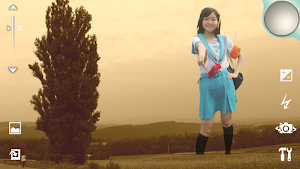
Adjust transparency of the overlay image.
■Operation
Camera mode
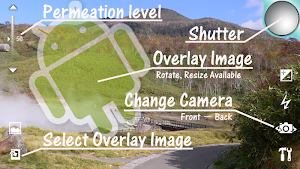
-Capture a image(Take a picture) by tapping the shutter icon(Top-Right on display).
-The following can be set from the icon on the screen.
-Exposure compensation setting
-Setting ON or OFF of flash(Except for some models)
-Select camera Front-facing or Back-facing(Except for some models)
-Other mode setting
-Display of the captured image(Start-up the viewer mode)
-Select overlay image
-Adjust permeation level of the overlay image by slidebar on left side of display.
-About other mode setting.
(Except for some models)
-Setting enable or disable of shutter tone
-Setting ON or OFF of flash(Except for some models)
-Setting focus mode
-Change resolution of saved image
-Setting image effect
-White balance setting
-Scene mode setting
-Anti-banding setting
-About overlay image.
-The available image file is png, jpg and bmp.
-The overlay image is moved by a drag.
-The overlay image is expand, reduced and rotated by a tap.
-select a plug-in image available.
(If the plug-in image is installed)
-Support functions for capturing image.
-Grid view mode
-Show gyroscope\n
-Save the image without the overlay image
-Rotate 90 degree automatically overlay image when orientation of capturing image is changed
-Mirroring overlay image
If the captured image by the front-facing camera is mirrored, Please enable setting.
(usually enable)
-The captured image is saved in
sdcard/mizmon21/PiPCamera
Viewer mode
-The image is moved by a drag.
-Reduced by pinch in.
-Expanded by pinch out.
-[menu]-[Share]
ex. Attached the image to e-mails.
note:
Access to the Internet(for ads Delivery).
When using the PiP camera, please observe the laws, rules, local laws and the manners.
(c)2011-2013 mizmon21
What’s new
Version V3.4.1 · Updated August 27, 2018
-V3.4.1(2018.8.27) Bug fixes: Fixed the problem to Crash of some -V3.3.0(2017.3.12) Function Enhancements: -Added the privacy policy -Changed ad library -V3.2.0(2014.6.2) Bug fixes: Fixed the problem to Crash of some Function Enhancements: Added support functions for capturing image -Gyroscope -V3.1.0(2013.12.29) Bug fixes: Fixed the problem to Crash of some Function Enhancements: Added support functions for capturing image -Save the image without the overlay image
User reviews

I need this app improved.. i use overlay photos as a guide to take pics...I would love for set of default overlay pictures I can switch between. I take same profile pics constantly for work and I need the overlay to line up the faces the same exact way each time.
Works great for what it's supposed to do. I hope more updates come.

Super

Ghastlier
KhAn Pathan
Super
Alternatives to PiPCamera【Overlay and Silent】
Looking for apps like PiPCamera【Overlay and Silent】? Here are 4 similar Android apps on Google Play. The highest rated is Fruits Parlor Free (4.6/5), and all 4 are free to download.
-
Fruits Miracle Free 4.4
-
No Sound Camera【Silent Camera】 3.2
-
Fruits Petit Putti Lite 4.3
-
Fruits Parlor Free 4.6
| App | Rating | Price | Installs | Last updated | Compare |
|---|---|---|---|---|---|
| PiPCamera【Overlay and Silent】 | 3.8 / 5 | Free | 100,000+ | Aug 27, 2018 | |
| Fruits Miracle Free | 4.4 / 5 | Free | 10,000+ | Jun 18, 2013 | Compare |
| No Sound Camera【Silent Camera】 | 3.2 / 5 | Free | 100,000+ | Mar 5, 2017 | Compare |
| Fruits Petit Putti Lite | 4.3 / 5 | Free | 10,000+ | Jul 20, 2013 | Compare |
| Fruits Parlor Free | 4.6 / 5 | Free | 10,000+ | Jul 20, 2013 | Compare |