

COCORO VISION
SHARP CORPORATION Entertainment Contains ads
It is an "entertainment / life information support app" (free of charge) that provides various services that expand the use of TV and useful and useful information that makes life more comfortable.
- Downloads
- 1M+
- on Google Play
- Price
- Free
- No in-app purchases
- Updated
- Aug 24
- 2026 · v5.07.02
Screenshots

About COCORO VISION
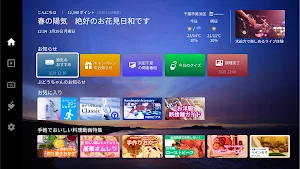
COCORO VISION is a free entertainment and lifestyle information support app that offers a variety of services that expand the way you use your TV and useful information that makes your life more comfortable.
Just connect your TV to the Internet and press the COCORO VISION button on your remote control to start using it right away.
■Main features
・Introducing online videos and the latest entertainment information that will enrich your time at home, safe and easy for beginners to enjoy
We select and deliver videos that you can easily enjoy, such as hobbies you should start now and easy exercises! We introduce the latest entertainment information, such as online live shows that have recently attracted attention and movies that have been released in advance.
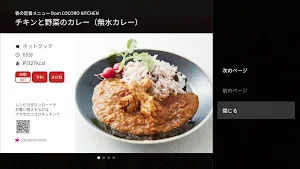
・The large screen makes it easy to see information about home appliances and recipes! Easy remote control operation while relaxing
You can easily display the status of compatible home appliances, useful usage, COCORO KITCHEN recipes, etc. by operating the remote control. You can check the ingredients and how to make them on the large TV screen.
・Notifications from home appliances are delivered to the TV screen, so everyone can notice and share them with everyone
Notifications from home appliances such as laundry and cooking completion are displayed on the TV screen. Notifications are sent to the TV used by the whole family, making it easier to share household chores. In addition to notifications from home appliances, when the TV is turned on, it will notify you of today's weather and other recommended information.
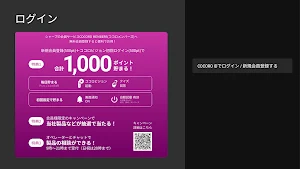
・COCORO MEMBERS members also receive special benefits such as daily quizzes and point giveaways.
If you log in with your COCORO MEMBERS ID, you can receive points every day just by starting COCORO VISION. You can use the points you have accumulated to enter a lottery to win our products and more!
■ Compatible models
Sharp AIoT-compatible TVs (Android Ver. O or later)
・Models released in 2025
4T-C65/55HS1, 4T-C65/55HQ1, 4T-C65/55/48/42HQ2, 4T-C75/65/55HP1, 4T-C50/43HP2
・Models released in 2024
4T-C65/55GS1, 4T-C77/65/55GQ1, 4T-C48/42GQ2, 4T-C75/65/55GP1, 4T-C50/43GP2, 4T-C75/65/55GN1, 4T-C55/50/43GN2, 4T-C75/65/55/50/43GL1, 4T-C65/55/50/43GJ1, 4T-C65/55/50/43GJ2, 2T-C43GF2, 2T-C32/24GF1
・Models released in 2023
4T-C65/50/42FL1, 4T-C75/65/55FN1, 4T-C55/50/43FN2, 4T-C65/55FS1, 4T-C65/55FQ1
・Models released in 2022
4T-C65/55ES1, 4T-C77/ 65/55EQ1,4T-C48/42EQ2,4T-C65/55EU1,4T-C70/65/60/55EN1,4T-C50/43EN2,4T-C75/65/50/43EL1
・2021 release model
4T-C70/65/60/55DN1,4T-C50/43DN2,4T-C65/50/43DL1,4T-C42DJ1,8T-C60/70DW1,4T-C65/55DS 1, 4T-C65/55DQ1, 4T-C65/55DQ2
・2020 model
8T-C70/60CX1, 4T-C70/60/55/40/43CN1, 4T-C55/50/43/40CL1, 4T-C65/55CQ1
・2019 model
8T-C70/60BW1, 4T-C70/60/50/45BN1, 4T-C55/50/45BL1, 4T-C40BJ1
・2 Models released in 2018
8T-C80/70/60AX1,8T-C60AW1,4T-C60/50AN1,4T-C45AL1,4T-C60/50/43AM1,4T-C60/55/50/45/40AJ1,4T-C70AU1
・Models released in 2017
LC-60/55UH5,LC-60/55/50US5
■Caution
・Services may be changed or discontinued without notice.
・For the GL1/GJ1/GJ2/GF1/GF2 LCD TV lines, the status of registered appliances can be displayed on the COCORO HOME tab in COCORO VISION, but device registration and operation on the smartphone/tablet app "COCORO HOME" is not supported.
■Notice
Click here for the latest information on COCORO VISION.
https://cocoroplus.jp.sharp/vision/
■COCORO VISION app inquiry desk
[email protected]
Just connect your TV to the Internet and press the COCORO VISION button on your remote control to start using it right away.
■Main features
・Introducing online videos and the latest entertainment information that will enrich your time at home, safe and easy for beginners to enjoy
We select and deliver videos that you can easily enjoy, such as hobbies you should start now and easy exercises! We introduce the latest entertainment information, such as online live shows that have recently attracted attention and movies that have been released in advance.
・The large screen makes it easy to see information about home appliances and recipes! Easy remote control operation while relaxing
You can easily display the status of compatible home appliances, useful usage, COCORO KITCHEN recipes, etc. by operating the remote control. You can check the ingredients and how to make them on the large TV screen.
・Notifications from home appliances are delivered to the TV screen, so everyone can notice and share them with everyone
Notifications from home appliances such as laundry and cooking completion are displayed on the TV screen. Notifications are sent to the TV used by the whole family, making it easier to share household chores. In addition to notifications from home appliances, when the TV is turned on, it will notify you of today's weather and other recommended information.
・COCORO MEMBERS members also receive special benefits such as daily quizzes and point giveaways.
If you log in with your COCORO MEMBERS ID, you can receive points every day just by starting COCORO VISION. You can use the points you have accumulated to enter a lottery to win our products and more!
■ Compatible models
Sharp AIoT-compatible TVs (Android Ver. O or later)
・Models released in 2025
4T-C65/55HS1, 4T-C65/55HQ1, 4T-C65/55/48/42HQ2, 4T-C75/65/55HP1, 4T-C50/43HP2
・Models released in 2024
4T-C65/55GS1, 4T-C77/65/55GQ1, 4T-C48/42GQ2, 4T-C75/65/55GP1, 4T-C50/43GP2, 4T-C75/65/55GN1, 4T-C55/50/43GN2, 4T-C75/65/55/50/43GL1, 4T-C65/55/50/43GJ1, 4T-C65/55/50/43GJ2, 2T-C43GF2, 2T-C32/24GF1
・Models released in 2023
4T-C65/50/42FL1, 4T-C75/65/55FN1, 4T-C55/50/43FN2, 4T-C65/55FS1, 4T-C65/55FQ1
・Models released in 2022
4T-C65/55ES1, 4T-C77/ 65/55EQ1,4T-C48/42EQ2,4T-C65/55EU1,4T-C70/65/60/55EN1,4T-C50/43EN2,4T-C75/65/50/43EL1
・2021 release model
4T-C70/65/60/55DN1,4T-C50/43DN2,4T-C65/50/43DL1,4T-C42DJ1,8T-C60/70DW1,4T-C65/55DS 1, 4T-C65/55DQ1, 4T-C65/55DQ2
・2020 model
8T-C70/60CX1, 4T-C70/60/55/40/43CN1, 4T-C55/50/43/40CL1, 4T-C65/55CQ1
・2019 model
8T-C70/60BW1, 4T-C70/60/50/45BN1, 4T-C55/50/45BL1, 4T-C40BJ1
・2 Models released in 2018
8T-C80/70/60AX1,8T-C60AW1,4T-C60/50AN1,4T-C45AL1,4T-C60/50/43AM1,4T-C60/55/50/45/40AJ1,4T-C70AU1
・Models released in 2017
LC-60/55UH5,LC-60/55/50US5
■Caution
・Services may be changed or discontinued without notice.
・For the GL1/GJ1/GJ2/GF1/GF2 LCD TV lines, the status of registered appliances can be displayed on the COCORO HOME tab in COCORO VISION, but device registration and operation on the smartphone/tablet app "COCORO HOME" is not supported.
■Notice
Click here for the latest information on COCORO VISION.
https://cocoroplus.jp.sharp/vision/
■COCORO VISION app inquiry desk
[email protected]
What’s new
Version 5.07.02 · Updated August 24, 2026
初回起動画面のデザイン修正等を実施しました。
Alternatives to COCORO VISION
Looking for apps like COCORO VISION? Here are 6 similar Android apps on Google Play. The highest rated is AQUOS TV REMOTE (2.6/5), and all 6 are free to download.
-
AQUOS TV REMOTE 2.6
-
Sharp Air 1.7
-
[for ASEAN] SHARP COCORO HOME
-
AQUOS AI
-
Poketomo
-
SH-52D 取扱説明書(Android 16)
| App | Rating | Price | Installs | Last updated | Compare |
|---|---|---|---|---|---|
| COCORO VISION | – | Free | 1,000,000+ | Aug 24, 2026 | |
| AQUOS TV REMOTE | 2.6 / 5 | Free | 100,000+ | Jul 23, 2026 | Compare |
| Sharp Air | 1.7 / 5 | Free | 5,000+ | Apr 14, 2026 | Compare |
| [for ASEAN] SHARP COCORO HOME | – | Free | 100+ | Jun 12, 2026 | Compare |
| AQUOS AI | – | Free | 10,000+ | Oct 7, 2026 | Compare |
| Poketomo | – | Free | 0+ | – | Compare |
| SH-52D 取扱説明書(Android 16) | – | Free | 50,000+ | Mar 8, 2026 | Compare |
Compare COCORO VISION with the top alternatives: ratings, updates, ASO score and keyword gaps →
Similar apps on Google Play
- AQUOS TV REMOTE
- Sharp Air
- [for ASEAN] SHARP COCORO HOME
- AQUOS AI
- Poketomo
- SH-52D 取扱説明書(Android 16)
- SH-51D 取扱説明書(Android 16)
- SH-54D 取扱説明書(Android 16)
- SH-52E 取扱説明書(Android 16)
- SH-51E 取扱説明書(Android 16)
- Synappx Manage for Service
- SHARP ePaper Distribution Tool
- SH-52D 取扱説明書(Android 15)
- SH-51D 取扱説明書(Android 15)
- SH-51E 取扱説明書(Android 15)
- めめログ
- SH-53D 取扱説明書(Android 15)
- SH-52E 取扱説明書(Android 15)
- SH-54D 取扱説明書 (Android 15)
- SHARP HOME
- 録画リスト(AQUOS専用)
- 聴覚拡張型イヤホン SUGOMIMI アプリ
- SH-51E 取扱説明書
- SH-52E 取扱説明書
- d-51C 取扱説明書 (Android 14)
- SH-51C 取扱説明書(Android 14)
- SH-53C 取扱説明書(Android 14)
- SH-52C 取扱説明書 (Android 14)
- SH-52D 取扱説明書 (Android 14)
- SH-54D 取扱説明書 (Android 14)
- SH-53D 取扱説明書(Android 14)
- SH-51D 取扱説明書(Android14)
- SH-54D 取扱説明書
- SH-53D 取扱説明書
- SH-52D 取扱説明書
- パスワード変更アプリ
- SH-51D 取扱説明書
- d-51C 取扱説明書(Android13)
- SH-51C 取扱説明書(Android13)
- SH-52C 取扱説明書(Android13)
- SH-53C 取扱説明書(Android13)
- d-51C 取扱説明書
- SH-53C 取扱説明書
- [for Taiwan] SHARP COCORO HOME
- LINC Biz emmホーム
- SH-52C 取扱説明書
- SH-51C 取扱説明書
- 連絡帳配信
- COCORO LISTENING
- Wi-Fi設定ツール
- SHM12 Wi-Fi設定ツール
- NW Setting for LINC Biz emm
- Location for LINC Biz emm
- AQUOS Config2(SHARP OEMConfig)
- AQUOS Config(SHARP OEMConfig)
- Synappx Go
- COCORO HOME
- COCORO GUIDE(ココロガイド)
- ロボホンモーションコントローラ
- SHV41 Basic Manual
- SHV39 Basic Manual
- SHV38 Basic Manual
- SHV37 Basic Manual
- BASIO2 Basic Manual
- SHV35 Basic Manual
- SHV34 Basic Manual
- Sharp Print Service Plugin
- SHV33 Basic Manual
- SHV32 Basic Manual
- PASSNOW
- SHV31 Basic Manual
- Swipe Pair
- Clip Now Viewer
- Clip Now
- SHL25 Basic Manual
- SHT22 Basic Manual
- SHL24 Basic Manual
- SHL23 Basic Manual
- SHL22 取扱説明書
- SHT21 取扱説明書
- SHARP Display Connect
- SHL21 取扱説明書
- IS17SH 取扱説明書
- IS15SH 取扱説明書
- ISW16SH 取扱説明書
- Sharpdesk Mobile
- INFOBAR C01 取扱説明書
- IS14SH 取扱説明書
- IS13SH 取扱説明書
- Network Print
- 「COCORO BOOKS」書籍・コミック・新聞・雑誌