

Reolink
Reolink Digital Technology Co., Ltd Utilities iPhoneiPadiPod touch
Reolink is a free Utilities app for iPhone and iPad by Reolink Digital Technology Co., Ltd. Rated 4.0/5 from 9,726 ratings. Requires iOS 15.1.
- Rating
- 4.0
- 9.7K ratings
- Price
- Free
- on the App Store
- Size
- 473 MB
- Age 4+
- Updated
- Oct 27
- 2026 · v4.64.3
Screenshots
About Reolink
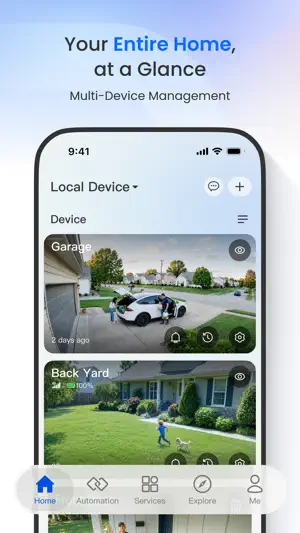
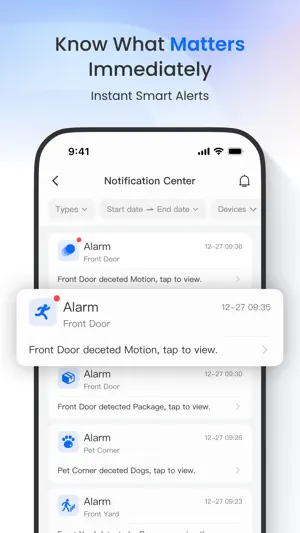
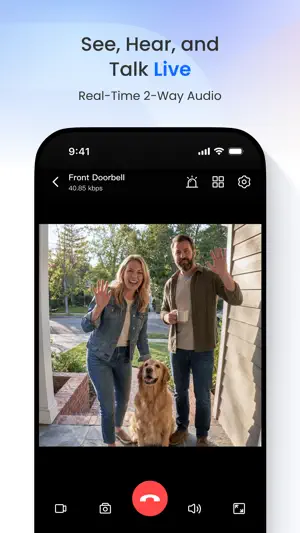
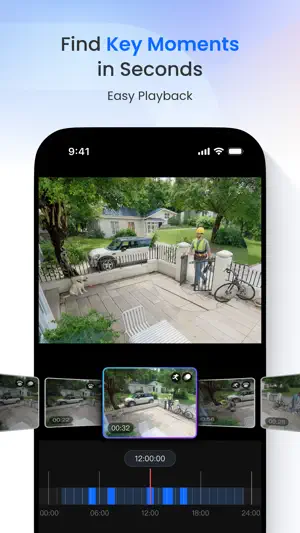
Reolink App is an easy-to-use security camera system surveillance app. It enables you to locally or remotely access your IP cameras and NVRs on mobile devices. You can monitor and watch live streaming of your home and business anywhere and anytime. It helps you easily get peace of mind. Key Features: 1. Only 3 steps to access cameras and NVRs (at the same local network) --- the easiest solution ever. 2. Easy and friendly interface for all users to use. 3. Remotely monitor and watch live streaming via 3G/4G or WiFi anywhere and anytime. 4. Multi-channel viewing (up to 16 channels) on screen at the same time. 5. Remotely playback video recording from your camera SD card and NVR HDD. 6. Capture video from live view channels on your mobile device to playback. 7. Capture single and multiple images to save on your mobile device. 8. Get emails or push notifications in real time when motion detection is triggered. 9. Schedule video recording (including motion-triggered recording) at anytime. 10. Control PTZ (pan-tilt-zoom) cameras remotely (left, right, up and down). Note: Reolink App is compatible with NVRs and IP Cams from Reolink. More Supports: Facebook: https://www.facebook.com/ReolinkTech/ Twitter: https://twitter.com/ReolinkTech Contact: https://reolink.com/contact-us/ YouTube: https://www.youtube.com/channel/UCEHKZX6fFVtWd4tnnRkzrMA
Ratings & reviews
4.0
9.7K ratings
What’s new
Version 4.64.3 · Updated October 27, 2026
1. Added support for iPhone Duo, including basic features such as live view and playback. 2. Optimized the landscape mode on iPad, with support for all four orientations and Picture-in-Picture display. 3. Added a confirmation prompt when manually activating the Siren to prevent unexpected loud sounds.
App privacy
The developer, Reolink Digital Technology Co., Ltd, reported these privacy practices to Apple.
Data Not Linked to You
The following data, which may be collected but is not linked to your identity, may be used for the following purposes:
- Usage Data: Product Interaction, Other Usage Data
Used for: Analytics, App Functionality
Alternatives to Reolink
Looking for apps like Reolink? Here are 6 similar apps on the App Store. The highest rated is Ubiquiti WiFiman (4.8/5), and all 6 are free to download.
-
 TP-Link Omada
4.6
TP-Link Omada
4.6
-
 Ubiquiti WiFiman
4.8
Ubiquiti WiFiman
4.8
-
 My Leviton
4.6
My Leviton
4.6
-
 IP Camera Viewer - IPCams
4.0
IP Camera Viewer - IPCams
4.0
-
 Rain Bird
4.7
Rain Bird
4.7
-
 NETGEAR Orbi - WiFi System App
4.7
NETGEAR Orbi - WiFi System App
4.7
| App | Rating | Price | Last updated | Compare |
|---|---|---|---|---|
| Reolink | 4.0 / 5 (9,726 ratings) | Free | October 27, 2026 | |
| TP-Link Omada | 4.6 / 5 (671) | Free | Oct 29, 2026 | Compare |
| Ubiquiti WiFiman | 4.8 / 5 (41,138) | Free | Jul 28, 2026 | Compare |
| My Leviton | 4.6 / 5 (6,383) | Free | Oct 26, 2026 | Compare |
| IP Camera Viewer - IPCams | 4.0 / 5 (1,223) | Free | Oct 26, 2026 | Compare |
| Rain Bird | 4.7 / 5 (78,680) | Free | Dec 29, 2025 | Compare |
| NETGEAR Orbi - WiFi System App | 4.7 / 5 (354,339) | Free | Oct 12, 2026 | Compare |
Compare Reolink with the top alternatives: ratings, updates, ASO score and keyword gaps →