

TP-Link Omada
TP-Link Systems Inc. Utilities iPhoneiPadiPod touch
TP-Link Omada is a free Utilities app for iPhone and iPad by TP-Link Systems Inc. Rated 4.6/5 from 670 ratings. Requires iOS 15.0. Updated October 29, 2026.
- Rating
- 4.6
- 670 ratings
- Price
- Free
- on the App Store
- Size
- 154 MB
- Age 4+
- Updated
- Oct 29
- 2026 · v5.3.26
Screenshots


About TP-Link Omada
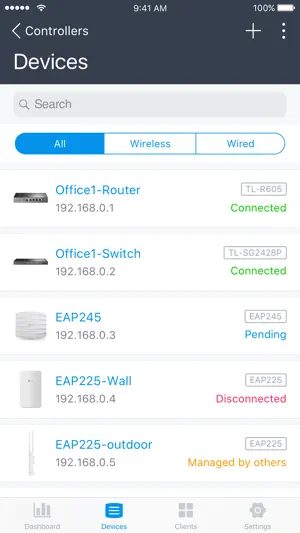
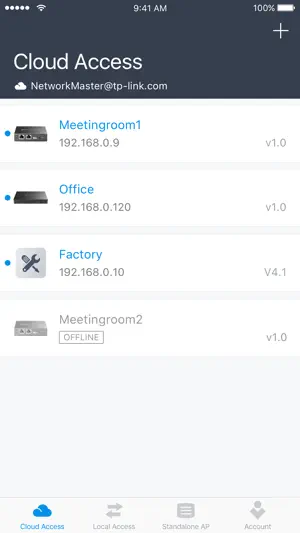
Omada app is used for configuring and managing your Omada devices. You can change settings, monitor the network status and manage clients, all from the convenience of a smart phone or tablet. STANDALONE MODE Standalone mode is designed for managing EAPs or wireless routers right away without having to spend time configuring a controller. Each device is managed separately. This mode is recommended for networks which only have a few EAPs (or wireless routers) and require only basic functions, such as home network. CONTROLLER MODE Controller mode works together with a software Omada Controller or a hardware Cloud Controller, and is suitable for managing multiple devices (including gateways, switches and EAPs) centrally. Controller mode allows you to configure and automatically synchronize unified settings to the devices in the network. Compared to Standalone Mode, more configuration options are available and supports to manage more devices in Controller mode. You can manage devices in Controller mode in two ways: via Local Access or Cloud Access. In Local Access mode, the Omada app can manage devices when the Controller and your mobile device are in the same subnet; in Cloud Access mode, the Omada app can access the Controller across the internet so you can manage your devices wherever you are. Compatibility List: The controller mode currently supports hardware cloud controllers (OC200 V1, OC300 V1), software Omada Controller v3.0.2 and above. (To experience more features support and more stable services, we recommend that you upgrade your controller to a new version). Standalone Mode currently supports the following models (with latest firmware): EAP245 (EU)/(US) V1 EAP225 (EU)/(US) V3/V2/V1 EAP115 (EU)/(US) V4/V2/V1 EAP110 (EU)/(US) V4/V2/V1 EAP225-Outdoor (EU)/(US) V1 EAP110-Outdoor (EU)/(US) V3/V1 EAP115-Wall (EU) V1 EAP225-Wall (EU) V2 ER706W (EU)/(US) V1/V1.6 ER706W-4G (EU)/(US) V1/V1.6 *The latest firmware is required and can be downloaded from https://www.tp-link.com/omada_compatibility_list. More devices supported by the app are coming!
Ratings & reviews
4.6
670 ratings
What’s new
Version 5.3.26 · Updated October 29, 2026
1. Fixed an issue where the app sometimes failed to log in after Face ID verification succeeded.
App privacy
The developer, TP-Link Systems Inc., reported these privacy practices to Apple.
Data Not Linked to You
The following data, which may be collected but is not linked to your identity, may be used for the following purposes:
- Identifiers: User ID, Device ID
- Location: Precise Location
- Contact Info: Email Address
- User Content: Photos or Videos, Customer Support
- Usage Data: Product Interaction
- Diagnostics: Crash Data, Performance Data
- Other Data: Other Data Types
Used for: Developer’s Advertising or Marketing, Analytics, App Functionality
Alternatives to TP-Link Omada
Looking for apps like TP-Link Omada? Here are 6 similar apps on the App Store. The highest rated is Ubiquiti WiFiman (4.8/5), and all 6 are free to download.
-
 Ubiquiti WiFiman
4.8
Ubiquiti WiFiman
4.8
-
 Network Analyzer: WiFi Scan
4.6
Network Analyzer: WiFi Scan
4.6
-
 NetSpot WiFi Analyzer
3.7
NetSpot WiFi Analyzer
3.7
-
 IP Scanner
4.6
IP Scanner
4.6
-
 MikroTik
3.9
MikroTik
3.9
-
 Ruijie Reyee
4.7
Ruijie Reyee
4.7
| App | Rating | Price | Last updated | Compare |
|---|---|---|---|---|
| TP-Link Omada | 4.6 / 5 (670 ratings) | Free | October 29, 2026 | |
| Ubiquiti WiFiman | 4.8 / 5 (41,149) | Free | Jul 28, 2026 | Compare |
| Network Analyzer: WiFi Scan | 4.6 / 5 (6,888) | Free | Sep 13, 2026 | Compare |
| NetSpot WiFi Analyzer | 3.7 / 5 (354) | Free | Sep 27, 2025 | Compare |
| IP Scanner | 4.6 / 5 (896) | Free | Oct 31, 2026 | Compare |
| MikroTik | 3.9 / 5 (282) | Free | Apr 21, 2026 | Compare |
| Ruijie Reyee | 4.7 / 5 (483) | Free | Oct 3, 2026 | Compare |
Compare TP-Link Omada with the top alternatives: ratings, updates, ASO score and keyword gaps →