

Opus One: Digital Planner
PISO 13, Inc. Productivity iPhoneiPadiPod touchApple Watch
Opus One: Digital Planner is a free Productivity app for iPhone and iPad by PISO 13, Inc. Rated 4.7/5 from 975 ratings. Requires iOS 15.0.
- Rating
- 4.7
- 975 ratings
- Price
- Free
- on the App Store
- Size
- 187 MB
- Age 4+
- Updated
- Oct 16
- 2026 · v2.9.6
Screenshots


About Opus One: Digital Planner
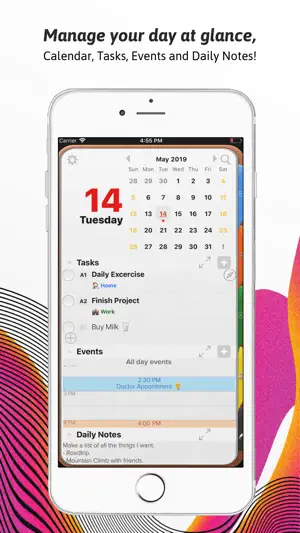
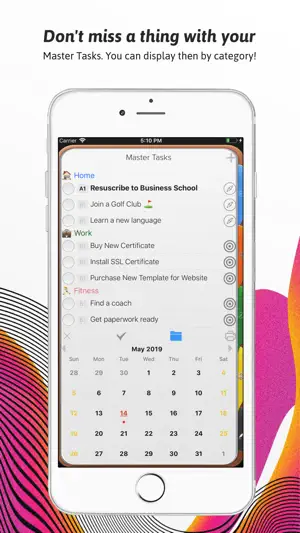
Opus One is a real day planner, not another to-do app. Each day gets its own page — tasks with A/B/C priorities, your schedule, and notes — on a planner that looks and feels like paper. Plan on iPhone, iPad, and Mac, and it all stays in sync. YOUR DAY ON ONE PAGE • Daily Tasks with A/B/C priorities, status, notes, and alarms. • A schedule that shows your Calendar events alongside your tasks. • Drag a task onto the schedule — with task durations, the end time fills in automatically. • Daily Notes with photos, PDFs, checklists, and audio. • Today's weather and a daily quote, right on the page. PLAN BEYOND TODAY • Master Tasks: everything on your mind in one list, no due date required. • Goals with timelines, photos, and progress you can see. • Roles: review the areas of your life each week so nothing important gets crowded out. • Mission, Values, and Vision pages to keep the big picture one tap away. • Meeting Planner for agendas, decisions, and next steps. NOTES AND JOURNALS • Rich notes with fonts, colors, tags, and your own custom sections. • Sketch and handwrite with Apple Pencil. • Journals with 25 covers to choose from, plus a guided Gratitude Journal. IT GOES WHERE YOU GO • Home Screen widgets for today's tasks, your mission, your values, and daily quotes. • Live Activities keep today's tasks on your Lock Screen. • Add a task from Control Center, or ask Siri. • Apple Watch app to see your day and check off tasks from your wrist. • iCloud sync across iPhone, iPad, and Mac. MAKE IT YOURS • Planner themes, including seasonal ones. • Task-complete sounds and rewards for finishing what you planned. • Color-coded categories and repeating rules with advanced options. OPUS ONE PRO The core planner is free. Opus One Pro adds cloud sync across all your devices, weather, attachments (images, PDFs, audio), Apple Pencil sketching, categories, repeating rules, Goals, Siri, and themes. One subscription covers iPhone, iPad, and Mac on the same iCloud account. Available yearly or monthly. Subscription details: Payment is charged to your Apple Account at confirmation of purchase. The subscription renews automatically unless auto-renew is turned off at least 24 hours before the end of the current period, and your account is charged for renewal within 24 hours before the period ends. Manage or cancel in your Account Settings. Privacy Policy: https://piso13.com/privacy-policy-2/ Terms of Service: https://piso13.com/terms-of-service/
Ratings & reviews
4.7
975 ratings
What’s new
Version 2.9.6 · Updated October 16, 2026
Your task alarms are rebuilt — louder, more persistent, and far more reliable. This update also includes: - A new Loud Alarm style that rings at full alarm volume, breaks through Silent mode and Focus, and shows a full-screen alert. Choose Notification or Loud Alarm for each task (iOS 26). - Set an alarm for when a task is due, or 5 minutes, 15 minutes, an hour, or a day before. - Real snooze with your choice of length, and escalating repeats that keep alarming until you deal with the task. - A proper alarm sound, and an alarm sheet that appears when you already have Opus One open. - Fixed alarms that arrived silently, and non-repeating alarms that could disappear before they fired. - Crash and sync fixes.
App privacy
The developer, PISO 13, Inc., reported these privacy practices to Apple.
Data Linked to You
The following data, which may be collected and linked to your identity, may be used for the following purposes:
- Purchases: Purchase History
- Identifiers: User ID, Device ID
- Usage Data: Product Interaction
- Diagnostics: Crash Data, Performance Data, Other Diagnostic Data
- Contact Info: Name
- User Content: Customer Support
Used for: Analytics, Product Personalization, App Functionality
Data Not Linked to You
The following data, which may be collected but is not linked to your identity, may be used for the following purposes:
- Location: Coarse Location, Precise Location
Used for: Analytics, App Functionality
Alternatives to Opus One: Digital Planner
Looking for apps like Opus One: Digital Planner? Here are 6 similar apps on the App Store. The highest rated is Productivity - Daily Planner (4.7/5), and all 6 are free to download.
-
 Productivity - Daily Planner
4.7
Productivity - Daily Planner
4.7
-
 Digital Planner for iPad
4.3
Digital Planner for iPad
4.3
-
 iStratus Notebook & Planner
4.2
iStratus Notebook & Planner
4.2
-
 24me: Calendar・Planner & To Do
4.5
24me: Calendar・Planner & To Do
4.5
-
 Planner Pro - Daily Planner
4.5
Planner Pro - Daily Planner
4.5
-
 Planner: Daily, Weekly Diary
4.7
Planner: Daily, Weekly Diary
4.7
| App | Rating | Price | Last updated | Compare |
|---|---|---|---|---|
| Opus One: Digital Planner | 4.7 / 5 (975 ratings) | Free | October 16, 2026 | |
| Productivity - Daily Planner | 4.7 / 5 (2,067) | Free | Jun 22, 2025 | Compare |
| Digital Planner for iPad | 4.3 / 5 (2,088) | Free | Oct 14, 2026 | Compare |
| iStratus Notebook & Planner | 4.2 / 5 (88) | Free | Oct 15, 2026 | Compare |
| 24me: Calendar・Planner & To Do | 4.5 / 5 (6,782) | Free | Oct 9, 2026 | Compare |
| Planner Pro - Daily Planner | 4.5 / 5 (13,257) | Free | Dec 17, 2025 | Compare |
| Planner: Daily, Weekly Diary | 4.7 / 5 (751) | Free | Aug 29, 2026 | Compare |