

FileBrowser Professional
Stratospherix Ltd Business iPhoneiPadiPod touch
FileBrowser Professional is a paid Business app for iPhone and iPad by Stratospherix Ltd. Rated 4.7/5 from 1,559 ratings. Requires iOS 15.0.
- Rating
- 4.7
- 1.5K ratings
- Price
- 14.99 USD
- on the App Store
- Size
- 86 MB
- Age 4+
- Updated
- Oct 23
- 2026 · v26.8
Screenshots
About FileBrowser Professional
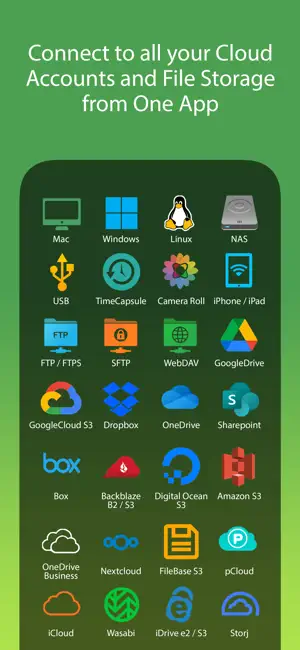
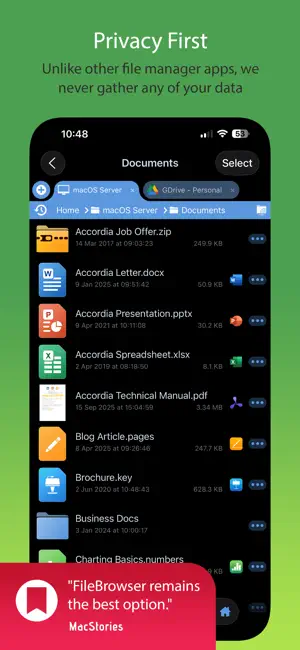
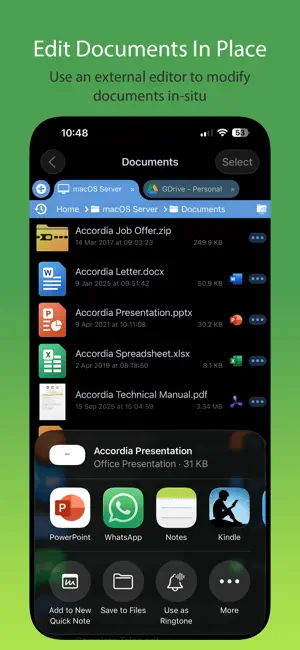
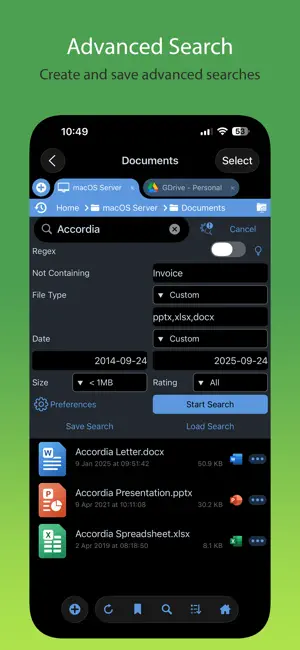
Professional document management for iOS, with bulk rename, backup and sync tasks. Edit your documents in-place, stream your media files and connect to over 20 different network and cloud storage locations. “Maximize the potential of what you can do with files on iOS” - Cult of Mac “FileBrowser remains the best option” - MacStories Direct and secure file access to your computers, servers and other storage devices on home or company networks. Core Features - Access file servers and cloud storage - View documents and optionally store them for offline viewing - Present a video, PowerPoint or Keynote direct from the server - Copy and move between any type of storage, from single files to whole directories - Bi-directional automatic sync of network folders to your iPad/iPhone - Backup local files to a network file server or cloud storage - Integrates with other apps allowing you to edit, save and share files while on the go - Integrates with your existing infrastructure, including Active Directory - Integrates with iOS data protection, utilising hardware-based encryption to secure content - Pro photographer XMP sidecar file support for rating images - VPN on-demand support for third-party VPN clients - Supports Microsoft Distributed File System (DFS) - Requires no additional software on company servers Office App Integration - No more duplication of documents between apps - Launch an Office app to edit a network document in-place - Changes are automatically saved to the original document - Scan documents or images direct to multi page PDF - Automatic colour and perspective correction of scanned documents MDM Integration - Centralised distribution of FileBrowser configuration settings - Enforced security lockdown - Conform to corporate Mobile Security Policies - Prevent users from changing local settings - Selectively override any local configuration setting - Distribute file server connection details - Control whether offline viewing/storage is permitted - Control whether content can be shared FileBrowser Professional uses the SMB1, SMB2, and SMB3 network access protocols (also known as CIFS or Windows File Sharing) to connect to: - Macs - PCs - NAS drives - Windows File Servers (including Windows Server Clusters) Access local storage - USB Drives - SD Cards - Folders of other apps - iCloud Drive folders of other apps - iOS Photo Library You can also connect to the following cloud storage - Microsoft OneDrive - Microsoft OneDrive for Business - Microsoft SharePoint 2013 or later - Box.com - Google Drive (including Shared Team Drives) - Dropbox (including Dropbox for Business) - Backblaze B2 - Amazon S3 - Nextcloud - pCloud - Digital Ocean S3 - FileBase S3 - Google Cloud S3 - iDrive Cloud S3 - Storj S3 - Wasabi S3 - WebDAV servers - FTP/FTPS servers - SFTP servers Unlike other file manager apps, we never gather any of your data. We also don't require you to create an account or register an email address with us. For fast friendly support please email [email protected]. We are happy to receive support emails in any language, but are only able to reply in English.
Ratings & reviews
4.7
1.5K ratings
What’s new
Version 26.8 · Updated October 23, 2026
26.8 * Fix crash on startup for some users. 26.7 New Features * Added support for latest iOS devices. * Local folders can now be chosen for sync tasks. * Shared files will now be opened in a new tab. * Folder sync icon now indicates that a sync is ongoing. * Improved Share Extension UI. * Improved performance of thumbnail extraction. * Improved rename popup window. Bug Fixes * Fixed HEIC properties not being viewable after editing. * Fixed hang when extracting thumbnails. * Fixed crash when searching Google Drive. * Fixed crash when changing VPN connection type. Thank you for helping to make our apps better. If you would like to rate or leave a review on the App Store, we look forward to hearing your feedback. Unlike other file manager apps, we never gather any of your data. We also don't require you to create an account or register an email address with us.
App privacy
The developer, Stratospherix Ltd, reported these privacy practices to Apple.
Data Not Collected
The developer does not collect any data from this app.
Alternatives to FileBrowser Professional
Looking for apps like FileBrowser Professional? Here are 6 similar apps on the App Store. The highest rated is S3 Client - Files location (4.8/5), and 3 of the 6 are free to download.
-
 FTPManager Pro
4.7
FTPManager Pro
4.7
-
 DEVONthink To Go 4
4.7
DEVONthink To Go 4
4.7
-
 S3 Client - Files location
4.8
S3 Client - Files location
4.8
-
 Owlfiles - File Manager
4.6
Owlfiles - File Manager
4.6
-
 Jump Desktop (RDP, VNC, Fluid)
4.5
Jump Desktop (RDP, VNC, Fluid)
4.5
-
 iA Writer
4.6
iA Writer
4.6
| App | Rating | Price | Last updated | Compare |
|---|---|---|---|---|
| FileBrowser Professional | 4.7 / 5 (1,559 ratings) | 14.99 USD | October 23, 2026 | |
| FTPManager Pro | 4.7 / 5 (1,042) | 2.99 USD | Oct 26, 2026 | Compare |
| DEVONthink To Go 4 | 4.7 / 5 (258) | Free | Oct 5, 2026 | Compare |
| S3 Client - Files location | 4.8 / 5 (56) | Free | Oct 20, 2026 | Compare |
| Owlfiles - File Manager | 4.6 / 5 (7,242) | Free | Oct 27, 2026 | Compare |
| Jump Desktop (RDP, VNC, Fluid) | 4.5 / 5 (1,707) | 14.99 USD | Oct 20, 2026 | Compare |
| iA Writer | 4.6 / 5 (1,544) | 19.99 USD | Oct 25, 2026 | Compare |