

Scan & Translate+ Text Grabber
Aisberg Inc LLC Productivity iPhoneiPadiPod touch
Scan & Translate+ Text Grabber is a free Productivity app for iPhone and iPad by Aisberg Inc LLC. Rated 4.3/5 from 20,007 ratings. Requires iOS 15.5.
- Rating
- 4.3
- 20K ratings
- Price
- Free
- on the App Store
- Size
- 130 MB
- Age 4+
- Updated
- Oct 31
- 2026 · v6.5.33
Screenshots



About Scan & Translate+ Text Grabber
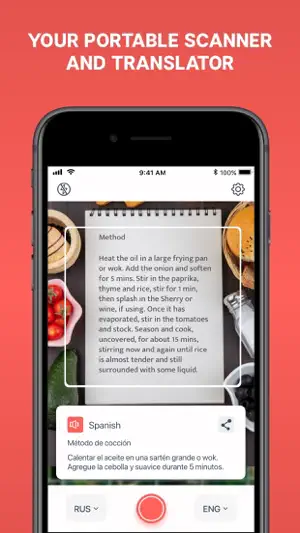
Download NOW the BEST Scan and Translate app in the WORLD and instantly translate business documents, contracts, homework assignments, menus, street signs and other images. GET MORE than 90 different languages which are available for translation! Scan & Translate app extracts texts from any printed sources: documents, books, signs, instructions or announcements and allows to immediately translate them to any of 90 languages. Take a picture of the text and after the text is recognized, you can immediately edit, hear, translate, share it on Facebook, Twitter, vKontakte or simply send by email or as SMS. Better and faster than any other similar product! 70% cheaper than any other similar app, offered by competitors! • Recognizes texts in more than 70 languages • Translates to more than 90 languages • Reads texts in more than 44 languages • Advanced optical character recognition technology for 79 languages, including Russian, English, German, Spanish, Greek, Turkish, Chinese, Korean, Japanese, Portuguese, French ( Internet connection is required) • Full text translation for more than 90 languages (Internet connection is required) • Listen to the text that has been recognized and translated into more than 44 languages! • Edit the text, copy it to clipboard, and save in other apps • Share the text on Facebook, Twitter, VKontakte or send as SMS or by email • All texts are saved in History and can be later recovered at any time With Scan & Translate app you can easily scan and translate: • any paper documents • recipes from cookbooks • notes and letters • menus in restaurants, bars, and cafes • articles from magazines and newspapers • book parts • instructions and manuals • texts on product labels • road signs as well as signs in airports and stations • and many more... How to use the app: • Select the language of the original text as text recognition language. • Take a picture of the document (page, instruction, or any other text) • Press the "Scan" button • Recognized text will appear on the screen with an option to select the source language and the target (translation) language. • After you select the language, the original text will be automatically translated and will appear at the bottom of the screen. • To listen to the translation, press the "Voice" button Scan & Translate app will digitize and translate any printed text right on your device! *Note: The Free version may be subject to limitations (ex. number of daily translations), which are subject to change*** Take advantage of the Premium Features: - Unlimited translations - Ads-free translation experience For complete access to Scan & Translate and all language change features, you will need to allow access to the following: *Camera *Photos Note: The Free version may be subject to limitations (ex. number of daily text recognitions and translations), which are subject to change Сhoose from different subscription options. Our standard subscription options are: 1-month Subscription 1-year Subscription Subscription plans unlock: - Unlimited translations - Unlimited text recognitions - Offline Text Recognition - Offline translations - Ads-free translation experience - Snap Mode You can cancel a free trial or subscription anytime by canceling your subscription through your iTunes account settings. This must be done 24 hours before the end of a free trial or subscription period to avoid being charged. The cancellation will take effect the day after the last day of the current subscription period, and you will be downgraded to the free service. Please note: any unused portion of a free trial period (if offered) will be forfeited when you purchase a premium subscription during the free trial period. EULA: https://datacomprojects.com/api/Eula?bid=com.translatoria.scanandtranslatefree Privacy Policy: https://datacomprojects.com/api/PrivacyPolicy?bid=com.translatoria.scanandtranslatefree
Ratings & reviews
4.3
20K ratings
What’s new
Version 6.5.33 · Updated October 31, 2026
• Purchases and Restore are more reliable. • Bug fixes and performance improvements.
App privacy
The developer, Aisberg Inc LLC, reported these privacy practices to Apple.
Data Used to Track You
The following data may be used to track you across apps and websites owned by other companies:
- Usage Data: Advertising Data
Data Not Linked to You
The following data, which may be collected but is not linked to your identity, may be used for the following purposes:
- Purchases: Purchase History
- Location: Coarse Location
- User Content: Customer Support, Other User Content
- Identifiers: Device ID
- Usage Data: Product Interaction, Advertising Data, Other Usage Data
- Diagnostics: Crash Data, Performance Data, Other Diagnostic Data
- Other Data: Other Data Types
Used for: Third-Party Advertising, Developer’s Advertising or Marketing, Analytics, Product Personalization, App Functionality, Other Purposes
Alternatives to Scan & Translate+ Text Grabber
Looking for apps like Scan & Translate+ Text Grabber? Here are 6 similar apps on the App Store. The highest rated is AI Photo Translator (4.5/5), and all 6 are free to download.
-
 AI Photo Translator
4.5
-
 Air Translate Photo Translator
4.4
-
 Translator - AI Translate
4.5
-
 Translate - Camera Translator
4.2
-
 PDF Translator: Document & OCR
4.2
-
 Translator GO: AI Translate
4.4
| App | Rating | Price | Last updated | Compare |
|---|---|---|---|---|
| Scan & Translate+ Text Grabber | 4.3 / 5 (20,007 ratings) | Free | October 31, 2026 | |
| AI Photo Translator | 4.5 / 5 (9,043) | Free | Oct 28, 2025 | Compare |
| Air Translate Photo Translator | 4.4 / 5 (4,419) | Free | Nov 18, 2025 | Compare |
| Translator - AI Translate | 4.5 / 5 (3,518) | Free | Oct 27, 2026 | Compare |
| Translate - Camera Translator | 4.2 / 5 (1,184) | Free | Feb 4, 2026 | Compare |
| PDF Translator: Document & OCR | 4.2 / 5 (478) | Free | Nov 2, 2026 | Compare |
| Translator GO: AI Translate | 4.4 / 5 (20,369) | Free | Nov 3, 2026 | Compare |