

PDF Translator: Document & OCR
Alex Gameli Heyman Productivity iPhoneiPadiPod touchMac
PDF Translator: Document & OCR is a free Productivity app for iPhone and iPad by Alex Gameli Heyman. Rated 4.2/5 from 478 ratings. Requires iOS 15.0.
- Rating
- 4.2
- 478 ratings
- Price
- Free
- on the App Store
- Size
- 103 MB
- Age 4+
- Updated
- Nov 2
- 2026 · v6.5.0
Screenshots
Save to Pinterest

About PDF Translator: Document & OCR
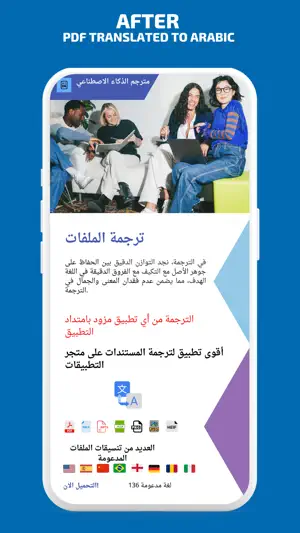
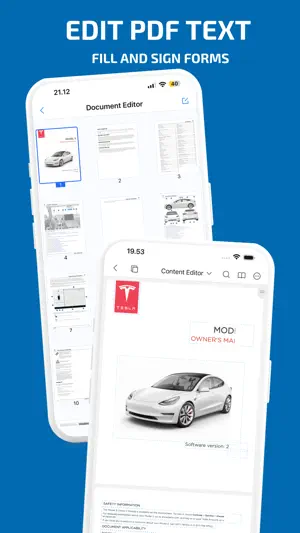
TRANSLATE PDF, WORD, EXCEL AND POWERPOINT — AND KEEP THE LAYOUT Most translators hand you back a wall of text. PDF Translator hands you back your document: the same tables, the same columns, the same letterhead and the same page breaks — in a new language. Try it before you pay. No account, no card. KEEPS YOUR FORMATTING - Tables stay tables and columns stay aligned. - Logos, headers, footers and images stay exactly where they were. - Page layout is preserved, so a translated contract still reads like a contract. - Documents that mix several languages can be translated into one single language. EVERY DOCUMENT YOU ACTUALLY WORK WITH - PDF, Word (.docx), Excel (.xlsx), PowerPoint (.pptx) and photos. - Scanned paperwork: built-in OCR reads the page first, then translates it. - Long documents: split and translated automatically, however many pages. - Up to 133 languages, with automatic language detection. TRANSLATE WITHOUT LEAVING THE APP YOU ARE IN Share a document straight from Mail, Files, Safari or any other app using the built-in extension, and get the translated file back without switching apps. STRAIGHT ANSWERS ON CREDITS - One page costs one credit, and you see the page count before anything is spent. - If a translation fails, the credit goes back into your balance automatically. - No machine-translation watermark on your translated documents. A FULL PDF TOOLKIT AS WELL - Edit the text and images inside a PDF. - Compress a PDF to reduce its file size. - Split, merge and scan, and convert photos into PDF. - Rename, save and share your files, with full Dark Mode support. CHOOSE YOUR ENGINE Translate with Microsoft or Google, whichever you prefer for your language pair. Built for iPhone, iPad and Mac. Terms of service: https://www.apple.com/legal/internet-services/itunes/dev/stdeula/ Privacy policy: https://www.pdftranslator.dk/privacy-policy
Ratings & reviews
4.2
478 ratings
What’s new
Version 6.5.0 · Updated November 2, 2026
- Purchases and subscriptions now go through even while your account is still loading, and your plan and page balance recover by themselves after a connection problem. - Fixed freezes when opening files, scanning, converting, editing or compressing, especially on Mac. - Split PDF and PDF to Photos now save your files only after the conversion has finished and been paid for, and split parts no longer overwrite each other. - A translation that comes back with missing pages is now refused, and its pages are refunded automatically.
App privacy
The developer, Alex Gameli Heyman, reported these privacy practices to Apple.
Data Used to Track You
The following data may be used to track you across apps and websites owned by other companies:
- Usage Data: Advertising Data
Data Linked to You
The following data, which may be collected and linked to your identity, may be used for the following purposes:
- Purchases: Purchase History
- Usage Data: Product Interaction, Advertising Data
- Identifiers: Device ID, User ID
- User Content: Photos or Videos, Other User Content
- Diagnostics: Crash Data, Performance Data
Used for: Developer’s Advertising or Marketing, Analytics, App Functionality
Alternatives to PDF Translator: Document & OCR
Looking for apps like PDF Translator: Document & OCR? Here are 6 similar apps on the App Store. The highest rated is XTranslate - Photo, Voice, PDF (4.5/5), and all 6 are free to download.
-
 PDF File Translator App
3.6
-
 PDF Translate Pro
4.1
-
 Scan & Translate+ Text Grabber
4.3
-
 XTranslate - Photo, Voice, PDF
4.5
-
 DeftPDF Document Translator
3.0
-
 Air Translate Photo Translator
4.4
| App | Rating | Price | Last updated | Compare |
|---|---|---|---|---|
| PDF Translator: Document & OCR | 4.2 / 5 (478 ratings) | Free | November 2, 2026 | |
| PDF File Translator App | 3.6 / 5 (9) | Free | Oct 8, 2026 | Compare |
| PDF Translate Pro | 4.1 / 5 (291) | Free | Mar 25, 2026 | Compare |
| Scan & Translate+ Text Grabber | 4.3 / 5 (20,004) | Free | Oct 31, 2026 | Compare |
| XTranslate - Photo, Voice, PDF | 4.5 / 5 (309) | Free | Nov 26, 2026 | Compare |
| DeftPDF Document Translator | 3.0 / 5 (2) | Free | Nov 20, 2026 | Compare |
| Air Translate Photo Translator | 4.4 / 5 (4,419) | Free | Nov 18, 2025 | Compare |