

Who's On - Basketball
Left Coast Labs Ltd. Sports iPhoneiPadiPod touch
Who's On - Basketball is a paid Sports app for iPhone and iPad by Left Coast Labs Ltd. Rated 1.0/5 from 2 ratings. Requires iOS 13.4. Updated July 9, 2025.
- Rating
- 1.0
- 2 ratings
- Price
- 2.99 USD
- on the App Store
- Size
- 38 MB
- Age 4+
- Updated
- Jul 9
- 2025 · v2.6.5
Screenshots



About Who's On - Basketball
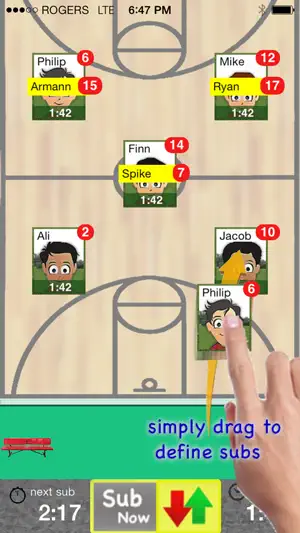
Who's On-Basketball helps youth-basketball coaches manage who's on the floor and who's going on next. It has been developed for the iPhone and iPad with experienced coaches who find managing rotations and balancing play time awkward and stressful. Watch our feature videos at "http://whos-on.leftcoastlabs.biz/videos/basketball". What coaches have said about Who's On apps... "It's intuitive and easy of use." "It can handle all the unpredictability of coaching youth sports. For instance, I don't know who's going to be there [on game day] until I show up at the game. Players sometimes show up late or leave early. Young players decide at the last minute that they don't want to go on, messing up my planned rotation. This app allows me to handle all this... with ease." "I like how clearly each player's name, number and picture is presented on the screen. I have a lousy memory and remembering new player names at the start of a season is always a problem for me." "The 1-touch Position History is really well done... I wouldn't want to coach again without it!" "I love how easy it is to add player photos to the team." Feature Summary: Simple drag and drop - With Who's On-Basketball, you simply drag player icons from the "bench" to "floor positions" as you make decisions for your starting lineup or substitutions. The app remembers "who" you've assigned "where" and tracks how long each player has been in each position during the game. 1-screen game information - All game-time information is displayed clearly on one screen (as shown in the screen shots). Bright yellow banners clearly indicate where you've pre-assigned substitutes for your next rotation. 1-button rotation - When it's time to make substitutions, you press one button to indicate that the subs have taken the floor and the app records this event. The app then places the icons of the players coming off the floor back on the bench ready for their next rotation assignments. Built-in substitution timer - A built-in timer can be used to balance rotation times. Press-and-hold play history (a unique and celebrated feature of Who's On-Soccer) – By simply dragging a player's icon to the bottom of the screen, the display will change to show a Position History (graphically indicating where the player has played and for how long). Hot-Cold Indicators - shows which players have significantly more or less play time than the average. Players with significantly more play time are highlighted red (Hot). Similarily, blue (Cold) for less play time. Fast team setup - We've built Who's On-Basketball to allow you to enter a team's information quickly. Typically it only takes a few minutes to enter all your team's information. 1-touch player pictures - Capture player pictures with the app's integrated camera function. 1-touch, point and click. Multiple teams - If you coach or assist with two or more teams, this app supports multiple teams. Simply select the team you want to use from the team list and your ready to go. Game / Practice schedules - Who's On-Basketball let's you store your team's schedule in your phone if you desire. Game data and notes - Use game notes to track pre-game thoughts and reminders as well as post-game comments. All game data is stored in the team's schedule as a completed game. Game stats can be reviewed at any time or sent to the team's record keeper via email. Supported platforms: - built for iPhone or iPod Touch - will work on iPad or iPad Mini as iPhone app
What’s new
Version 2.6.5 · Updated July 9, 2025
bug fixes
App privacy
The developer, Left Coast Labs Ltd., reported these privacy practices to Apple.
Data Not Linked to You
The following data, which may be collected but is not linked to your identity, may be used for the following purposes:
- Diagnostics: Other Diagnostic Data
Used for: Analytics
Alternatives to Who's On - Basketball
Looking for apps like Who's On - Basketball? Here are 6 similar apps on the App Store. The highest rated is Desi Ballers League (5.0/5), and all 6 are free to download.
-
 Benchwarmer — Team Manager
-
 Desi Ballers League
5.0
Desi Ballers League
5.0
-
 Even Minutes - Basketball
-
 CaddyTrack AI
5.0
CaddyTrack AI
5.0
-
 Court Shift
5.0
Court Shift
5.0
-
 Player Rotation
2.0
Player Rotation
2.0
| App | Rating | Price | Last updated | Compare |
|---|---|---|---|---|
| Who's On - Basketball | 1.0 / 5 (2 ratings) | 2.99 USD | July 9, 2025 | |
| Benchwarmer — Team Manager | – | Free | Oct 10, 2026 | Compare |
| Desi Ballers League | 5.0 / 5 (3) | Free | Oct 12, 2026 | Compare |
| Even Minutes - Basketball | – | Free | Jul 30, 2026 | Compare |
| CaddyTrack AI | 5.0 / 5 (8) | Free | Mar 31, 2026 | Compare |
| Court Shift | 5.0 / 5 (1) | Free | Feb 12, 2025 | Compare |
| Player Rotation | 2.0 / 5 (1) | Free | Aug 18, 2026 | Compare |