

Private Safe Pic Vault: Tresor
Nitin Gohel Photo & Video iPhoneiPadiPod touch
Private Safe Pic Vault: Tresor is a free Photo & Video app for iPhone and iPad by Nitin Gohel. Rated 3.8/5 from 8 ratings. Requires iOS 16.0.
- Rating
- 3.8
- 8 ratings
- Price
- Free
- on the App Store
- Size
- 9 MB
- Age 4+
- Updated
- Sep 22
- 2026 · v4.0
Screenshots
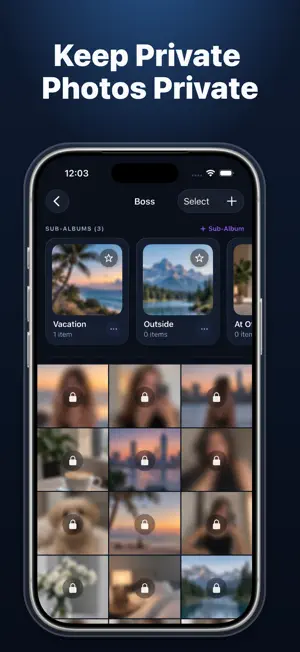

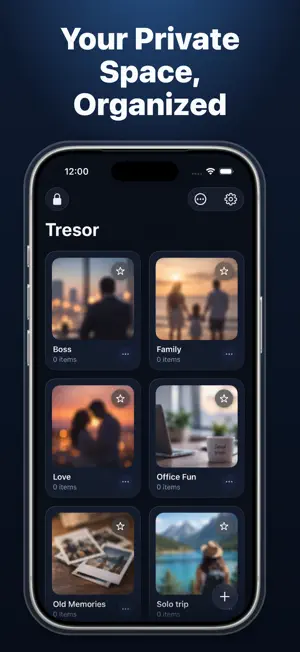
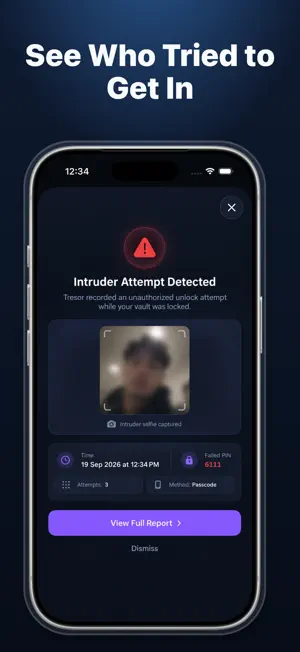
About Private Safe Pic Vault: Tresor
Tresor gives you a private place for the photos and videos you don’t want sitting in your main library. Move personal media into your vault, sort it into private albums, add a PIN to individual albums, and use extra privacy tools when you need them. Tresor is built to keep things simple: open the app, protect what matters, and stay in control of your own content. WHAT YOU CAN DO WITH TRESOR ◉ Keep Photos & Videos Private Import photos and videos from your iPhone library and keep them together inside your private vault. ◉ Create Private Albums Make your own albums, rename them, and organize your photos and videos in a way that makes sense to you. ◉ Lock Individual Albums Some albums need more privacy than others. Add a separate PIN to specific albums for an extra layer of protection. ◉ Use an Emergency PIN Set up a second PIN that can open a separate dummy view instead of your main vault content when needed. ◉ Check Break-In Attempts Tresor can record failed access attempts and, when the feature is enabled and permission is granted, capture an intruder selfie for you to review later. ◉ Exit Quickly Need to leave the vault fast? Quick Exit lets you move away from private content with a single action. ◉ Transfer Over Wi-Fi Move photos and videos between your computer and Tresor while both devices are connected to the same local Wi-Fi network. ◉ Restore Recently Deleted Media Deleted something by mistake? Check Recently Deleted and restore supported photos or videos before they are permanently removed. ◉ Set a PIN Recovery Question Create your own recovery question and answer when setting up your PIN. Your recovery details are kept under your control and are not stored on our external servers. PRIVACY THAT STAYS SIMPLE Tresor is designed so your private photos and videos can stay on your device without being sent to external servers or third-party APIs for normal vault use. Your media remains under your control unless you choose to use a supported transfer or backup option. Tresor is useful when you want to: • Hide private photos on iPhone • Keep personal videos out of your main library • Create private photo albums • Lock specific albums with a PIN • Organize hidden photos and videos • Transfer media over local Wi-Fi • Review recently deleted vault content • Check unsuccessful access attempts • Leave private content quickly when needed Whether you’re keeping personal memories separate, organizing private albums, or simply adding another layer of privacy to photos and videos on your iPhone, Tresor gives you practical tools without making things complicated. SUBSCRIPTIONS & IN-APP PURCHASES Tresor offers the following PRO options: • Tresor PRO Annual — Auto-renewing subscription, with a free trial when offered • Tresor PRO Monthly — Auto-renewing subscription • Tresor PRO Lifetime — One-time in-app purchase Payment will be charged to your Apple ID account at confirmation of purchase. Subscriptions renew automatically unless canceled at least 24 hours before the end of the current period. Your Apple ID account will be charged for renewal within 24 hours before the end of the current period. You can manage or cancel your subscription at any time from your App Store account settings. If a free trial is offered, any unused portion may be forfeited when a subscription is purchased, where applicable. PRIVACY POLICY https://appreator.com/privacy-policy TERMS OF USE https://appreator.com/terms-of-use SUPPORT & FEEDBACK [email protected]
Ratings & reviews
3.8
8 ratings
What’s new
Version 4.0 · Updated September 22, 2026
Welcome to Tresor (Version 4.0). We are proud to introduce a complete rebranding and architectural overhaul of the app. Built from the ground up with the latest iOS technologies and modern security standards, Tresor delivers a faster, more secure, and beautifully redesigned private vault experience. WHAT IS NEW IN TRESOR 4.0: 1. INTRODUCING TRESOR & COMPLETE REDESIGN - The app has been fully rebranded as Tresor with an all-new modern interface. - Features a native liquid glass keypad with natural depth, light refraction, and tactile haptic feedback. - Full Light and Dark appearance support that adapts seamlessly to your system theme. 2. ENHANCED MILITARY-GRADE SECURITY ARCHITECTURE - Rebuilt from the ground up with hardware-accelerated 256-bit AES-GCM encryption. - Multi-layer protection combining Face ID, Touch ID, Master Passcode, and Apple Keychain security. - Instant App Switcher Privacy Shield that automatically conceals your screen when switching between apps. 3. INDIVIDUAL ALBUM PASSCODE LOCKS - Protect sensitive folders with their own independent 4-digit PINs. - Includes a dedicated floating glass authorization card with secure question recovery. 4. INTRUDER BREAK-IN DETECTION - Silently captures front-camera photos with timestamps whenever repeated incorrect passcodes are entered. - View and manage break-in reports directly within security settings. 5. WIRELESS WI-FI DESKTOP WEB TRANSFER (PRO) - Seamlessly import and export photos and videos between your iPhone and any Mac or PC desktop browser via encrypted local pairing. 6. FACE-DOWN PANIC LOCK & RECOVERY TRASH - Instantly lock your vault simply by flipping your device face-down. - Built-in 30-Day Trash bin allows safe restoration of accidentally deleted photos and videos. 7. PERFORMANCE & MODERNIZATION - Integrated StoreKit 2 for seamless, instant subscription management and restores. - Optimized high-performance thumbnail caching for fluid scrolling through large media collections. - Full compatibility with the latest iOS 18 features and devices. Thank you for trusting Tresor with your privacy. For support or feedback, please reach out to us at [email protected].
App privacy
The developer, Nitin Gohel, reported these privacy practices to Apple.
Data Used to Track You
The following data may be used to track you across apps and websites owned by other companies:
- Usage Data: Advertising Data
Data Not Linked to You
The following data, which may be collected but is not linked to your identity, may be used for the following purposes:
- Identifiers: Device ID
- Usage Data: Advertising Data
Used for: Third-Party Advertising, Analytics
Alternatives to Private Safe Pic Vault: Tresor
Looking for apps like Private Safe Pic Vault: Tresor? Here are 6 similar apps on the App Store. The highest rated is Zweep: Duplicate Photo Cleaner (5.0/5), and all 6 are free to download.
-
 Hide Photos: Secret Album
3.5
Hide Photos: Secret Album
3.5
-
 Zweep: Duplicate Photo Cleaner
5.0
Zweep: Duplicate Photo Cleaner
5.0
-
 RetroLine: Draw To Find Photo
5.0
RetroLine: Draw To Find Photo
5.0
-
 Dual Camera Recorder: Duocamly
4.4
Dual Camera Recorder: Duocamly
4.4
-
 F-captions: auto subtitles
4.6
F-captions: auto subtitles
4.6
-
 Vane: Video to Live Photo
| App | Rating | Price | Last updated | Compare |
|---|---|---|---|---|
| Private Safe Pic Vault: Tresor | 3.8 / 5 (8 ratings) | Free | September 22, 2026 | |
| Hide Photos: Secret Album | 3.5 / 5 (2) | Free | Oct 25, 2026 | Compare |
| Zweep: Duplicate Photo Cleaner | 5.0 / 5 (1) | Free | Oct 18, 2026 | Compare |
| RetroLine: Draw To Find Photo | 5.0 / 5 (1) | Free | Oct 13, 2026 | Compare |
| Dual Camera Recorder: Duocamly | 4.4 / 5 (7) | Free | Oct 10, 2026 | Compare |
| F-captions: auto subtitles | 4.6 / 5 (10) | Free | Oct 5, 2026 | Compare |
| Vane: Video to Live Photo | – | Free | Oct 27, 2026 | Compare |