

Archivia Mail
Maurizio Pizzolante Productivity iPhoneiPadiPod touchMac
Archivia Mail is a paid Productivity app for iPhone and iPad by Maurizio Pizzolante. Requires iOS 15.0. Updated November 23, 2026.
- Price
- 1 USD
- on the App Store
- Size
- 27 MB
- Age 4+
- Updated
- Nov 23
- 2026 · v1.4.0
Screenshots
Save to Pinterest


About Archivia Mail
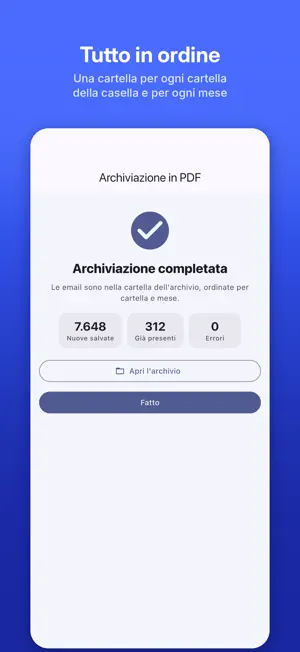
Mailbox full and afraid of losing something? Archivia Mail saves your emails as PDF files, with attachments and originals, in a tidy archive on your device. Then, only after checking that everything is safe, it frees up space on the server. HOW IT WORKS 1. Sign in with your email and password (Outlook and Hotmail: with your Microsoft account). The app finds your mail server by itself. 2. Choose which emails: all of them, only the older ones (for example older than a year) or a specific period. 3. Tap "Archive as PDF": every email becomes a clear, readable PDF with sender, recipients, date, subject and text. 4. Whenever you like, tap "Free up space on the server": the app checks the archive email by email and only then moves the emails to the Trash or deletes them. Emails you don't need can also be removed without saving them, if you choose to. A TIDY ARCHIVE • One folder for every mailbox folder, with a subfolder for every month • Attachments saved next to the PDFs • "Conversations as one PDF": each conversation, with all its replies, in a single PDF to read from start to finish • The original .eml file of every message, which opens in any email program • Readable PDFs in every language, Japanese, Chinese and Korean included • Run it again and only new emails are saved SWITCHING PROVIDER? • "Copy to another mailbox" uploads your archived emails to another IMAP mailbox, keeping the same folders • Emails already there are not copied twice, and your old mailbox is not touched • Emails too big for the new provider are copied without their largest attachments, which stay in your archive • "Export as mbox" creates one .mbox file per folder, to import into Thunderbird, Apple Mail and many other email apps NEWSLETTERS AND ADS • See who sends you newsletters and ads and how much space their emails take up • Unsubscribe in one tap: where the sender allows it, the request is sent automatically; otherwise the sender's page or a ready-made email opens • Remove their emails and your spam: to the Trash or deleted for good, as you prefer TRULY SAFE • By default no email leaves the server unless it is in the archive with all its files: if even one is missing, nothing is touched. Unsaved emails are removed only if you choose to, after a confirmation • You choose whether to move emails to the Trash or delete them for good (Gmail too) • Your password is never stored and travels, encrypted, only to your mail server • No account, no ads, no data collected: your emails stay yours WORKS WITH Gmail, Outlook and Hotmail, iCloud, Yahoo, GMX, WEB.DE, T-Online, Aruba and almost every mailbox that supports IMAP, custom domains included. Gmail and iCloud need an app-specific password: the app explains how to create one. With Outlook and Hotmail you sign in with your Microsoft account, directly on Microsoft's page. Not supported: Proton Mail. WHERE TO FIND THE ARCHIVE • Mac: Downloads › Mail Archive • iPhone and iPad: Files app › On My iPhone › Archivia Mail Available in English, German and Italian. One purchase works on iPhone, iPad and Mac.
What’s new
Version 1.4.0 · Updated November 23, 2026
• New: "Conversations as one PDF". Puts the emails of the same conversation, with all the replies, into a single PDF, from the oldest to the newest. If you like, each reply shows only its new text, without repeating the earlier emails. • New: "Export as mbox". Creates one .mbox file per folder with the original emails in your archive: if you ever need them back as emails, open or import them in Thunderbird, Apple Mail and many other email apps.
App privacy
The developer, Maurizio Pizzolante, reported these privacy practices to Apple.
Data Not Collected
The developer does not collect any data from this app.
Alternatives to Archivia Mail
Looking for apps like Archivia Mail? Here are 6 similar apps on the App Store. The highest rated is CREATOR Cognitive OS (5.0/5), and 5 of the 6 are free to download.
-
 Side Link for Safari
-
 SnapRecaller
-
 Native Tasks for Obsidian
-
 CREATOR Cognitive OS
5.0
-
 AI Limits: AI Usage Tracker
-
 Enlock
| App | Rating | Price | Last updated | Compare |
|---|---|---|---|---|
| Archivia Mail | – | 1 USD | November 23, 2026 | |
| Side Link for Safari | – | 0.99 USD | Oct 26, 2026 | Compare |
| SnapRecaller | – | Free | Nov 2, 2026 | Compare |
| Native Tasks for Obsidian | – | Free | Nov 6, 2026 | Compare |
| CREATOR Cognitive OS | 5.0 / 5 (2) | Free | Aug 16, 2026 | Compare |
| AI Limits: AI Usage Tracker | – | Free | Nov 28, 2026 | Compare |
| Enlock | – | Free | Jan 4, 2026 | Compare |
Compare Archivia Mail with the top alternatives: ratings, updates, ASO score and keyword gaps →