

SnapRecaller
Samay LLC Productivity iPhoneiPadiPod touch
SnapRecaller is a free Productivity app for iPhone and iPad by Samay LLC. Requires iOS 26.0. Updated November 2, 2026.
- Price
- Free
- on the App Store
- Size
- 1 MB
- Age 4+
- Updated
- Nov 2
- 2026 · v1.0
Screenshots
Save to Pinterest


About SnapRecaller
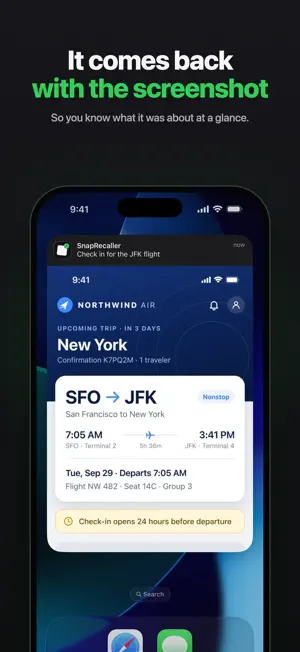
Screenshots are how we save things for later. Then later never comes, and they sink into your camera roll. SnapRecaller turns a screenshot into a reminder in a few seconds, and brings it back exactly when you need it. HOW IT WORKS 1. Take a screenshot and tap Share. 2. Choose SnapRecaller. 3. Type when and why in one line, like “tomorrow 9am send Priya the deck”, or just the time, and tap Save. At the time you picked, a notification arrives with the screenshot attached, so you know what it was about before you even open it. ONE LINE, NO PICKERS Type the time and the note together. SnapRecaller splits them apart as you type: “fri 10am” becomes the reminder and “buy tickets” becomes the note. Adjust either one before saving, or tap a quick option like “in 3 hours”, “tomorrow morning”, “this weekend” or “next week”. The options you use most move to the front. NO TIME TO WRITE A NOTE? Just type the time. SnapRecaller reads the text in your screenshot and suggests a short note for you, like “Charred Corn & Miso Butter Pasta” or “Flight from San Francisco to New York.” Keep it, tweak it, or type your own. Suggested notes are labeled AI when you open the reminder, so you always know which ones you wrote. The suggestion is made entirely on your iPhone by Apple’s on-device language model. Your screenshot is never sent to a server or an AI service. On iPhones without Apple Intelligence, SnapRecaller suggests a simpler note from the screenshot’s text instead. MADE FOR THE THINGS YOU SCREENSHOT • Tickets that go on sale Friday at 10 • A recipe to cook this weekend • A message you need to reply to properly • A price you want to check again next week • A flight check-in, an open house, a bill that’s due • A book, a hike, a gift idea SWIPE TO KEEP IT MOVING Upcoming reminders sit at the top, soonest first. Swipe right to mark one done. Swipe left to reschedule or delete. Changed your mind? Undo is one tap away. TAP TO SEE IT AGAIN Open any reminder to see the full screenshot and its note. Edit the note or mark it done right there. NOT SURE WHEN? Save a screenshot without a time and it’s kept with its note, ready when you are. PRIVATE BY DESIGN • No account and no sign-up • No ads, no analytics, no tracking • Your screenshots stay on your iPhone and are never sent to us or anyone else • AI note suggestions run on your iPhone, not in the cloud • SnapRecaller only sees the screenshot you share with it. It never asks for access to your photo library. PAY ONCE Your first 20 reminders are free. After that, unlock unlimited reminders with a single one-time purchase. No subscription, ever.
App privacy
The developer, Samay LLC, reported these privacy practices to Apple.
Data Not Collected
The developer does not collect any data from this app.
Alternatives to SnapRecaller
Looking for apps like SnapRecaller? Here are 6 similar apps on the App Store. The highest rated is Sift — Your Screenshot Inbox (5.0/5), and all 6 are free to download.
-
 Sift — Your Screenshot Inbox
5.0
-
 PicReminder: Photo Reminder
-
 Recall - Screenshot Reminder
-
 Ask My Screenshot
-
 Photo Reminder: AI Tasks
-
 Shotbox: Screenshot Organizer
| App | Rating | Price | Last updated | Compare |
|---|---|---|---|---|
| SnapRecaller | – | Free | November 2, 2026 | |
| Sift — Your Screenshot Inbox | 5.0 / 5 (4) | Free | Nov 3, 2026 | Compare |
| PicReminder: Photo Reminder | – | Free | Sep 17, 2026 | Compare |
| Recall - Screenshot Reminder | – | Free | Apr 6, 2026 | Compare |
| Ask My Screenshot | – | Free | Jul 13, 2026 | Compare |
| Photo Reminder: AI Tasks | – | Free | Nov 5, 2026 | Compare |
| Shotbox: Screenshot Organizer | – | Free | Oct 31, 2026 | Compare |
Compare SnapRecaller with the top alternatives: ratings, updates, ASO score and keyword gaps →