

DuoTop
Talal Khorbotly Utilities iPhoneiPadiPod touch
DuoTop is a free Utilities app for iPhone and iPad by Talal Khorbotly. Requires iOS 26.0. Updated November 28, 2026.
- Price
- Free
- on the App Store
- Size
- 22 MB
- Age 4+
- Updated
- Nov 28
- 2026 · v2.1
Screenshots
Save to Pinterest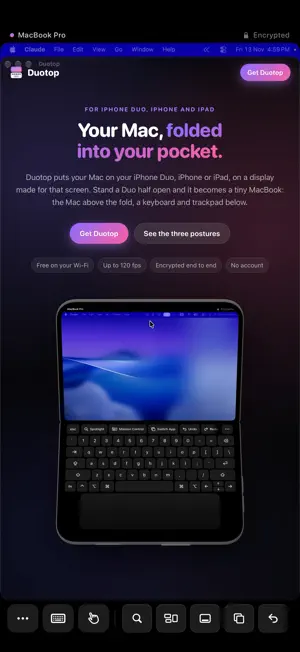

About DuoTop
DuoTop puts your Mac on your iPhone Duo, iPhone or iPad, on a display made to fit that screen instead of a shrunk copy of your Mac's own. MADE FOR THE FOLD • Half open: your Duo becomes a tiny MacBook. The Mac sits above the fold; a Mac keyboard, app shortcuts and a trackpad sit below it. • Closed: the Mac fills the outer display, with controls beside the camera. • Fully open: the whole inner display is your Mac, or two Mac displays side by side. • Turn the device and the Mac reshapes to match. FAST AND SHARP • Retina-sharp text, up to 120 frames a second with Pro. • Your Mac's sound plays on your device. CONTROL THAT FEELS RIGHT • Tap to click, slide to move, two fingers to scroll. • Slide to the bottom edge to bring up the Dock. • Shortcut keys that change with the Mac app in front. • Type with the iOS keyboard or a hardware keyboard, with Command, Option, Control and Shift. • A full Mac keyboard on the lower half of an open Duo, with key clicks you can hear and feel. PRIVATE BY DESIGN • No account. Pair once with a six-digit code. • Everything is encrypted end to end between your device and your Mac. On your own Wi-Fi they talk directly. Away from it, the DuoTop relay only passes the encrypted stream along and cannot see your screen. WATCH YOUR AGENTS • Let an AI agent (any MCP client) use your Mac while you watch from your device. Touch the screen to pause it. NEW IN 1.6 • The control bar rests in the side of the screen as a drop and comes out under your finger, so your Mac gets the whole display. • Two Mac displays on an open Duo, one on each half. • Unlock your Mac with Face ID or Touch ID. Your Mac's apps in a row. Any of your Mac's own screens. • A Touch Bar you set up, with brightness and volume you slide without lifting, and ways to finish the word you are typing. • Gestures you choose, a game controller on screen, and pairing by pointing the camera at your Mac. • Files and pictures travel both ways. A curtain over your Mac's own screen. Open My Mac from a widget, Control Center, Siri and Shortcuts. FREE • One Mac on the same Wi-Fi, 60 frames a second, every layout, no time limit, no ads. DUOTOP PRO • Up to 120 frames a second. • Open your Mac from anywhere, on Wi-Fi or mobile data, with no setup. • Pair all your Macs. Pro is a monthly or yearly subscription (the yearly plan starts with 7 days free), or a one-time lifetime purchase. Subscriptions renew automatically until you cancel in your App Store account settings, at least 24 hours before the period ends. DuoTop needs the free DuoTop app for Mac (macOS 26 or later), from duotop.app/mac. Terms of Use: https://duotop.app/terms Privacy Policy: https://duotop.app/privacy
What’s new
Version 2.1 · Updated November 28, 2026
Much faster in mainland China and East Asia, and help is now one tap away. • Faster in China: Duotop now also connects through a new relay in Hong Kong and uses whichever answers first. From inside China, the connection to your Mac from away is about six times quicker, with far fewer dropped packets. Your Mac updates itself to match. • Settings › Get Help: email support with a report that holds what they need to help, with your network addresses removed. You see the email before it is sent. • Purchases & Subscription: see your plan, change or cancel it, or ask Apple for a refund, without leaving the app. • Your Support ID in Settings lets support find your purchase quickly. • Duotop for Mac 2.1 adds Test Connection…, which checks the way to your Mac from anywhere and says what to fix.
App privacy
The developer, Talal Khorbotly, reported these privacy practices to Apple.
Data Not Linked to You
The following data, which may be collected but is not linked to your identity, may be used for the following purposes:
- Purchases: Purchase History
Used for: Analytics, App Functionality
Alternatives to DuoTop
Looking for apps like DuoTop? Here are 6 similar apps on the App Store. The highest rated is Ferry Remote Desktop (4.8/5), and 5 of the 6 are free to download.
-
 Ferry Remote Desktop
4.8
-
 DuoMiniMac
-
 Tomaco: Remote Desktop
4.2
-
 Headroom: Remote Desktop
4.3
-
 DuoKey
-
 Glassy Desk: Remote Desktop
3.0
| App | Rating | Price | Last updated | Compare |
|---|---|---|---|---|
| DuoTop | – | Free | November 28, 2026 | |
| Ferry Remote Desktop | 4.8 / 5 (33) | Free | Nov 25, 2026 | Compare |
| DuoMiniMac | – | 4.99 USD | Nov 24, 2026 | Compare |
| Tomaco: Remote Desktop | 4.2 / 5 (5) | Free | Nov 24, 2026 | Compare |
| Headroom: Remote Desktop | 4.3 / 5 (3) | Free | Nov 27, 2026 | Compare |
| DuoKey | – | Free | Nov 24, 2026 | Compare |
| Glassy Desk: Remote Desktop | 3.0 / 5 (2) | Free | Nov 11, 2026 | Compare |
Compare DuoTop with the top alternatives: ratings, updates, ASO score and keyword gaps →