

Tomaco: Remote Desktop
磊 崔 Utilities iPhoneiPadiPod touch
Tomaco: Remote Desktop is a free Utilities app for iPhone and iPad by 磊 崔. Rated 5.0/5 from 4 ratings. Requires iOS 16.0. Updated October 19, 2026.
- Rating
- 5.0
- 4 ratings
- Price
- Free
- on the App Store
- Size
- 3 MB
- Age 4+
- Updated
- Oct 19
- 2026 · v2.0.1
Screenshots



About Tomaco: Remote Desktop
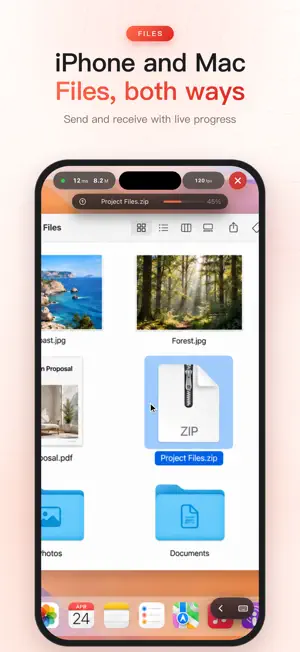
Tomaco does one thing: turn your iPhone or iPad into the best remote control for your Mac. Built exclusively for the Apple ecosystem — and because of that focus, every millisecond of latency and every frame of quality gets the attention it deserves. WHY TOMACO ■ Best-in-class picture A straight HEVC hardware encode/decode pipeline with up to 5K resolution and 120Hz ProMotion. Code and documents stay razor sharp. When the screen goes still, Tomaco automatically refines the frame to full clarity. ■ It feels right The pointer is rendered locally — it follows your finger instantly, fully decoupled from network latency. Two-finger scrolling has real inertia and rubber-banding. The cursor changes shape with content (I-beam over text, hand over links), just like a real trackpad. ■ Sound, zero setup Your Mac's system audio plays right on your iPhone/iPad. No virtual audio driver, no kernel extension, no reboot — connect and it just works. ■ Private by design Peer-to-peer on your local network: your screen and input never touch a third-party server. Secure Enclave hardware device keys, manual approval on first pairing, end-to-end encryption. ■ Remote made simple Away from home? Pair Tomaco with the free Tailscale app to reach your Mac securely from anywhere — a full guide is built in. Wake-on-LAN wakes a sleeping Mac remotely. FEATURES • Virtual Display: use a headless Mac with a dedicated 5K/120Hz screen (Pro) • Two-way clipboard sync and multi-file transfer • Smart shortcut bar that adapts to the frontmost Mac app (Pro) • Modifier keys bar: ⌘⌥⌃⇧ combos, Esc/Tab/arrows • Multi-display switching, auto-reconnect, adaptive quality on weak networks • Siri & Shortcuts: "Connect my Mac" • Trackpad mode (relative) and Touch mode (tap where you look) FREE & ONE-TIME PURCHASE The free tier is fully usable: no time limits, no ads. Tomaco Pro is a one-time purchase that unlocks 5K, 120Hz, the smart shortcut bar, Virtual Display and multiple Macs. No subscription. Ever. WHAT YOU NEED • A Mac (Apple Silicon or Intel, macOS 14+) running the free, notarized Tomaco Helper (download from our site) • iPhone/iPad on the same Wi-Fi, or a Tailscale connection for remote access
What’s new
Version 2.0.1 · Updated October 19, 2026
Fixed an issue that prevented Chinese text input with Apple's built-in Simplified and Traditional Chinese Pinyin keyboards. Thanks to redt for reporting this issue.
App privacy
The developer, 磊 崔, reported these privacy practices to Apple.
Data Not Collected
The developer does not collect any data from this app.
Alternatives to Tomaco: Remote Desktop
Looking for apps like Tomaco: Remote Desktop? Here are 6 similar apps on the App Store. The highest rated is Remote Pane (5.0/5), and all 6 are free to download.
-
 Remote Pane
5.0
Remote Pane
5.0
-
 Remio - Remote Desktop
4.6
Remio - Remote Desktop
4.6
-
 Conduit: SSH, RDP, VNC & Web
1.0
Conduit: SSH, RDP, VNC & Web
1.0
-
 Scry: Remote Desktop
5.0
Scry: Remote Desktop
5.0
-
 QuickRemote - Desktop Manager
1.0
QuickRemote - Desktop Manager
1.0
-
 Mirage – Remote Display
3.8
Mirage – Remote Display
3.8
| App | Rating | Price | Last updated | Compare |
|---|---|---|---|---|
| Tomaco: Remote Desktop | 5.0 / 5 (4 ratings) | Free | October 19, 2026 | |
| Remote Pane | 5.0 / 5 (1) | Free | Oct 6, 2026 | Compare |
| Remio - Remote Desktop | 4.6 / 5 (9) | Free | Oct 24, 2026 | Compare |
| Conduit: SSH, RDP, VNC & Web | 1.0 / 5 (1) | Free | Oct 23, 2026 | Compare |
| Scry: Remote Desktop | 5.0 / 5 (3) | Free | Oct 24, 2026 | Compare |
| QuickRemote - Desktop Manager | 1.0 / 5 (1) | Free | Aug 28, 2026 | Compare |
| Mirage – Remote Display | 3.8 / 5 (8) | Free | Sep 20, 2026 | Compare |