

Remio - Remote Desktop
Long Ngo Huynh Utilities iPhoneiPadiPod touchMac
Remio - Remote Desktop is a free Utilities app for iPhone and iPad by Long Ngo Huynh. Rated 4.7/5 from 12 ratings. Requires iOS 18.0.
- Rating
- 4.7
- 12 ratings
- Price
- Free
- on the App Store
- Size
- 62 MB
- Age 4+
- Updated
- Oct 24
- 2026 · v3.4.0
Screenshots

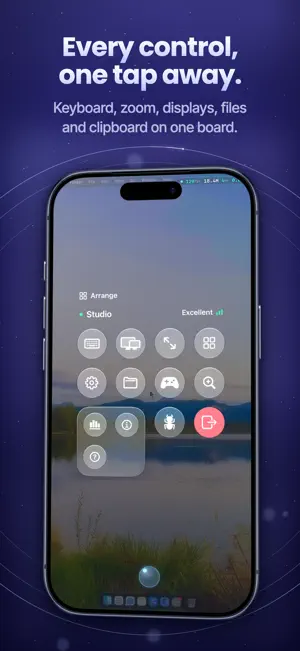


About Remio - Remote Desktop
The free remote desktop for iPhone and iPad — sized to your screen, up to 6K at 120 FPS. Remio is a free, 100% native remote desktop. Reach your Mac, Windows PC or Linux machine and it feels like you're sitting at it — every touch lands right away and text stays crisp. ▸ FREE TO USE Remio and Remio Host are free to use, at home or at work. No time limit, no ads, no commercial-use detection, no card to enter. ▸ CONNECT IN SECONDS Scan a QR or type a six-digit code. No account, no router config, no IT department. Install the free Remio Host on your computer, open Remio, and you're in. ▸ FEELS LIKE YOUR MACHINE • The remote desktop reshapes itself to your window — live, pixel-perfect, like it's your machine. Rotate your iPhone or iPad and it follows. • One perfect screen — a dedicated virtual display sized exactly to your device, not a squeezed copy of the host's monitor • Up to 6K at 120 FPS with hardware H.265, end to end • About 8 ms of processing latency on your local network — the rest is your display's own refresh • HDR from a Mac with Apple silicon — on an iPhone or iPad with an HDR screen, your desktop shows the brightness and color it really has • Close the MacBook lid. Keep working. No dummy HDMI dongle — ever. ▸ TOUCH THAT MAKES SENSE • Trackpad mode turns your screen into a precision trackpad. Direct Touch lets you tap exactly where you see it. • Tap to click, two-finger tap to right-click, scroll, pinch to zoom, press and hold to drag • Three-finger swipes move between desktops and open Mission Control. Put any shortcut on a three- or four-finger tap. • The on-screen keyboard never covers what you're typing, and it opens the moment you tap a text field on your computer • Keyboard shortcuts carry through — with a real Windows key for Windows and Linux computers • Point, tap and scroll with Apple Pencil. Bring a keyboard or trackpad to your iPad and it just works. • Play with your controller — buttons map to your games ▸ A SECOND SCREEN FOR YOUR COMPUTER Make your iPhone or iPad an extra display for your Mac, Windows PC or Linux computer and move windows over to it. It extends your desktop instead of copying it, your computer's own screens stay on, and it works at home or away, straight between your devices — never through a relay or Remio's servers. Needs Remio Host 3.2.2 on a Mac or a Windows PC, or Remio Host 3.2 on Linux (GNOME or X11); away from your own network, the latest Remio Host. ▸ BUILT FOR IPHONE DUO Fold it halfway and it's a mini laptop — your computer on top, the keyboard below the hinge. Open it flat for the whole desktop. The session carries on as you open, close and fold. ▸ EVERYTHING WITHIN REACH Tap the Remio button and every control sits on one board — keyboard, zoom, volume, files, apps, displays and settings. Drag anything to where your thumb lives; Remio remembers the layout. • Hear your computer's audio right on your device — in sync with the screen • Copy on one device, paste on the other — text with any computer, pictures too with a Mac • Send files straight to your computer • Type your clipboard into sign-in screens and apps that block paste • Pick which of your computer's screens to view • Blank your computer's screen while you work, or lock it from here • Picture in Picture keeps your computer in view while you use other apps • Your session stays on the Lock Screen and in the Dynamic Island while you're elsewhere ▸ PRIVATE BY DESIGN Video, audio, input, clipboard and files are encrypted end to end — even the relay only sees ciphertext. Direct peer-to-peer by default; encrypted relay only when your network demands it. No ads, no data brokers — your screen content is never logged or inspected. ▸ WORKS WITH YOUR COMPUTERS Remio Host — free at remio.net — runs on macOS, Windows and Linux. Remio also runs on Mac, Windows PCs, Apple TV and Apple Vision Pro. Terms of Use: https://remio.net/terms Privacy Policy: https://remio.net/privacy
Ratings & reviews
4.7
12 ratings
What’s new
Version 3.4.0 · Updated October 24, 2026
New • Pair a computer with one tap: a Mac running Remio Host on the same Wi‑Fi shows up on the Pair screen. Tap it, check that the Mac shows the same code, and you're in — no QR code, nothing to type. • Game mode: one switch on the Control Board sets up a session for playing, with the highest frame rate your screen shows. Remio remembers it for each computer. • Buttons of your own on the Control Board: a press, a double press or a hold plays key combinations, typed text and short waits. • Check on a Mac without connecting: a paired Mac's page shows its processor, memory, battery, disks and the apps running on it, live. End an app that's stuck. • Lock Remio: Remio asks for Face ID, Touch ID or your passcode before anyone can reach your computers. • Zoom in with a map: past 1.5×, a small map shows where you are on the computer's screen, and the computer sends just the part you're looking at. • Take a screenshot of your computer's screen, or watch it with View only. • Plug your iPhone or iPad into your Mac with a USB cable for a session with less delay. • Also from the 3.3 updates: connect with Siri, Spotlight and Shortcuts, Text on screen, switching screens, Open in New Window on iPad, and a second display away from your home network. Improvements • Each computer keeps its own settings: control style, pointer speed, frame rate and sound. • Type a computer's password at its lock screen, saved behind Face ID, Touch ID or your passcode. • Remove a computer and make it forget this device too. • A computer's card tells you what's in the way before you connect, such as screen sharing being off. • Sharper text on colored backgrounds with 4:4:4 color. • Touch and typing feel quicker on ProMotion screens, and a tap in Direct Touch clicks a third of a second sooner. • Steadier on mobile data and after a hiccup; the picture rests while Remio is in the background. • Keyboard shortcuts for each computer. Bug fixes • Sound no longer lags behind the picture. • A two-finger scroll no longer stops halfway. • Coming back to Remio no longer asks to allow paste every time. • Opening a computer right after leaving another no longer freezes Remio. Some features need the latest Remio Host on your computer.
App privacy
The developer, Long Ngo Huynh, reported these privacy practices to Apple.
Data Linked to You
The following data, which may be collected and linked to your identity, may be used for the following purposes:
- Identifiers: User ID
- Contact Info: Email Address, Name
Used for: Analytics, App Functionality
Data Not Linked to You
The following data, which may be collected but is not linked to your identity, may be used for the following purposes:
- Identifiers: Device ID
- Usage Data: Product Interaction
- Diagnostics: Performance Data, Crash Data
Used for: Analytics, App Functionality
Alternatives to Remio - Remote Desktop
Looking for apps like Remio - Remote Desktop? Here are 6 similar apps on the App Store. The highest rated is Tomaco: Remote Desktop (5.0/5), and all 6 are free to download.
-
 Tomaco: Remote Desktop
5.0
-
 QuickRemote - Desktop Manager
1.0
-
 Mirage – Remote Display
3.8
-
 Conduit: SSH, RDP, VNC & Web
1.0
-
 Glassy Desk: Remote Desktop
5.0
-
 Scry: Remote Desktop
5.0
| App | Rating | Price | Last updated | Compare |
|---|---|---|---|---|
| Remio - Remote Desktop | 4.7 / 5 (12 ratings) | Free | October 24, 2026 | |
| Tomaco: Remote Desktop | 5.0 / 5 (4) | Free | Oct 19, 2026 | Compare |
| QuickRemote - Desktop Manager | 1.0 / 5 (1) | Free | Aug 28, 2026 | Compare |
| Mirage – Remote Display | 3.8 / 5 (8) | Free | Sep 20, 2026 | Compare |
| Conduit: SSH, RDP, VNC & Web | 1.0 / 5 (1) | Free | Oct 23, 2026 | Compare |
| Glassy Desk: Remote Desktop | 5.0 / 5 (1) | Free | Oct 24, 2026 | Compare |
| Scry: Remote Desktop | 5.0 / 5 (3) | Free | Oct 24, 2026 | Compare |