

Farroom: Remote Desktop
Daniel Rentz Utilities iPhoneiPadiPod touchMac
Farroom: Remote Desktop is a free Utilities app for iPhone and iPad by Daniel Rentz. Requires iOS 18.0. Updated October 22, 2026.
- Price
- Free
- on the App Store
- Size
- 36 MB
- Age 17+
- Updated
- Oct 22
- 2026 · v1.2
Screenshots



About Farroom: Remote Desktop
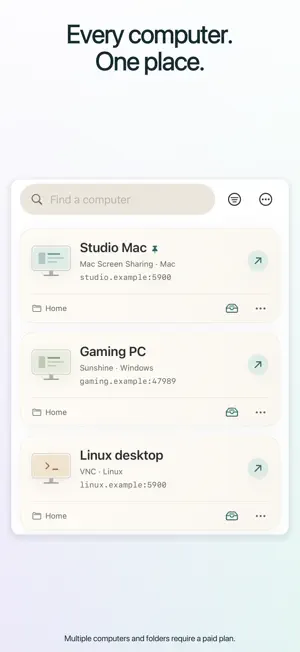
Your computers and PC games, on iPhone and iPad. Use touch controls on iPhone or a spacious workspace with keyboard and pointer support on iPad. On iPhone Duo with iOS 27.1, unfold for a larger desktop or partially fold for a desktop above a trackpad or keyboard. FOUR WAYS TO CONNECT • Mac Screen Sharing: Apple High Performance streaming on compatible Apple-silicon Macs, with physical or virtual desktops and host-supported computer audio. Choose all physical displays or an individual monitor. • RDP: connect to supported Windows and Linux desktops, with text and image clipboard sharing and host-supported audio. Transfer files and folders with Pro when the server supports clipboard file redirection. • VNC: connect to compatible Mac, Windows and Linux servers. Adjust image quality and compression on supporting servers and choose a monitor when the server supplies its layout. • Sunshine: stream a desktop or configured app from a separately installed Sunshine host. Use a compatible controller or the on-screen gamepad. Choose HEVC or H.264 and adjust stream size, frame rate, bitrate and stereo audio quality. Optional HDR needs a compatible host, decoder and display. CONTROLS THAT FIT Click, drag, scroll and type. Use touch gestures, an extra-key strip, standard shortcuts, and supported keyboards and pointing devices. Fit the desktop or zoom in. Desktop previews, Compact view and quick-access widgets help you find your computers. Built-in setup and gesture guides help you get connected. START FREE One saved computer, every connection type, full connection settings, supported audio and text clipboard, RDP image sharing, Sunshine HDR and game controllers, standard shortcuts, desktop previews and backup export. No ads, session timers or artificial quality limits. MORE ROOM WITH PRO Unlimited saved computers, folders, notes, reusable text, custom and pinned shortcuts, control presets, saved workspaces, desktop captures, screen-text recognition, RDP file and folder transfers, and connection-library import. Choose what to sync through iCloud, automatically or manually, with a Wi-Fi/Ethernet-only option. Open up to eight session windows on iPad or Mac. Customize the Duo control strip. Monthly, yearly and lifetime plans include the same Pro features across iPhone, iPad and Mac using the same Apple Account. Existing lifetime owners keep access. Restore Purchases is on the Pro page. YOUR CONNECTION, YOUR SETUP No Farroom account, relay or Farroom helper app. Your computer needs a supported remote-access server and a reachable address. Away from home, you can use a separately installed private-network app such as Tailscale. Farroom does not provide a VPN. KNOW YOUR CONNECTION Quality, frame rate, HDR, sound and available controls depend on the host, network and viewing device. Sunshine display selection is managed on the host; it has no clipboard or file transfer. Controller rumble depends on controller and host support. Unicode text input depends on the host; a US keyboard compatibility mode is available. VNC has no audio and supports Latin-1 text clipboard only. RDP images and files need host clipboard support; Windows Home cannot host built-in RDP. Linux support depends on its desktop and server. Microphone forwarding and session recording are unavailable. Mobile systems may suspend background sessions. Saved passwords stay in device Keychain. Optional iCloud setup sync excludes passwords, certificate approvals, desktop images, audio and clipboard contents. SUBSCRIPTIONS Monthly and yearly Pro renew automatically unless canceled. Eligible yearly subscribers receive a 14-day free trial. Local prices and eligibility appear before purchase. Manage or cancel through Apple Account subscriptions. Expiry returns to Free without deleting saved data. Lifetime does not renew. Privacy: https://farroom.danielren.tz/privacy/ Terms: https://www.apple.com/legal/internet-services/itunes/dev/stdeula/
What’s new
Version 1.2 · Updated October 22, 2026
Farroom has a fresh look, more ways to work, and improvements across your remote sessions. WHAT’S NEW • A redesigned computer library with desktop previews, a new Compact view, and simpler search, filtering, and folder controls. • Expanded iPhone Duo support with layouts that adapt as you fold, unfold, and rotate—including a trackpad or keyboard below your desktop. • RDP image clipboard sharing and file and folder transfers, with progress tracking and file conflict handling. • More iCloud sync options: choose automatic or manual syncing and what to sync across your devices. • An expanded Toolkit with saved text, shortcuts, control presets, session notes, screen-text recognition, and saved workspaces. • HDR streaming through Sunshine on compatible hosts and displays, plus on-screen gamepad controls. • Support for up to eight session windows on iPad with Pro. IMPROVEMENTS & FIXES • Refreshed light and dark appearances, clearer Free and Pro comparisons, and improved setup guides. • Improved Sunshine reconnection after closing Farroom with a session running. • Fixed sidebar navigation issues on iPhone in landscape. • Fixed animated artwork disappearing after reopening a screen and reduced scrolling stutter. • Improved Advanced settings, computer card sizing, and alignment throughout the app. • Improved VNC decoding robustness and compatibility with larger desktop updates. • Fixed touch-control preset compatibility. • Improved iCloud sync recovery, clipboard handling, and keyboard behavior. Some features require Farroom Pro and compatible hardware or host software. Clipboard and file transfers are not supported over Sunshine.
App privacy
The developer, Daniel Rentz, reported these privacy practices to Apple.
Data Not Collected
The developer does not collect any data from this app.
Alternatives to Farroom: Remote Desktop
Looking for apps like Farroom: Remote Desktop? Here are 6 similar apps on the App Store. The highest rated is Glassy Desk: Remote Desktop (5.0/5), and all 6 are free to download.
-
 RemoteX: Remote Desktop
-
 Glassy Desk: Remote Desktop
5.0
Glassy Desk: Remote Desktop
5.0
-
 XConnect - SSH & RDP Client
-
 Desktop Mirroring
-
 Remote Mac Desktop Control
5.0
Remote Mac Desktop Control
5.0
-
 Scan4D
| App | Rating | Price | Last updated | Compare |
|---|---|---|---|---|
| Farroom: Remote Desktop | – | Free | October 22, 2026 | |
| RemoteX: Remote Desktop | – | Free | Sep 22, 2026 | Compare |
| Glassy Desk: Remote Desktop | 5.0 / 5 (1) | Free | Oct 24, 2026 | Compare |
| XConnect - SSH & RDP Client | – | Free | Sep 24, 2026 | Compare |
| Desktop Mirroring | – | Free | Sep 27, 2026 | Compare |
| Remote Mac Desktop Control | 5.0 / 5 (1) | Free | Aug 17, 2026 | Compare |
| Scan4D | – | Free | May 4, 2026 | Compare |