

SidePane: Second Monitor
Yuen Mun Chan Productivity iPhoneiPadiPod touch
SidePane: Second Monitor is a free Productivity app for iPhone and iPad by Yuen Mun Chan. Requires iOS 18.0. Updated November 25, 2026.
- Price
- Free
- on the App Store
- Size
- 3 MB
- Age 4+
- Updated
- Nov 25
- 2026 · v1.0.3
Screenshots
Save to Pinterest

About SidePane: Second Monitor
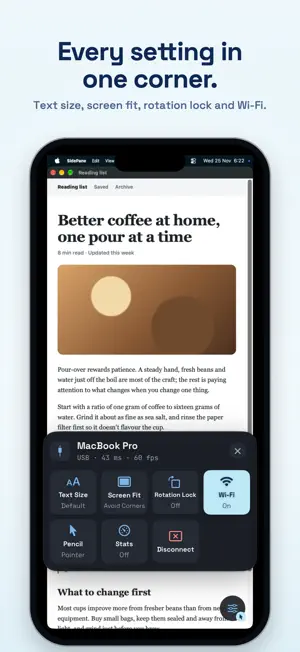
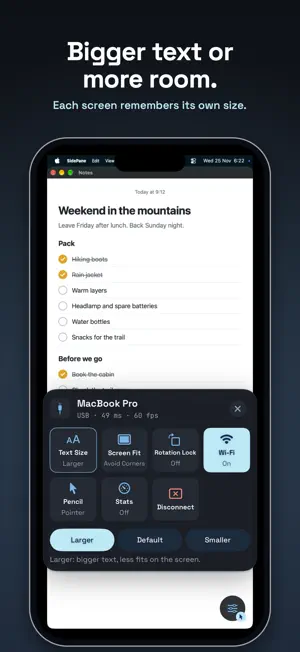
SidePane gives your Mac an extra screen on your iPhone. Drag any window onto it, then tap, scroll and draw on it, over the USB cable or Wi-Fi. It's a real extended display, not a mirror: your Mac sees a new monitor you can arrange like any other. WHAT YOU NEED • The free SidePane app for Mac, from getsidepane.com (Apple silicon, macOS 15 or later). Download it on your Mac. • An iPhone with iOS 18 or later, and a USB cable or the same Wi-Fi. BUILT FOR IPHONE DUO • Use the big inner screen or the cover screen. The Mac display follows the screen you're using and resizes when you fold or turn the phone. • Each screen remembers its own text size, and the picture keeps clear of the rounded corners. • Works on every iPhone running iOS 18 or later. USB OR WI-FI • Plug in for the lowest delay and up to 120 frames a second. • Or use the same Wi-Fi, at up to 60 frames a second. • Unplug and SidePane carries on over Wi-Fi; plug back in and it moves to the cable. • USB keeps working with Chrome or Brave open. TOUCH AND APPLE PENCIL • Tap to click, double-tap to double-click, drag with two fingers to scroll, touch and hold to right-click. • Apple Pencil: hover to point and touch to click, draw in Ink, or write by hand in Write and have it typed on your Mac. • Your palm is ignored while the Pencil is in use. MADE TO STAY OUT OF THE WAY • One small button in a corner opens the controls: Text Size, Screen Fit, Rotation Lock, Wi-Fi, Pencil and Disconnect. • Pair once by plugging in, or with a QR code. Only your iPhones can connect. • Turn off Use Wi-Fi on public networks to use the cable only. FREE TO TRY • Sessions last 15 minutes, as many as you like. • Unlock once for no time limit: one payment, no subscription, Family Sharing included. No account, no ads, no data collected.
What’s new
Version 1.0.3 · Updated November 25, 2026
A small housekeeping update. SidePane works the same as before.
App privacy
The developer, Yuen Mun Chan, reported these privacy practices to Apple.
Data Not Collected
The developer does not collect any data from this app.
Alternatives to SidePane: Second Monitor
Looking for apps like SidePane: Second Monitor? Here are 6 similar apps on the App Store. The highest rated is Panevue (5.0/5), and all 6 are free to download.


| App | Rating | Price | Last updated | Compare |
|---|---|---|---|---|
| SidePane: Second Monitor | – | Free | November 25, 2026 | |
| Panevue | 5.0 / 5 (1) | Free | Nov 16, 2026 | Compare |
| Spanscreen: Second Display | – | Free | Oct 31, 2026 | Compare |
| Desktap | – | Free | May 13, 2026 | Compare |
| Better Island | – | Free | Apr 20, 2026 | Compare |
| Second Monitor: ScreenDeck | – | Free | Nov 21, 2026 | Compare |
| Sasayaki | – | Free | Apr 11, 2026 | Compare |