

Sasayaki
kazami oda Productivity iPhoneiPadiPod touch
Sasayaki is a free Productivity app for iPhone and iPad by kazami oda. Requires iOS 15.0. Updated April 11, 2026.
- Price
- Free
- on the App Store
- Size
- 56 MB
- Age 4+
- Updated
- Apr 11
- 2026 · v1.3.0
Screenshots

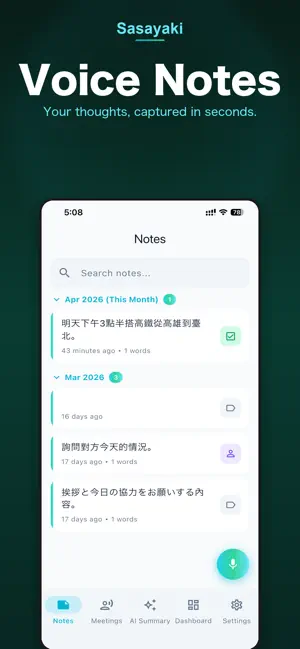
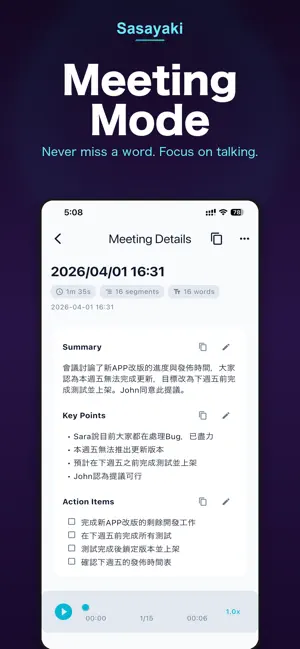

About Sasayaki
Sasayaki turns your voice into polished text — right where you are typing. Set up Sasayaki as a keyboard on your iPhone or iPad, switch to it in any app, and tap the mic button to start speaking. Your speech is transcribed, refined by AI, and inserted directly into the text field. No copy-pasting, no switching apps. How It Works 1. Enable Sasayaki as a keyboard in Settings 2. Switch to the Sasayaki keyboard in any app 3. Tap the mic button and speak 4. Refined text is inserted instantly Key Features - Voice Keyboard — Use voice input in any app: messaging, email, notes, social media, and more - 100+ Languages — Fast, highly accurate speech recognition powered by advanced AI technology - AI Text Refinement — Automatically removes filler words, fixes grammar, and formats your speech into clean text - Custom Refine Templates — Choose from preset templates (Email, Meeting Minutes, Bullet Points, etc.) or create your own. Switch templates directly from the keyboard. - Speed & Accuracy Modes — Choose between faster transcription or higher precision - Real-time Translation — Translate your voice or selected text into 19 languages AI Summary & Meeting Notes - Upload audio or video files for AI-powered summaries - Record meetings and get structured notes with key points and action items - Share summaries and meeting notes via secure links with optional password protection Text Processing in Any App - Select text in any app, tap Share, and choose Sasayaki to refine or translate instantly - Works with any text in Safari, Messages, Notes, and every other app Search & Organization - Unified search across all notes, summaries, and meeting records - Notes with categories and full-text search - Dashboard & stats — track transcription count, duration, and time saved Listen — Text to Speech Paste any text and generate natural-sounding audio with AI voices. Choose from 19 languages and multiple voice options per language. Listen while commuting, exercising, or doing chores. Features: • Background playback with lock screen controls • Karaoke-style subtitle video generation • Cloud-synced playlists to organize your audio • Voice settings — preview and choose your preferred voice • Share audio files or karaoke videos to any app Cross-Platform Sasayaki is also available on macOS, Windows, and the web. Sign in to sync your usage across all platforms. Privacy First — Voice data is processed securely with no cloud retention. Never stored or used for AI training. Pricing - Free: 4,000 words per week with basic refinement - Pro: Unlimited transcriptions with advanced AI refinement Terms of Use: https://sasayaki.cc/en/legal/terms Privacy Policy: https://sasayaki.cc/en/legal/privacy
What’s new
Version 1.3.0 · Updated April 11, 2026
AI Summary Improvements - Translate summaries to 19 languages with one tap - AI auto-generates descriptive titles for each summary - Editable titles — tap to rename - Per-section copy buttons for quick sharing - Usage policy disclaimer for media uploads Quality & Stability - Smarter timeout handling with automatic fallback - Fixed file picker for uppercase extensions (.M4A) - Improved CJK language translation chunking - Better error messages when processing fails
App privacy
The developer, kazami oda, reported these privacy practices to Apple.
Data Not Linked to You
The following data, which may be collected but is not linked to your identity, may be used for the following purposes:
- Contact Info: Email Address
- User Content: Customer Support
- Usage Data: Product Interaction
- Diagnostics: Crash Data, Performance Data, Other Diagnostic Data
- Identifiers: User ID, Device ID
Used for: Analytics, App Functionality
Alternatives to Sasayaki
Looking for apps like Sasayaki? Here are 6 similar apps on the App Store. The highest rated is Summrize: AI Video Summarizer (1.0/5), and all 6 are free to download.
-
 Transcribee: AI Voice to Text
-
 MyVoice Clone AI Multilingual
-
 Summrize: AI Video Summarizer
1.0
-
 Saves Library: Posts & Links
-
 KeepNest: Screenshot Organizer
-
 Save2Notion
| App | Rating | Price | Last updated | Compare |
|---|---|---|---|---|
| Sasayaki | – | Free | April 11, 2026 | |
| Transcribee: AI Voice to Text | – | Free | Mar 28, 2026 | Compare |
| MyVoice Clone AI Multilingual | – | Free | May 3, 2026 | Compare |
| Summrize: AI Video Summarizer | 1.0 / 5 (1) | Free | Oct 20, 2026 | Compare |
| Saves Library: Posts & Links | – | Free | Oct 30, 2026 | Compare |
| KeepNest: Screenshot Organizer | – | Free | Nov 2, 2026 | Compare |
| Save2Notion | – | Free | Aug 14, 2026 | Compare |
Compare Sasayaki with the top alternatives: ratings, updates, ASO score and keyword gaps →