

KeepNest: Screenshot Organizer
Fu Chung Lo Productivity iPhoneiPadiPod touch
KeepNest: Screenshot Organizer is a free Productivity app for iPhone and iPad by Fu Chung Lo. Requires iOS 15.0. Updated October 24, 2026.
- Price
- Free
- on the App Store
- Size
- 41 MB
- Age 4+
- Updated
- Oct 24
- 2026 · v1.0.7
Screenshots


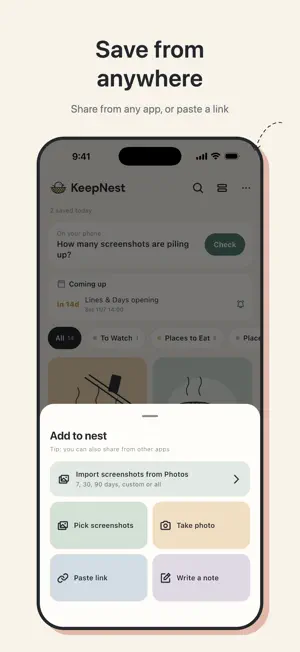

About KeepNest: Screenshot Organizer
Spotted a restaurant you want to try, a show to watch, or a handy AI prompt? Just screenshot it and drop it in. KeepNest turns the screenshots, links and text you save into tidy cards, with the title, category, address, opening hours and dates filled in for you. Scroll through your collection like a social feed, and find anything in seconds when you need it. SAVE FROM ANYWHERE - Tap Share in any app and pick KeepNest: Photos, Safari, Threads, Instagram, YouTube and more - Import screenshots from Photos in one go: the last 7, 30 or 90 days, or all of them - Snap a photo, paste a link, or jot down a note. AI THAT READS YOUR SCREENSHOTS - Adds a title and picks a category for you - Reads the text in your screenshots (OCR) and picks out place names, addresses, phone numbers, opening hours, prices and dates as easy-to-search details - Titles and details come out in your language - Free includes 30 AI sorts a month FORGOT WHERE YOU SAVED IT? JUST SEARCH - Search titles, addresses, tags, and even the text inside your screenshots - With KeepNest AI, ask your collection "Where was that ramen place?" and get an answer from your own cards, with the source DATES IN SCREENSHOTS BECOME REMINDERS - Exhibitions, reservations, appointments, expiring deals: set a reminder and never miss one - Add it to your phone's calendar in one tap, and choose which calendar it goes in SORT A PILE IN MINUTES WITH QUICK SORT - Go through your screenshots one at a time and tap where each one goes - Done sorting? Delete the original screenshots from your phone to free up storage (iOS asks you to confirm first) STAYS ON YOUR PHONE, NO ACCOUNT NEEDED - Your collection is stored on your iPhone, so you can save, browse and search even offline - Private cards lock with Face ID, and are never sent to AI - No ads, no tracking, no selling your data - Export a backup file anytime, or with KeepNest Plus, back up automatically to iCloud Drive or Google Drive PLANS - Free: unlimited saves, Photos import, full-text search, 30 AI sorts a month, 6 custom categories, Quick Sort up to 50 per round - KeepNest Plus (one-time purchase): unlimited categories and Quick Sort, plus auto backup to iCloud Drive or Google Drive. Yours to keep - KeepNest AI (monthly or yearly subscription): 1,000 AI sorts a month and Ask your collection, with everything in Plus Payment is charged to your Apple ID account when you confirm the purchase. Subscriptions renew automatically unless canceled at least 24 hours before the end of the current period, and your account is charged for renewal within the 24 hours before it ends. Manage or cancel anytime in Settings > Apple ID > Subscriptions. If you cancel, all your cards stay. Privacy Policy: https://keepnest.roughzone.tw/privacy Terms of Use: https://keepnest.roughzone.tw/terms
What’s new
Version 1.0.7 · Updated October 24, 2026
KeepNest now speaks English, Japanese and Korean, and AI organizing is faster. - The app follows your iPhone's language - AI writes titles, categories and details in your language - Dates like "Oct 27, 7 PM" in your screenshots can now become reminders - Screenshots and links turn into cards more than twice as fast Thanks for using KeepNest. Questions or ideas? Write to [email protected]
App privacy
The developer, Fu Chung Lo, reported these privacy practices to Apple.
Data Not Linked to You
The following data, which may be collected but is not linked to your identity, may be used for the following purposes:
- Purchases: Purchase History
- User Content: Photos or Videos, Other User Content
- Identifiers: User ID
- Diagnostics: Crash Data
Used for: App Functionality
Alternatives to KeepNest: Screenshot Organizer
Looking for apps like KeepNest: Screenshot Organizer? Here are 6 similar apps on the App Store.
-
 ChronoCast
-
 Stash - Post & Link Saver
-
 BizWave 脈潮
-
 Zephlo: AI Bookmark Organizer
-
 ZTranslation - 網頁 AI 翻譯
-
 LinkSpace: AI Notes & Links
| App | Rating | Price | Last updated | Compare |
|---|---|---|---|---|
| KeepNest: Screenshot Organizer | – | Free | October 24, 2026 | |
| ChronoCast | – | Free | Sep 18, 2026 | Compare |
| Stash - Post & Link Saver | – | Free | Sep 15, 2026 | Compare |
| BizWave 脈潮 | – | Free | Jun 11, 2026 | Compare |
| Zephlo: AI Bookmark Organizer | – | Free | Sep 17, 2026 | Compare |
| ZTranslation - 網頁 AI 翻譯 | – | Free | Sep 26, 2026 | Compare |
| LinkSpace: AI Notes & Links | – | Free | Oct 24, 2026 | Compare |