

NestWork: Daily Planner
Pawlicki Designs LLC Productivity iPhoneiPadiPod touch
NestWork: Daily Planner is a free Productivity app for iPhone and iPad by Pawlicki Designs LLC. Requires iOS 27.0. Updated November 19, 2026.
- Price
- Free
- on the App Store
- Size
- 19 MB
- Age 4+
- Updated
- Nov 19
- 2026 · v1.1
Screenshots


About NestWork: Daily Planner
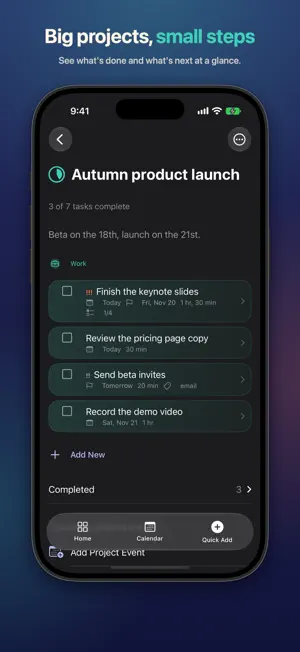
NestWork is one calm place for everything you need to do: work projects, home chores, grocery runs and the habits you're building, woven into a day that fits around your calendar. JUST TYPE IT Write "pay the water bill Friday" or "eggs" and NestWork works out whether it's a task or a list item, where it belongs and when it's due. You see it on a card before it's saved and can change anything with a tap. It remembers where you put things, so next time it's already right. On devices with Apple Intelligence, the on-device model understands looser phrasing; everywhere else, NestWork's own parser does the work. A DAY THAT FITS Connect your calendar and NestWork fits your tasks into the real gaps between events: work during work hours, home and personal around them, with breathing room in between. A short morning plan walks you through the day ahead, and an evening wrap-up moves what's left to tomorrow. Your changes always win. • Today, Upcoming, Anytime and Someday • Calendar by day, week or month; drop a task on a day to schedule it • Weekly Review and a Logbook of everything you've finished WORK, HOME, PERSONAL Areas keep each part of life in its own place, with sub-areas, projects with progress rings, tags, and saved filters you can view as a list or a board. The Show switch narrows everything to Work or Personal, or let your Focus do it for you. LISTS THAT SHOP WITH YOU Grocery lists sort themselves by store section. Take a photo of a handwritten list or a recipe to add the items. NestWork notices what you buy regularly and suggests it when you're due. On iPhone, get a reminder when you arrive at the store. HABITS, NOTES AND FOCUS • Track habits and watch your streaks grow • Daily notes: type, record a voice memo that's transcribed on your device, add a photo, or write by hand on iPad, then search all of it • A focus timer with a Live Activity on your Lock Screen • Reminders at a time, or when you arrive at or leave a place SHARE WITH YOUR HOUSEHOLD Share an area or a list with family through iCloud. Everyone works from the same list, and your private areas stay private. MADE FOR EVERY APPLE DEVICE Native on iPhone, iPad and Mac, with widgets, Control Center controls, Siri and Shortcuts, Spotlight, a share extension, Handoff, keyboard shortcuts, multiple windows and quick add from the Mac menu bar. Full VoiceOver and Dynamic Type support. PRIVATE BY DESIGN No account to create and no server of ours. Your data syncs through your own iCloud, intelligence runs on your device, and there's no tracking or analytics. NESTWORK PLUS NestWork is free with up to 4 areas, 4 shopping lists, 4 open projects and 4 habits, and smart quick add is free for everyone. NestWork Plus removes those limits and lets you start sharing areas and lists. Joining someone else's share is always free. Plus is available as a monthly subscription or a one-time purchase, and nothing you've made is ever taken away. The subscription renews automatically each month unless it's turned off at least 24 hours before the end of the current period. Payment is charged to your Apple Account when you confirm the purchase. Manage or cancel it in your Apple Account settings. Terms of Use: https://www.apple.com/legal/internet-services/itunes/dev/stdeula/ Privacy Policy: https://www.nestwork.life/privacy
What’s new
Version 1.1 · Updated November 19, 2026
In this update we have made a large number of layout and refinement updates. Additionally we added more optimizations and layout tweaks for the iPhone Duo. Thank you for using NestWork!
App privacy
The developer, Pawlicki Designs LLC, reported these privacy practices to Apple.
Data Not Collected
The developer does not collect any data from this app.
Alternatives to NestWork: Daily Planner
Looking for apps like NestWork: Daily Planner? Here are 6 similar apps on the App Store. The highest rated is Jot: Quick Notes & Inbox (5.0/5), and all 6 are free to download.
-
 MLA: Mental Load Assistant
-
 Chapbook: Notes
-
 Jot: Quick Notes & Inbox
5.0
-
 NextUp: Client Meeting Notes
-
 TimeLoop: Day & Weekly Planner
-
 Leeway: Time Blocking Planner
| App | Rating | Price | Last updated | Compare |
|---|---|---|---|---|
| NestWork: Daily Planner | – | Free | November 19, 2026 | |
| MLA: Mental Load Assistant | – | Free | Nov 11, 2026 | Compare |
| Chapbook: Notes | – | Free | Nov 12, 2026 | Compare |
| Jot: Quick Notes & Inbox | 5.0 / 5 (2) | Free | Nov 13, 2026 | Compare |
| NextUp: Client Meeting Notes | – | Free | Nov 20, 2026 | Compare |
| TimeLoop: Day & Weekly Planner | – | Free | Nov 20, 2026 | Compare |
| Leeway: Time Blocking Planner | – | Free | Nov 11, 2026 | Compare |