

Pause Calendar
Hyunok Lee Productivity iPhoneiPadiPod touch
Pause Calendar is a free Productivity app for iPhone and iPad by Hyunok Lee. Requires iOS 18.0. Updated November 19, 2026.
- Price
- Free
- on the App Store
- Size
- 2 MB
- Age 4+
- Updated
- Nov 19
- 2026 · v1.0.2
Screenshots
Save to Pinterest


About Pause Calendar
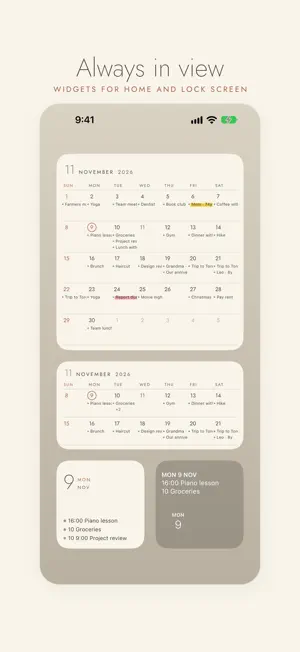
Pause Calendar shows your whole month on one calm screen. No clutter. Just the dates, your events, and room to breathe. It reads the calendars already on your iPhone, like iCloud and Google, so there's nothing new to sign up for. • The full month at a glance. Scroll up and down through the weeks, or swipe to the next month • Event names written right in each day, with a small dot for each calendar's color • Events that last several days show as one strip, in a color you choose • Reminders with a date show on the calendar. Check them off or add new ones • Choose which calendars to show, and their colors • Tap a day to see its events, add a new one, or change and delete them • See exactly which account and calendar a new event goes into • The same birthday saved in several calendars shows only once • Ages on birthdays (76y) and years on anniversaries (10th) • Highlight important events in a color you choose • Weather on the days ahead, with highs and lows (or turn it off) • Widgets for the Home Screen (small, medium, large) and the Lock Screen • Ready for British Columbia's new year-round time (UTC−7). Event times stay right even if your iPhone hasn't caught up yet. Outside BC, it simply follows your iPhone's time zone. • All-day events stay on the right day Your events stay on your iPhone and in your own calendar accounts. Your highlights, colors and settings are also kept in your iCloud. No account, no ads, no tracking.
What’s new
Version 1.0.2 · Updated November 19, 2026
• Save button is now at the top of the event screen. • Tapping outside while picking a time no longer closes the event without saving. • Changing the start time moves the end time with it (new events last one hour by default). • The day view always opens at half height. • If an event can’t be deleted, you’re told instead of it quietly coming back.
App privacy
The developer, Hyunok Lee, reported these privacy practices to Apple.
Data Not Collected
The developer does not collect any data from this app.
Alternatives to Pause Calendar
Looking for apps like Pause Calendar? Here are 6 similar apps on the App Store. The highest rated is noticed AI (5.0/5), and all 6 are free to download.
-
 noticed AI
5.0
-
 tuck: brain dump notes & to-do
-
 Daypages - Calm Calendar
4.7
-
 Quick Note: Sticky Notes Menu
4.4
-
 Grammar Air - Writing Checker
3.0
-
 Weekly Calendar App - Week+
3.6
| App | Rating | Price | Last updated | Compare |
|---|---|---|---|---|
| Pause Calendar | – | Free | November 19, 2026 | |
| noticed AI | 5.0 / 5 (1) | Free | Nov 12, 2026 | Compare |
| tuck: brain dump notes & to-do | – | Free | Nov 23, 2026 | Compare |
| Daypages - Calm Calendar | 4.7 / 5 (10) | Free | Nov 22, 2026 | Compare |
| Quick Note: Sticky Notes Menu | 4.4 / 5 (7) | Free | Nov 17, 2026 | Compare |
| Grammar Air - Writing Checker | 3.0 / 5 (5) | Free | Mar 18, 2026 | Compare |
| Weekly Calendar App - Week+ | 3.6 / 5 (8) | Free | Oct 22, 2026 | Compare |
Compare Pause Calendar with the top alternatives: ratings, updates, ASO score and keyword gaps →