

tuck: brain dump notes & to-do
Rehaan Patel Productivity iPhoneiPadiPod touchMacApple Watch
tuck: brain dump notes & to-do is a free Productivity app for iPhone and iPad by Rehaan Patel. Requires iOS 27.0. Updated November 19, 2026.
- Price
- Free
- on the App Store
- Size
- 36 MB
- Age 4+
- Updated
- Nov 19
- 2026 · v1.5.1
Screenshots
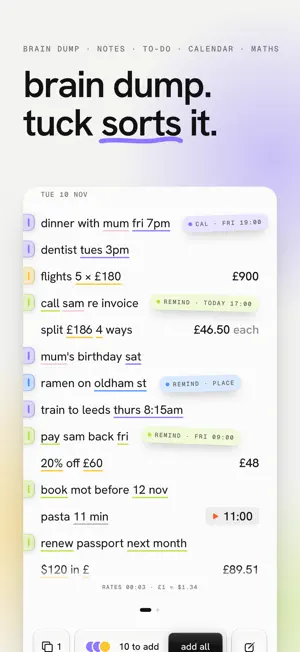


About tuck: brain dump notes & to-do
brain dump everything. tuck sorts it. tuck is a notepad that reads as you write. jot "dentist tues 3pm", "pay sam back fri" or "split $186 4 ways", and tuck underlines what it understood, answers sums on the line, and one tap on add all puts your plans in Calendar and your to-dos in Reminders. nothing is added until you say. ask your notes anything write a question as a line and tuck answers it from what you've written: "how much has the puppy cost?", "when did i last service the furnace?", "what's sam's number?", "who owes me money?". tap an answer to see every line it came from. nothing is made up: sums are tuck's own math, and it all stays on your device. reads how you really write • shorthand and slang: "2moro dinner w jo 7", "call mom at lunchtime", "drinks around 7 fri" • ranges, repeats and alerts: "viewing 2 till 4 sat", "trash out every tues", "dentist tues 3pm, remind me mon" • dates the way you say them: "next fri", "first monday of the month", "christmas eve", "in 20 mins", "3pm est" • and the past stays the past: "met jo last wednesday" notes that do the math • sums, splits, tips and tax on the line: "flights 5 × $180", "tip 18% on $64", "$64 + 8% tax" • currencies at today's rates, units, time zones and dates: "€120 in $", "5'10" in cm", "time in tokyo", "days until christmas" • "$1,800 over 18 months" is $100 a month, and "5k in 24:31" gives your pace who owes who, sorted write "owe jo $10 for taxi" or "lent sam $50" and the running total sits under the line. ask "how much do i owe jo?" and get one balance per person. a to-do list that writes itself • add all sends plans to Calendar and to-dos to Reminders, with 8 seconds to undo • works with the calendars already on your phone, including google and outlook • timers you never have to start: "parking until 4:30pm" rings then, like an alarm, even on silent • lists, habits and math pages: start a page with "shopping", "habits" or "math" paper, screenshots and your voice • scan a school letter, a trash pickup schedule or a poster and watch its dates land in your month • find the plans already sitting in your screenshots: bookings, tickets, flights • hold to talk, and what you say becomes sorted lines • share links, notes, checklists and pdfs into tuck from any app built for iPhone Duo from the start jot on the cover, closed. unfold, and every line is waiting inside, sorted. on any other iPhone or iPad, turn it sideways. apple watch and widgets • say a line on your wrist and your iPhone puts it in Calendar or Reminders. tick your shopping list and today's habits there • the next plan on your watch face, and an ask widget that keeps a question answered on your home screen • a jot widget and control that open straight to the caret • copy a page or your week for ChatGPT or Claude tuck pro scan, pictures and screenshots, hold to talk, as many habits as you like, and asking across your pages. try each one free first. monthly, yearly with a free week, or once for life. yours alone tuck reads everything on your device. no account, no server of ours, no analytics, no ads. your pages sync only through your own iCloud. subscriptions tuck pro is monthly, or yearly with a free week first. payment is taken from your Apple ID when you confirm. it renews automatically unless you cancel at least 24 hours before the end of the period, and you can manage or cancel it in your App Store account settings. tuck pro for life is a one-off purchase. terms of use: https://www.apple.com/legal/internet-services/itunes/dev/stdeula/ privacy policy: https://tucknotes.app/privacy
What’s new
Version 1.5.1 · Updated November 19, 2026
stand your duo up and the timer's time flies off its line into the big numbers, and back again when you lay it flat. two timers running? swipe between them on the face. when one rings, the top half fills with color and the bottom becomes one big stop. easy to hit with floury hands. plus bug fixes and improvements.
App privacy
The developer, Rehaan Patel, reported these privacy practices to Apple.
Data Not Collected
The developer does not collect any data from this app.
Alternatives to tuck: brain dump notes & to-do
Looking for apps like tuck: brain dump notes & to-do? Here are 6 similar apps on the App Store. The highest rated is Casalist: Family Organizer (5.0/5), and all 6 are free to download.
-
 iknowpc
-
 Great Reminders
-
 Casalist: Family Organizer
5.0
-
 Dumpling: Tasks, Notes & AI
-
 HiveMind: Remember & Connect
5.0
-
 beckett: AI notes & planner
5.0
| App | Rating | Price | Last updated | Compare |
|---|---|---|---|---|
| tuck: brain dump notes & to-do | – | Free | November 19, 2026 | |
| iknowpc | – | Free | Nov 13, 2026 | Compare |
| Great Reminders | – | Free | Aug 12, 2026 | Compare |
| Casalist: Family Organizer | 5.0 / 5 (3) | Free | Nov 19, 2026 | Compare |
| Dumpling: Tasks, Notes & AI | – | Free | Nov 11, 2026 | Compare |
| HiveMind: Remember & Connect | 5.0 / 5 (5) | Free | Nov 20, 2026 | Compare |
| beckett: AI notes & planner | 5.0 / 5 (6) | Free | Nov 14, 2026 | Compare |