

Dumpling: Tasks, Notes & AI
By Azur LLC Productivity iPhoneiPadiPod touchApple Watch
Dumpling: Tasks, Notes & AI is a free Productivity app for iPhone and iPad by By Azur LLC. Requires iOS 17.0. Updated November 11, 2026.
- Price
- Free
- on the App Store
- Size
- 61 MB
- Age 12+
- Updated
- Nov 11
- 2026 · v0.37.0
Screenshots


About Dumpling: Tasks, Notes & AI
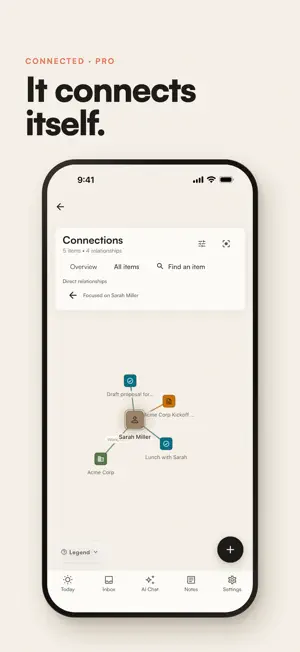
ONE APP INSTEAD OF FIVE. Dumpling holds your tasks, notes, calendar, habits, goals, and contacts in one connected workspace, with an assistant that can act on all of it. Stop copying things between a to-do app, a notes app, and a calendar. In Dumpling everything lives together, and connects itself. Tasks, notes, projects and areas are free, with limits. Anything marked Pro needs a Dumpling Pro subscription. WATCH IT CONNECT ITSELF (PRO) Write "call Sarah about the Q3 launch" and Dumpling links that task to Sarah's contact card and your Q3 launch notes. No tags, no backlinks, no setup. Open any person or project and see everything related to it, even things you never filed. A note from two years ago resurfaces exactly when it becomes relevant again. You never tagged anything. AN ASSISTANT THAT ACTUALLY DOES THINGS (PRO) Ask Dumpling to reschedule your 3pm, draft notes for tomorrow's standup, or plan your week around a launch, and it does it. It remembers your context across conversations, and you choose exactly what it can see. MOVE THROUGH YOUR DAY • Tasks: priorities, due dates, deadlines, subtasks, recurring tasks, and board views. Fast capture, faster completion. • Calendar (Pro): your meetings and time-blocked tasks together on one timeline, with Google Calendar sync. • Habits (Pro): daily routines and streaks, gently kept. No separate habit app. GIVE WORK A SHAPE • Projects and Areas: organise by outcome and responsibility, list or board. • Goals (Pro): big targets with progress that updates itself as you work. • Statistics: see where your time and focus actually go, week over week. The full breakdown is Pro. KEEP THE CONTEXT CLOSE • Notes: a rich editor with daily notes, a scratch pad, and version history. Notes link themselves to the projects they mention. • People and Organizations (Pro): a lightweight CRM woven into your work. • Connections (Pro): explore how everything you've written connects. CAPTURE FROM ANYWHERE Home Screen and Lock Screen widgets, Siri shortcuts, Apple Watch, and instant quick capture. Get it out of your head before it's gone. EVERYWHERE YOU WORK iPhone, iPad and Mac, each a native app. Start a thought on your phone, finish it at your desk. PRIVATE BY DESIGN Your data is yours. It is never sold and never used to train AI models. It is shared with our AI providers only after you turn the assistant on, and you choose which kinds of data it can see. Export everything, anytime. Delete your account, and all its data, from inside the app. BUILT TO LIVE IN Dumpling feels like a well-bound paper planner that happens to be alive: warm surfaces, editorial type, animation that keeps up with you. Dumpling is what you get if you combine the best task manager, the best notes app, and a personal chief of staff, with nothing to configure before it is useful. DUMPLING PRO Dumpling is free to use, with limits on tasks, notes, projects and areas. Dumpling Pro removes those limits and adds the assistant (with a monthly allowance), Calendar, Habits, Goals, People and Organizations, Connections, Looking Back and full Statistics. It is a monthly or annual subscription, charged to your Apple Account, that renews automatically unless you cancel at least 24 hours before the end of the current period. One subscription unlocks Pro on every device you sign in on. Terms of Use: https://www.apple.com/legal/internet-services/itunes/dev/stdeula/ Privacy Policy: https://getdumpling.app/privacy.html
What’s new
Version 0.37.0 · Updated November 11, 2026
Today fits more on your phone, and the Overdue heading has Move to today, which moves every overdue task with one undo. Saved filters work on every device. Create, edit and delete them on your phone, and drag them into order in the sidebar on iPad and desktop. A new account picks where to start: today's note, a task, or a short checklist for setting up an area and a project. Today's note counts the days in a row you have written, and Settings can remind you to write it each day. The Notes list fits about twice as many notes, and a task's screen is tidier. The number on the app icon can include the habits still to do today. Plus fixes for edits made on two devices, quick add, mentions, reminders, and layouts at larger text sizes.
App privacy
The developer, By Azur LLC, reported these privacy practices to Apple.
Data Linked to You
The following data, which may be collected and linked to your identity, may be used for the following purposes:
- Usage Data: Product Interaction, Other Usage Data
- User Content: Other User Content, Photos or Videos, Customer Support
- Purchases: Purchase History
- Location: Coarse Location
- Contact Info: Email Address, Name
- Contacts: Contacts
- Identifiers: User ID, Device ID
- Diagnostics: Crash Data, Performance Data, Other Diagnostic Data
Used for: Analytics, Product Personalization, App Functionality
Alternatives to Dumpling: Tasks, Notes & AI
Looking for apps like Dumpling: Tasks, Notes & AI? Here are 6 similar apps on the App Store. The highest rated is Craft Catalog (5.0/5), and all 6 are free to download.
-
 NotesMD
-
 SaneClip
-
 Craft Catalog
5.0
-
 Clue AI:Smart AI Contacts
-
 Thoughts! - Idea Organizer
-
 The Abyss: Agent Remote
3.0
| App | Rating | Price | Last updated | Compare |
|---|---|---|---|---|
| Dumpling: Tasks, Notes & AI | – | Free | November 11, 2026 | |
| NotesMD | – | Free | Nov 4, 2026 | Compare |
| SaneClip | – | Free | Oct 10, 2026 | Compare |
| Craft Catalog | 5.0 / 5 (2) | Free | Sep 11, 2026 | Compare |
| Clue AI:Smart AI Contacts | – | Free | Feb 12, 2026 | Compare |
| Thoughts! - Idea Organizer | – | Free | Oct 20, 2026 | Compare |
| The Abyss: Agent Remote | 3.0 / 5 (1) | Free | Nov 9, 2026 | Compare |