

Hollr: Family Walkie-Talkie
Jemimah Kukua Aggrey Social Networking iPhoneiPadiPod touchApple Watch
Hollr: Family Walkie-Talkie is a free Social Networking app for iPhone and iPad by Jemimah Kukua Aggrey. Requires iOS 18.0. Updated November 13, 2026.
- Price
- Free
- on the App Store
- Size
- 8 MB
- Age 4+
- Updated
- Nov 13
- 2026 · v1.2
Screenshots


About Hollr: Family Walkie-Talkie
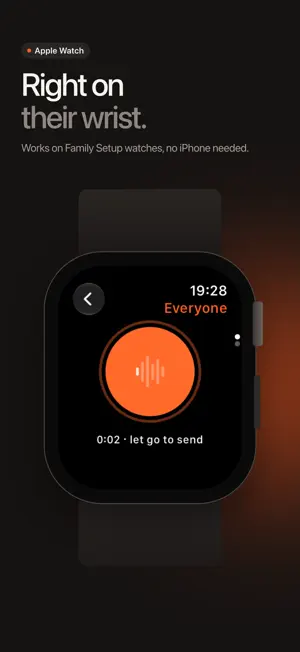
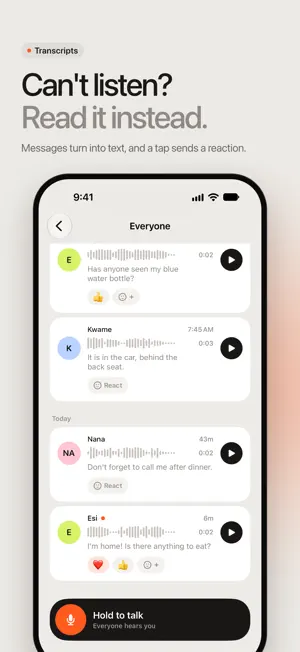
Hold one button, say it, and let go. Hollr sends your voice to your family on iPhone and Apple Watch, including kids' watches that have no iPhone of their own. It's free for you and one other person, and Hollr Family brings in up to 12. For the quick things: "I'm outside." "Dinner's ready." "Call me when practice ends." TALK IN ONE PRESS • Hold the big talk button, speak, and let go to send. Slide away to cancel. • Talk to everyone at once, or tap a face to talk to just one person. • When Hollr is open and you're Listening, new messages play out loud as they arrive. Switch to Muted and they wait for you. • Changed your mind? Tap Undo right after sending, or delete a recent message you sent, for everyone. ON THE WRIST • The Apple Watch app has the same big hold-to-talk button, plus recent messages and reactions. • A child's watch set up with Family Setup joins with a 6-character code and works without an iPhone. • Your own watch picks up your family from your iPhone, with no setup. WHEN YOU CAN'T TALK • Read a message when you can't listen. Transcripts are made with Apple's speech recognition, on the device where your language supports it. • React with an emoji instead of replying, including one that means "heard you, can't talk right now." • React straight from a message alert on your Lock Screen or Apple Watch, without unlocking. EVERYONE AT A GLANCE • See who's listening and who's busy. • Invite your people with a 6-character code or link. They need iCloud, not Family Sharing. • A Home Screen widget shows how many are listening and what's new. Lock Screen widgets count new messages and open the talk button. • Add a Talk control to Control Center or the Action button, or ask Siri to "Talk in Hollr." Each one opens Hollr on the talk button. • The Activity tab shows how your family talked this week. FREE, THEN HOLLR FAMILY Your first week after you download Hollr includes everything in Hollr Family. There's no sign-up and no payment, and nothing is charged when the week ends. After that, Hollr stays free for you and one other person in one space. Hollr Family adds: • Up to 12 people in a space • Up to 6 spaces: your family, the grandparents, the carpool, each with its own people and code • Lock Screen talk: a talk button on the Lock Screen, and in the Dynamic Island on iPhones that have one, powered by Push to Talk • Quiet hours: pick a time each day when new messages don't play out loud One plan covers your Family Sharing group. The size of a space comes from the plan of the person who started it. Hollr Family is an auto-renewable subscription, billed monthly or yearly to your Apple Account. It renews automatically unless you cancel at least 24 hours before the end of the current period. Manage or cancel it any time in your Apple Account settings. Subscribing during the free week starts your plan that day. PRIVATE BY DEFAULT • No accounts to create, no ads, no analytics, no tracking. • Voice messages, transcripts and reactions are kept in iCloud and shared with the people in your space. They never go through servers of ours. • Invite codes and alerts go through Hollr's public iCloud database so they can reach people. They carry things like a first name and the space's name, never audio or anything you said. • Spaces are invite-only. Report a message or a person from inside Hollr, or block them. A report reaches only us, never includes audio, and includes what was said only if you choose. Blocking stays on your devices, and they aren't told. • The microphone records only while you're sending a message, for up to 60 seconds. Talking with real people needs an iCloud account on each iPhone or watch. Not signed in yet? Hollr starts you with a demo family so you can hear how it works. Terms of Use: https://jasoneliphalet.com/hollr/terms Privacy Policy: https://jasoneliphalet.com/hollr/privacy Download Hollr, tap Get started, and say hi to your family.
What’s new
Version 1.2 · Updated November 13, 2026
Hollr 1.2: now with fewer "wait, what did you say?" • Speed it up. After the first listen, play messages at 1.5× or 2×, and drag along the waveform to jump straight to the good bit. • Rename your space. You started it, you name it. "The Mensahs" can finally become "Team Jollof". • 32 more reactions, and pick your skin tone for every hand. • Free plan now keeps 3 spaces after the trial, not just 1. Home, school run, and the cousins. • On the free plan, messages tidy themselves away after 30 days. Hollr Family keeps every one.
App privacy
The developer, Jemimah Kukua Aggrey, reported these privacy practices to Apple.
Data Linked to You
The following data, which may be collected and linked to your identity, may be used for the following purposes:
- Contact Info: Name
- User Content: Audio Data, Other User Content
- Identifiers: User ID, Device ID
Used for: App Functionality
Alternatives to Hollr: Family Walkie-Talkie
Looking for apps like Hollr: Family Walkie-Talkie? Here are 6 similar apps on the App Store. The highest rated is Buzz: Push To Talk (PTT) (5.0/5), and all 6 are free to download.
-
 OkayTu: Family Walkie Talkie
-
 Funki - Walkie-Talkie
-
 Orange Bridges
-
 Buzz: Push To Talk (PTT)
5.0
-
 Rogr – Walkie-Talkie
-
 TruckerFy
4.3
| App | Rating | Price | Last updated | Compare |
|---|---|---|---|---|
| Hollr: Family Walkie-Talkie | – | Free | November 13, 2026 | |
| OkayTu: Family Walkie Talkie | – | Free | Nov 19, 2026 | Compare |
| Funki - Walkie-Talkie | – | Free | Nov 11, 2026 | Compare |
| Orange Bridges | – | Free | Oct 29, 2026 | Compare |
| Buzz: Push To Talk (PTT) | 5.0 / 5 (1) | Free | Nov 7, 2025 | Compare |
| Rogr – Walkie-Talkie | – | Free | Nov 15, 2026 | Compare |
| TruckerFy | 4.3 / 5 (6) | Free | Nov 24, 2025 | Compare |