

MultiMovie: Multi-View Browser
TSUBASA FUKUCHI Entertainment iPhoneiPadiPod touch
MultiMovie: Multi-View Browser is a free Entertainment app for iPhone and iPad by TSUBASA FUKUCHI. Requires iOS 17.0. Updated November 22, 2026.
- Price
- Free
- on the App Store
- Size
- 5 MB
- Age 17+
- Updated
- Nov 22
- 2026 · v1.2.0
Screenshots
Save to Pinterest

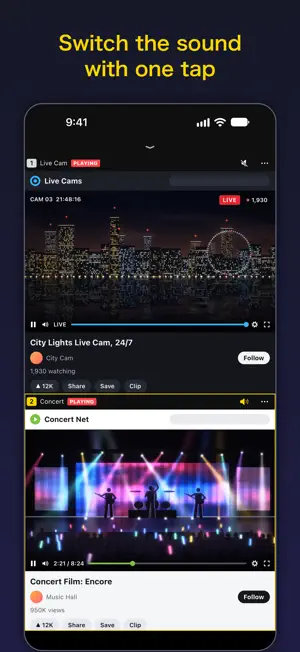
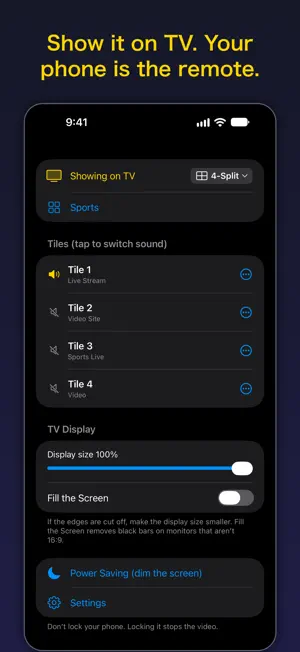
About MultiMovie: Multi-View Browser
A split-screen browser for anyone who wants to follow several live streams at once. Paste a URL to line up pages from video sites like YouTube and other live streams. Play pages from the sites you choose on up to four screens at the same time. Follow several sports broadcasts, watch races side by side, or keep up with multiple streams. AUDIO FOCUS Only one tile plays sound at a time. Tap to switch: the other tiles are muted automatically and keep playing. A yellow border shows which tile has sound. TV OUTPUT Connect with an HDMI adapter or AirPlay. The TV shows only the full-screen video grid, and your phone becomes the remote: switch sound, zoom, swap tiles, and change layouts from your hand. Power Saving dims the phone's screen. ADD FROM THE SHARE MENU In Safari or a video app, tap Share and choose MultiMovie to put the page in a tile. SAVE AND SYNC LAYOUTS Name a combination of tiles and bring it back at any time. Layouts sync between your iPhone and iPad with iCloud. LAYOUTS THAT FIT YOUR SCREEN Choose single, 2-split, 3-split, 4-split, or 1 large + 3 small. The arrangement changes with your screen's orientation to keep each video as large as possible. MORE FEATURES - Go back and forward inside a tile, and save the current page to the tile - URL history and favorites - Share a layout with a link or a QR code - Open layouts from Shortcuts and a Home Screen widget - Video Mode: fills the tile with only the page's video - Desktop Site: switch per tile - Auto Reload: set an interval per tile - Blocks jumps to other apps - Keeps the screen on during playback - Warns when your device gets hot, and pauses tiles other than the one with sound PRICING Free to use, with ads. The free version offers up to 2 splits and 3 saved layouts. Watch an ad to use 3 or more tiles for 3 hours. MultiMovie Pro (auto-renewing subscription, monthly or yearly): no ads, 3-split, 4-split and 1 large + 3 small, unlimited saved layouts, Video Mode on every tile, Auto Reload, Immersive View, Sleep Timer, and unlimited favorites. Payment is charged to your Apple Account when you confirm the purchase. The subscription renews automatically unless you cancel at least 24 hours before the end of the current period. You can cancel in your App Store account settings. PLEASE NOTE MultiMovie shows only the pages you enter. It has no download, save, or recording features. Please follow the terms of each site. Some sites may not support simultaneous playback or embedding. YouTube is a trademark of Google LLC. Other service names are trademarks of their respective owners. This app is not affiliated with or endorsed by any of these services. Terms of Use: https://www.apple.com/legal/internet-services/itunes/dev/stdeula/ Privacy Policy: https://fukusefeb-dev.github.io/multimovie/en/privacy.html
What’s new
Version 1.2.0 · Updated November 22, 2026
- Paste a copied URL straight into an empty tile. URLs are also picked out of text shared from video apps - Type words instead of a URL to search for videos inside the tile. Open the video you want and tap "Use" to keep it in the tile - On iPad, drag a link from Safari or another app onto a tile - The player's full-screen button now fills just that tile, so the other tiles stay on screen - Opening a link inside a tile no longer switches to another app - On iPad, in a window, the window controls no longer cover the control bar - Other small fixes
App privacy
The developer, TSUBASA FUKUCHI, reported these privacy practices to Apple.
Data Used to Track You
The following data may be used to track you across apps and websites owned by other companies:
- Identifiers: Device ID
Data Linked to You
The following data, which may be collected and linked to your identity, may be used for the following purposes:
- Location: Coarse Location
- Identifiers: Device ID
- Usage Data: Product Interaction, Advertising Data
- Diagnostics: Performance Data, Other Diagnostic Data, Crash Data
Used for: Third-Party Advertising, Developer’s Advertising or Marketing, Analytics
Alternatives to MultiMovie: Multi-View Browser
Looking for apps like MultiMovie: Multi-View Browser? Here are 6 similar apps on the App Store. The highest rated is MultiviewTV Player (5.0/5), and all 6 are free to download.
-
 MultiviewTV Player
5.0
-
 2mado - Split Screen Browser
4.8
-
 Djubi Player - IPTV & M3U
-
 TruthScan AI - Lie Detector
-
 ViewGrid - Multi Stream Viewer
5.0
-
 Ara Multiple video Player
3.1
| App | Rating | Price | Last updated | Compare |
|---|---|---|---|---|
| MultiMovie: Multi-View Browser | – | Free | November 22, 2026 | |
| MultiviewTV Player | 5.0 / 5 (1) | Free | Nov 25, 2026 | Compare |
| 2mado - Split Screen Browser | 4.8 / 5 (5) | Free | Nov 26, 2026 | Compare |
| Djubi Player - IPTV & M3U | – | Free | Jul 14, 2026 | Compare |
| TruthScan AI - Lie Detector | – | Free | Aug 12, 2026 | Compare |
| ViewGrid - Multi Stream Viewer | 5.0 / 5 (2) | Free | Nov 25, 2026 | Compare |
| Ara Multiple video Player | 3.1 / 5 (14) | Free | Nov 8, 2026 | Compare |