

MultiviewTV Player
Bastian Veliz Vega Entertainment iPhoneiPadiPod touch
MultiviewTV Player is a free Entertainment app for iPhone and iPad by Bastian Veliz Vega. Rated 5.0/5 from 1 ratings. Requires iOS 18.5.
- Rating
- 5.0
- 1 ratings
- Price
- Free
- on the App Store
- Size
- 65 MB
- Age 17+
- Updated
- Nov 25
- 2026 · v2.1.0
Screenshots
Save to Pinterest

About MultiviewTV Player
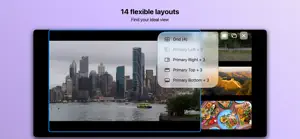
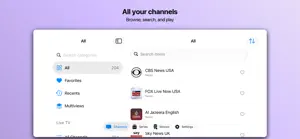
MultiviewTV — Multi-stream video player for iOS Watch up to 4 video streams simultaneously on a single screen. Perfect for following multiple live TV channels at once, monitoring security cameras, comparing sports broadcasts, or exploring everything your IPTV provider has to offer. FLEXIBLE LAYOUTS Choose from 14 different screen configurations: fullscreen, side by side, 2×2 grid, layouts with a featured primary player and secondary slots, and many more combinations for 1, 2, 3, or 4 streams. Switch layouts at any time without interrupting playback. PICTURE IN PICTURE AND AIRPLAY Keep watching in Picture in Picture, in the background, or from the lock screen, with controls that always act on the right player. Multiview over AirPlay is displayed correctly on your Apple TV or an external display again, and now supports video on demand too. FULL PROTOCOL SUPPORT Two playback engines in a single app: • Native engine for HLS and DASH (HTTP/HTTPS) • GStreamer for RTSP, RTSPS, RTMP, RTMPS, SRT, UDP/RTP, and MMS The engine is selected automatically based on the URL type, or you can force one manually from Settings. Both engines favour the device's hardware for maximum smoothness and efficiency. SOURCE MANAGEMENT Import your content from: • M3U playlists by URL, with real-time download progress tracking • Full Xtream Codes API: live channels, video on demand (VOD), and series with seasons and episodes Browse by category, search channels by name, sort content, and explore thousands of sources from a clean and fast interface. Channel logos load progressively. ICLOUD SYNC Sync your sources, favorites, layouts and playback progress across your devices. Compare what each device has and merge the changes with explicit conflict control: nothing is overwritten silently. INDEPENDENT CONTROLS PER PLAYER Each player works completely independently. Pause, resume, restart, select audio tracks in different languages, enable subtitles, and scrub the progress bar on VOD content individually. You can also promote any player to the primary slot with a single tap. REBUILT PLAYER We rebuilt the player to be more capable and reliable: refreshed controls, audio and subtitle menus inside the player itself, immediate error recovery, and a foundation ready to keep growing. RECENTS IN EVERY CATEGORY Every category has its own Recents section with only items of that kind: channels you watched live appear under live recents, and on-demand titles under their own. Pick up instantly where you left off and continue video on demand exactly where you stopped, on another device too if you use iCloud. CONFIGURABLE DECODING Adjust how video is decoded to suit your needs: • Hardware VideoToolbox: maximum performance and energy efficiency • Automatic VideoToolbox: hardware with software fallback • FFmpeg software: ideal for interlaced or problematic streams Play movies from your Xtream Codes sources even when your provider cannot load their details.
What’s new
Version 2.1.0 · Updated November 25, 2026
What's New in Version 2.1.0 • If a stream fails, its cell now shows an error banner while the rest of your streams keep playing. • Series detail pages now have a season menu to jump straight to the season you want. • Fixed crashes that could interrupt sync merges and the handling of deleted items. • Favorite channels and titles no longer show a duplicated heart in list rows. • General stability and performance improvements across the app.
App privacy
The developer, Bastian Veliz Vega, reported these privacy practices to Apple.
Data Used to Track You
The following data may be used to track you across apps and websites owned by other companies:
- Identifiers: Device ID
- Usage Data: Product Interaction
Data Linked to You
The following data, which may be collected and linked to your identity, may be used for the following purposes:
- Usage Data: Product Interaction
Used for: Analytics, App Functionality
Data Not Linked to You
The following data, which may be collected but is not linked to your identity, may be used for the following purposes:
- Identifiers: Device ID
- Diagnostics: Crash Data, Performance Data, Other Diagnostic Data
Used for: Analytics, App Functionality
Alternatives to MultiviewTV Player
Looking for apps like MultiviewTV Player? Here are 6 similar apps on the App Store. The highest rated is ViewGrid - Multi Stream Viewer (5.0/5), and 5 of the 6 are free to download.
-
 Multiview App
4.4
-
 RunTV - IPTV Player & Remote
4.2
-
 ViewGrid - Multi Stream Viewer
5.0
-
 QuadStream
4.7
-
 MultiStreamer TV
4.6
-
 MyPTV Smart IPTV Player
5.0
| App | Rating | Price | Last updated | Compare |
|---|---|---|---|---|
| MultiviewTV Player | 5.0 / 5 (1 rating) | Free | November 25, 2026 | |
| Multiview App | 4.4 / 5 (27) | Free | Sep 24, 2026 | Compare |
| RunTV - IPTV Player & Remote | 4.2 / 5 (6) | Free | Nov 3, 2026 | Compare |
| ViewGrid - Multi Stream Viewer | 5.0 / 5 (2) | Free | Nov 25, 2026 | Compare |
| QuadStream | 4.7 / 5 (12) | 0.99 USD | Apr 30, 2026 | Compare |
| MultiStreamer TV | 4.6 / 5 (5) | Free | Nov 4, 2026 | Compare |
| MyPTV Smart IPTV Player | 5.0 / 5 (2) | Free | Nov 14, 2026 | Compare |
Compare MultiviewTV Player with the top alternatives: ratings, updates, ASO score and keyword gaps →