

AnyPrompter Voice Teleprompter
Holdone Software SRL Productivity iPhoneiPadiPod touch
AnyPrompter Voice Teleprompter is a free Productivity app for iPhone and iPad by Holdone Software SRL. Requires iOS 26.0. Updated November 10, 2026.
- Price
- Free
- on the App Store
- Size
- 241 MB
- Age 4+
- Updated
- Nov 10
- 2026 · v1.0
Screenshots
Save to Pinterest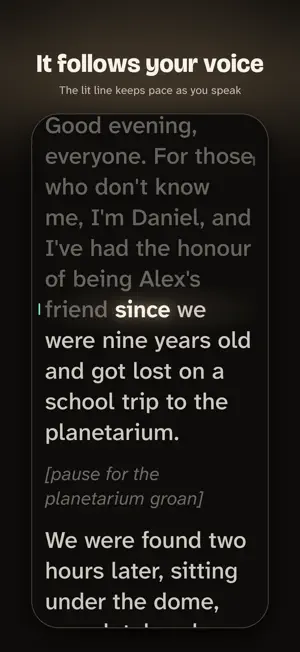


About AnyPrompter Voice Teleprompter
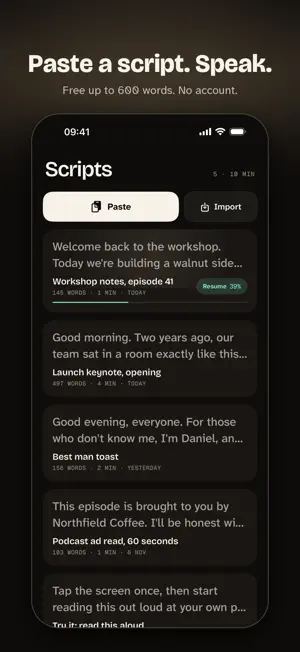
AnyPrompter is a teleprompter that listens. Paste your script, start talking, and the text keeps pace with your voice: the line you are saying sits in a warm pool of light, what you have read falls into shadow, and what comes next waits just below. Speech recognition runs on your iPhone or iPad. No account, no watermark, no subscription. FOLLOWS YOUR VOICE • Voice mode moves the script as you speak, word by word, and waits when you pause. • Ad-lib, skip a line or go back: it finds you again within a word or two. • Lost your place? Tap any word and the light moves there. • A small listening indicator shows when it is following you and when it cannot find the line, so it never jumps without telling you. • Text in [square brackets] is a stage direction: shown in grey and skipped while you speak. THREE WAYS TO SCROLL • Voice: the script follows you. • Auto: steady scrolling at the words-per-minute you set. • Manual: scroll with your finger; where you stop is where you read from. Switch modes mid-take and your place carries over. Scroll by hand in any mode, and two-finger swipe to jump a paragraph. PASTE OR IMPORT • Paste from any app with one tap, or import text, RTF and PDF files. • A library of your scripts with word counts and estimated reading time. • Edit in the app, with # headings and [directions] for structure. MADE TO READ AT A GLANCE • Large type in Atkinson Hyperlegible, a typeface designed for legibility, plus SF Pro, SF Rounded and New York. • Pinch to resize. Adjust line spacing, margins and where the light sits on screen. • Dark stage, light Paper theme and high contrast. • Mirror horizontally or vertically for teleprompter glass. • Countdown before you start, and the screen stays awake. • Settings are remembered for each script. • On iPad with a keyboard: Space plays and pauses, the arrow keys move a paragraph. FOR Videos and reels, presentations, speeches, sermons, lectures, podcasts, voiceovers, self-tape auditions, and any talk you want to give without memorising it. PRIVATE BY DESIGN Your voice is recognised on your device: English uses a speech model built into the app, and other languages use Apple's on-device speech recognition. Your scripts stay on your device. There is no account, no ads and no tracking. The app sends anonymous usage statistics, never linked to you, to help us improve it. PRICING, PLAINLY AnyPrompter is free to download. Every mode works free on scripts up to 600 words (about four minutes of speaking), with no watermark and no time limit. Auto and Manual scrolling work free on scripts of any length. AnyPrompter Pro unlocks Voice mode for scripts of any length. It is a single one-time purchase: no subscription, no trial that turns into a charge, nothing to cancel. Restore it any time from the Pro screen with the same Apple Account.
App privacy
The developer, Holdone Software SRL, reported these privacy practices to Apple.
Data Not Linked to You
The following data, which may be collected but is not linked to your identity, may be used for the following purposes:
- Purchases: Purchase History
- Usage Data: Product Interaction, Other Usage Data
Used for: Analytics, App Functionality
Alternatives to AnyPrompter Voice Teleprompter
Looking for apps like AnyPrompter Voice Teleprompter? Here are 6 similar apps on the App Store. The highest rated is SpeakSync (5.0/5), and all 6 are free to download.
-
 Clean Sheet PDF
-
 SpeakSync
5.0
-
 My Prompter
5.0
-
 Teleprompter & Video: VoiceCue
-
 PaceTimer: Speech Timer
-
 HibiDo: Todo, Calendar & Notes
4.6
| App | Rating | Price | Last updated | Compare |
|---|---|---|---|---|
| AnyPrompter Voice Teleprompter | – | Free | November 10, 2026 | |
| Clean Sheet PDF | – | Free | Nov 8, 2026 | Compare |
| SpeakSync | 5.0 / 5 (9) | Free | Aug 17, 2026 | Compare |
| My Prompter | 5.0 / 5 (1) | Free | Jul 9, 2026 | Compare |
| Teleprompter & Video: VoiceCue | – | Free | Nov 27, 2026 | Compare |
| PaceTimer: Speech Timer | – | Free | Nov 16, 2026 | Compare |
| HibiDo: Todo, Calendar & Notes | 4.6 / 5 (64) | Free | Nov 17, 2026 | Compare |