

leaNNotes: Handwritten Notes
Selin Kurtulus Productivity iPhoneiPadiPod touch
leaNNotes: Handwritten Notes is a free Productivity app for iPhone and iPad by Selin Kurtulus. Requires iOS 26.0. Updated November 23, 2026.
- Price
- Free
- on the App Store
- Size
- 7 MB
- Age 4+
- Updated
- Nov 23
- 2026 · v0.8.1
Screenshots
Save to Pinterest


About leaNNotes: Handwritten Notes
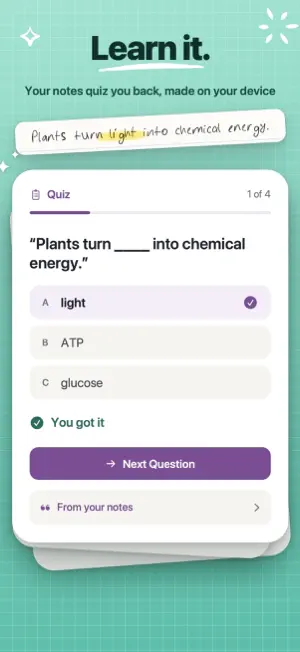
Your notes quiz you back. Write by hand in leaNNotes, and it turns your notes into flashcards and quizzes, privately on your device. STUDY FROM YOUR OWN NOTES • Turn your notes into flashcards and quizzes, on-device. Questions come from the sentences in your notes, and Apple Intelligence picks the key terms when it's available. • Cover answers with tape. Tap to reveal. TAP TO HEAR THAT MOMENT • Record a lecture while you write, then tap your handwriting to hear that moment. SPEECH TO TEXT • Recordings are transcribed on-device, in the language you choose in Settings. Tap a line of the transcript to play from there. SEARCH YOUR NOTES • Search your handwriting, PDFs and recordings. Results depend on legible handwriting; equations and diagrams aren't searchable. WRITE ON PDFS AND PAPER • Import slides and PDFs, then write on them. Pages stay sharp as you zoom. • Ruled, grid, dot, Cornell and planner pages. • Open two notes side by side on iPad, or two notes at once on iPhone. • Jot a quick note; leaNNotes suggests where it belongs. • Export and share as PDF. • Automatic backups to Files or iCloud Drive. • Light and dark mode, PDF pages included. • In English, Turkish and Spanish. Change the app language in Settings → App language. WHAT YOU NEED • iPad or iPhone with iOS 26 or later. • Apple Pencil is recommended on iPad. On iPhone, you write with your finger. On iPad without a Pencil, choose Pencil & finger in leaNNotes under Settings → Writing input. • The first time you transcribe in a language, iOS downloads Apple's speech model for it. That needs an internet connection once. • Study sets use Apple Intelligence when available and work on every supported device. They are made from the sentences in your notes, so pages of equations or diagrams give them little to work with. PRIVATE BY DESIGN No account, no ads, no analytics. Your notes stay on your device unless you back them up or share them. Search, transcription and study sets run on your device, and after one-time language downloads they work offline. Your first 5 notes are free. A monthly subscription unlocks unlimited notes. Payment is charged to your Apple Account when you confirm the purchase. The subscription renews automatically each month unless you cancel it in your App Store account settings at least 24 hours before the current period ends. Terms of Use: https://www.apple.com/legal/internet-services/itunes/dev/stdeula/ Privacy Policy: https://novapps.tech/leanotes/privacy
What’s new
Version 0.8.1 · Updated November 23, 2026
Turn the tasks you write by hand into to-dos. • Extract To-dos, in a note's ⋯ menu, reads the page or the whole note with Apple Intelligence on your device and lists the tasks you wrote, with their due dates. • Check them off in the new To-dos list in the sidebar, grouped into Overdue, Today, Upcoming and No Date. Tap the note name on a to-do to go to the page it came from. • The To-dos button in a note's toolbar shows that note's to-dos. Add your own with +. • Give a to-do a time and leaNNotes reminds you then. • Add to-dos to the Reminders app, or copy and share them.
App privacy
The developer, Selin Kurtulus, reported these privacy practices to Apple.
Data Not Collected
The developer does not collect any data from this app.
Alternatives to leaNNotes: Handwritten Notes
Looking for apps like leaNNotes: Handwritten Notes? Here are 6 similar apps on the App Store. The highest rated is AI Voice Notes - Jotmatic (5.0/5), and all 6 are free to download.
-
 Meettrail Meeting Recorder
-
 Lucy: AI Notes, Tasks & Goals
-
 AI Voice Notes - Jotmatic
5.0
-
 Speech to Text: Voice Notes AI
-
 VoText: Voice & Speech to Text
-
 Voxt: Transcribe Audio to Text
| App | Rating | Price | Last updated | Compare |
|---|---|---|---|---|
| leaNNotes: Handwritten Notes | – | Free | November 23, 2026 | |
| Meettrail Meeting Recorder | – | Free | Nov 17, 2026 | Compare |
| Lucy: AI Notes, Tasks & Goals | – | Free | Nov 1, 2026 | Compare |
| AI Voice Notes - Jotmatic | 5.0 / 5 (1) | Free | Nov 18, 2026 | Compare |
| Speech to Text: Voice Notes AI | – | Free | Oct 22, 2026 | Compare |
| VoText: Voice & Speech to Text | – | Free | Nov 18, 2026 | Compare |
| Voxt: Transcribe Audio to Text | – | Free | Nov 13, 2026 | Compare |