

VoText: Voice & Speech to Text
Bilal Karadeniz Productivity iPhoneiPadiPod touch
VoText: Voice & Speech to Text is a free Productivity app for iPhone and iPad by Bilal Karadeniz. Requires iOS 17.0. Updated November 18, 2026.
- Price
- Free
- on the App Store
- Size
- 15 MB
- Age 4+
- Updated
- Nov 18
- 2026 · v1.2.0
Screenshots
Save to Pinterest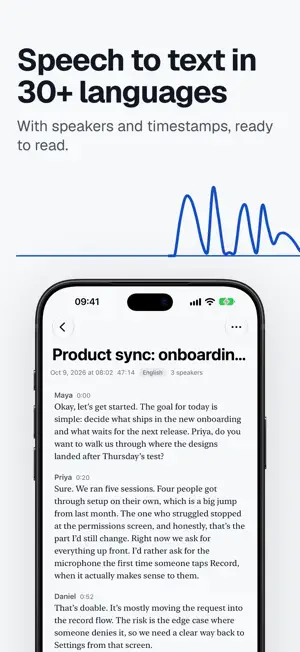


About VoText: Voice & Speech to Text
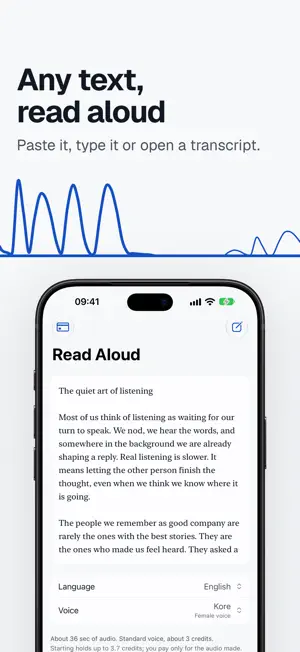
Record a meeting, a lecture or an interview, or import audio and video you already have. VoText turns the speech into text in 30+ languages, with speakers and timestamps, and sums it up in key points and action items. When you would rather listen than read, it reads any text aloud in a natural voice. TRANSCRIPTS YOU CAN USE • 30+ languages, detected automatically, even when speakers switch language mid-sentence • Speaker labels and a timestamp on every line; tap a line to hear that moment again • Punctuation and paragraphs, so the transcript reads like text • Fix any word and rename speakers right in the transcript • Import audio or video from Files or the share sheet SUMMARIES • A short overview, the key points and the action items of a transcript, in the language it was spoken • A summary costs a few credits, depending on the length of the transcript; on supported iPhones and iPads, a simpler summary of a shorter transcript can also be made on the device for free • Written by AI, so check the details that matter • Share a summary, or include it when you export the transcript RECORD WITHOUT WORRY • Recording is free and keeps going with the screen locked or another app open • Recordings stay on your iPhone or iPad until you choose to transcribe them IN THE CLOUD OR ON YOUR DEVICE • Cloud transcription labels speakers and detects the language for you • Recordings up to 5 minutes can also be transcribed on your device, free and offline, in the languages it recognizes; this is less accurate and has no speaker labels READ ALOUD • Paste or type any text, or open a transcript, and listen • Natural AI voices in 30+ languages; premium voices come with Pro • Keep the audio and share it • Your device's own voice reads for free and offline, highlighting each word as it goes EXPORT PDF, plain text, Markdown, SRT and VTT subtitles, or the original audio. Without a current plan, PDF, text and Markdown files end with a short "Transcribed with VoText" line. PRIVATE BY DESIGN Recordings, transcripts and summaries live on your device. Audio or text leaves it only when you ask for a transcript, a summary or a reading, and only after you agree. It goes to trusted AI services that may not use it to train their models, and our servers delete it within 24 hours. No ads, no tracking, and no account needed. Sign in with Apple or an email code only if you want your credits on another device. PAY FOR WHAT YOU USE One credit is one minute of transcription, and your balance shows how many minutes it covers. New users get free credits to try VoText, with no account or payment. VoText shows the cost before anything starts, and a job that fails costs nothing. • Plus and Pro plans, billed monthly or yearly; yearly costs about 40% less • Monthly plan credits stay valid for 12 months and yearly plan credits for 24 months, so unused credits carry over • Pro adds premium voices and files longer than 2 hours • Top-up credits never expire, with or without a plan • Invite a friend who is new to VoText, and you each get bonus credits VoText works on iPhone, iPad and iPhone Duo. Subscriptions renew automatically unless cancelled at least 24 hours before the end of the current period. Manage or cancel them in your Apple Account settings. Terms of use: https://votext.app/en/terms/ Privacy policy: https://votext.app/en/privacy/
What’s new
Version 1.2.0 · Updated November 18, 2026
• Summaries: get a short overview, the key points and the action items of any transcript. On supported iPhones and iPads, a simpler summary of a shorter transcript can also be made on the device for free. • Invite friends: share your invite code from Settings, and you and a friend who is new to VoText each get bonus credits. • Speaker labels are now on by default for new transcriptions, so you can see who said what. • Your balance now shows how many minutes of transcription it covers: one credit is one minute. • On new installs, on-device transcription is free for recordings up to 5 minutes; longer recordings use cloud transcription. If you already use VoText, on-device transcription stays as it was. • Recording, playback and Read Aloud are more reliable, and VoText checks your balance before a job starts.
App privacy
The developer, Bilal Karadeniz, reported these privacy practices to Apple.
Data Linked to You
The following data, which may be collected and linked to your identity, may be used for the following purposes:
- Usage Data: Product Interaction
- Purchases: Purchase History
- Contact Info: Email Address
- User Content: Photos or Videos, Audio Data, Customer Support, Other User Content
- Identifiers: User ID, Device ID
- Diagnostics: Other Diagnostic Data
Used for: Analytics, App Functionality
Alternatives to VoText: Voice & Speech to Text
Looking for apps like VoText: Voice & Speech to Text? Here are 6 similar apps on the App Store. The highest rated is AI Voice Notes - Jotmatic (5.0/5), and all 6 are free to download.
-
 Hearfolio
-
 leaNNotes: Handwritten Notes
-
 Meettrail Meeting Recorder
-
 Lucy: AI Notes, Tasks & Goals
-
 AI Voice Notes - Jotmatic
5.0
-
 Audio and video transcription
| App | Rating | Price | Last updated | Compare |
|---|---|---|---|---|
| VoText: Voice & Speech to Text | – | Free | November 18, 2026 | |
| Hearfolio | – | Free | Nov 10, 2026 | Compare |
| leaNNotes: Handwritten Notes | – | Free | Nov 23, 2026 | Compare |
| Meettrail Meeting Recorder | – | Free | Nov 17, 2026 | Compare |
| Lucy: AI Notes, Tasks & Goals | – | Free | Nov 1, 2026 | Compare |
| AI Voice Notes - Jotmatic | 5.0 / 5 (1) | Free | Nov 18, 2026 | Compare |
| Audio and video transcription | – | Free | Oct 20, 2026 | Compare |