

SPLIX: Multi Split Browser
Siu Hin Fan Utilities iPhoneiPadiPod touch
SPLIX: Multi Split Browser is a free Utilities app for iPhone and iPad by Siu Hin Fan. Requires iOS 17.0. Updated November 23, 2026.
- Price
- Free
- on the App Store
- Size
- 6 MB
- Age 17+
- Updated
- Nov 23
- 2026 · v1.3.1
Screenshots
Save to Pinterest

About SPLIX: Multi Split Browser
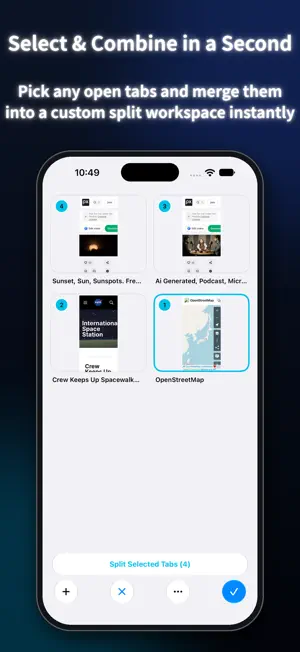
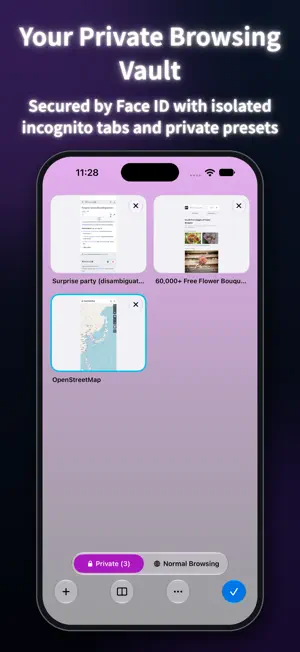
Turn your screen into a powerhouse of multitasking. SPLIX is a multi-window split-screen browser designed for video streaming, research and side-by-side browsing. Whether you want to watch multiple live streams at the same time, follow a walkthrough while watching a video, or keep an eye on the markets while reading the news, SPLIX puts it all on one screen, with no more switching between apps. KEY FEATURES • Multi-Video Playback Built with a smart playback engine that tries to keep other panes playing while you interact with one (results may vary by website). • Up to 8 Panes and 11 Layouts Start with 2 panes for free, or unlock up to 8. Choose from Smart Auto, Top/Bottom, Left/Right, L-Shape, Main + Sub-panes and Equal Grid, and drag the dividers to resize any pane. • Smart Audio and Audio Lock Tap any pane to switch the audio source instantly, or mute individual panes. Tap the lock icon to keep listening to your main stream while you use other panes. • One-Tap Presets Save your favorite combinations of websites and layouts, and bring them back with a single tap. • Video Focus and Immersive Mode Expand any web video to fill its pane, and hide all toolbars with Immersive Mode. • Private Browsing with Face ID A separate private space protected by Face ID / Touch ID or your passcode. Browsing history and cookies are not saved. • Handy Page Tools One-tap webpage translation, 0.75x–2x video speed, Desktop Mode, Find in Page and a pop-up blocker. SPLIX PRO SPLIX is free with 2 panes and Immersive Mode (the free version shows banner ads). Upgrade to SPLIX Pro (monthly, yearly with a free trial, or a one-time lifetime purchase) to unlock 3–8 panes, unlimited presets, divider resizing, video speed control, the pop-up blocker and Face ID private browsing, and to remove all ads. SPLIX Pro is available as an auto-renewing monthly or yearly subscription (the yearly plan includes a 7-day free trial for eligible new subscribers) or a one-time lifetime purchase. Payment is charged to your Apple Account at confirmation of purchase. Subscriptions renew automatically unless cancelled at least 24 hours before the end of the current period. You can manage or cancel in your Apple Account settings. Any unused portion of a free trial is forfeited when you purchase a subscription. Privacy Policy: https://sites.google.com/view/splixprivacypolicy Terms of Use (EULA): https://www.apple.com/legal/internet-services/itunes/dev/stdeula/
What’s new
Version 1.3.1 · Updated November 23, 2026
- Upgraded Link Long-Press Menu: Added Open in Background, Open in New Tab, and muted live link previews with a quick Switch pill. - Smart Child Tabs & Navigation Shortcuts: Links opening in a new window now launch as child tabs and automatically close back to the parent tab when tapping Back; long-press Back, the address bar, or Reload for history jumps, Paste and Go, and Desktop Mode. - Enhanced Tab Overview Gestures: Swipe tab cards left or right to close, long-press cards for quick actions, and automatically load thumbnails and titles in Private Mode. - Native File & PDF Downloads: Download web files and linked documents directly and save them to the iOS Files app or share sheet. - Layout & Stability Improvements: Refined bottom bar layout and overall browsing responsiveness.
App privacy
The developer, Siu Hin Fan, reported these privacy practices to Apple.
Data Not Linked to You
The following data, which may be collected but is not linked to your identity, may be used for the following purposes:
- Location: Coarse Location
- Identifiers: Device ID
- Usage Data: Product Interaction, Advertising Data
- Diagnostics: Crash Data, Performance Data, Other Diagnostic Data
Used for: Third-Party Advertising, Developer’s Advertising or Marketing, Analytics, Product Personalization, App Functionality
Alternatives to SPLIX: Multi Split Browser
Looking for apps like SPLIX: Multi Split Browser? Here are 6 similar apps on the App Store. The highest rated is SwatBrowser: Browse in Peace (5.0/5), and all 6 are free to download.
-
 OmuType Cantonese Voice Typing
-
 Veil Browser+
-
 数据泄露防护
-
 Navega La Vila
-
 HappyWeb: Safe Family Browser
-
 SwatBrowser: Browse in Peace
5.0
| App | Rating | Price | Last updated | Compare |
|---|---|---|---|---|
| SPLIX: Multi Split Browser | – | Free | November 23, 2026 | |
| OmuType Cantonese Voice Typing | – | Free | Nov 24, 2026 | Compare |
| Veil Browser+ | – | Free | Sep 24, 2026 | Compare |
| 数据泄露防护 | – | Free | Jun 24, 2025 | Compare |
| Navega La Vila | – | Free | Jan 30, 2025 | Compare |
| HappyWeb: Safe Family Browser | – | Free | Nov 22, 2026 | Compare |
| SwatBrowser: Browse in Peace | 5.0 / 5 (2) | Free | Nov 13, 2026 | Compare |