

OmuType Cantonese Voice Typing
Alano Tech Pte. Ltd. Utilities iPhoneiPadiPod touch
OmuType Cantonese Voice Typing is a free Utilities app for iPhone and iPad by Alano Tech Pte. Ltd. Requires iOS 16.0. Updated November 24, 2026.
- Price
- Free
- on the App Store
- Size
- 114 MB
- Age 17+
- Updated
- Nov 24
- 2026 · v1068
Screenshots
Save to Pinterest


About OmuType Cantonese Voice Typing
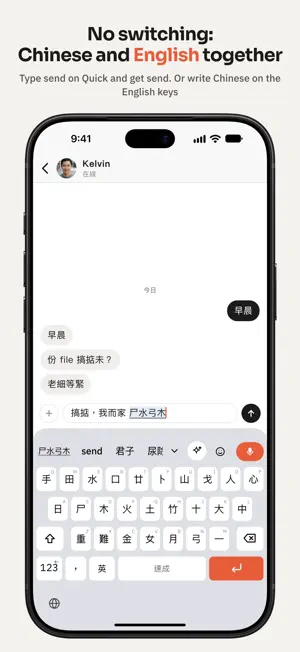
OmuType is the iPhone keyboard made for Hong Kong. Speak or type Cantonese with English mixed in, in one go, without switching keyboards, and it comes out right. Cangjie, Quick, Stroke, handwriting and Jyutping are built in depth for Hong Kong: Hong Kong glyphs, Hong Kong words, Hong Kong suggestions. AI tidies and translates, keeping your tone. CANTONESE + ENGLISH VOICE TYPING Tap the mic and speak. "我 send 咗個 Figma link 畀你,你 check 下先" comes out exactly like that: English stays English, Cantonese stays colloquial (嘅, 咗, 喺), never Mandarin written forms, never Simplified. • OmuType hears the sentence again and swaps only the misheard words in place: homophones, names, brands • Spoken numbers come out as digits: 九三零 becomes 930 • Add the names and companies you say to Keywords and voice matches them by sound: 卡神 comes out as Kason • Said it wrong? Say "not Mandy, Wendy" (唔係 Mandy,係 Wendy) and only that word changes; "shorter" or "in English" work too CANGJIE AND QUICK, MADE FOR HONG KONG • Quick (速成) types whole phrases: ofvdrf gives 你好嗎 • Pick the "跟 Windows" order and 竹戈 7 = 我, the same places as on your PC • Cangjie (倉頡): every 3rd- and 5th-generation code works, radicals shown on the keys • Two at once: Quick + Cangjie, or Cangjie + Jyutping, no switching • English candidates sit in the same row: type send for send, no 中/英 key; spaces between Chinese and English are added for you STROKE, HANDWRITING AND JYUTPING • Stroke (筆劃): five stroke keys • Handwriting (手寫): keep writing without stopping to pick; or write a character straight on the letter keys • Lazy Jyutping (粵拼): no tones needed, tinlau gives 填漏; Hong Kong spellings like yau for 有 work too • Next-word suggestions that know Hong Kong words: 綜援, 港鐵, 唔該 AI CHECK: A SECOND LOOK BEFORE YOU SEND Tap AI check and AI reads your message the way the recipient will: 倉蠅同速成 becomes 倉頡同速成; names, brand spellings and punctuation are tidied. Your tone, your Cantonese and your English stay. • Translate a selection to English or Chinese in one tap • Travel mode: translate into Japanese or Thai when you travel FAST ENGLISH TOO • Autocorrect that splits missed spaces (mucgbitter → much better) • Swipe typing for English words ALSO • Phrases and clipboard: paste what you copied in one tap; saved phrases one tap away • Emoji page with recents, search and suggestions for the sentence you're writing • Send key colors: iPhone's own by default and a few free ones; VIP adds 15 more and your own • Adjustable height and number row; full- or half-width punctuation • Simple mode: big keys and big text for older relatives PRIVACY • Typing (without voice or AI) is processed on your iPhone, works offline, is never sent and works without Full Access • Only voice and AI check send the recording or the text near your cursor to speech and AI providers; our servers keep no recordings or content • Voice and AI check need Full Access (Settings › Keyboards); starting voice opens the OmuType app to turn the microphone on • Password fields: no mic, no AI, nothing sent • No account, no ads, no tracking Privacy policy: https://omutype.co/en/privacy PRICE Typing and handwriting are free with no limits. Voice includes 10 free minutes a week, reset every Monday; after that, 1 minute every hour. AI check is free 50 times a week. OmuType VIP: 4 hours of voice and 1,000 AI checks a week, and every keyboard color. Monthly or yearly, billed through the App Store. The subscription renews automatically unless cancelled in your Apple ID settings at least 24 hours before the end of the current period; renewal is charged within 24 hours before the period ends. Terms of Use: https://omutype.co/en/terms Privacy Policy: https://omutype.co/en/privacy For users 18 and over. Made by Alano Tech Pte. Ltd. Website: https://omutype.co
What’s new
Version 1068 · Updated November 24, 2026
• New features and improvements. See omutype.co/updates for details
App privacy
The developer, Alano Tech Pte. Ltd., reported these privacy practices to Apple.
Data Not Linked to You
The following data, which may be collected but is not linked to your identity, may be used for the following purposes:
- Identifiers: User ID, Device ID
- Usage Data: Product Interaction
- Diagnostics: Performance Data, Other Diagnostic Data
- Other Data: Other Data Types
- Purchases: Purchase History
- User Content: Audio Data, Other User Content
- Search History: Search History
Used for: Analytics, App Functionality
Alternatives to OmuType Cantonese Voice Typing
Looking for apps like OmuType Cantonese Voice Typing? Here are 6 similar apps on the App Store. The highest rated is OtterBoard: 中英混打「滑動」鍵盤 (5.0/5), and all 6 are free to download.
-
 KongBoard 香港中文鍵盤
-
 KOI Keyboard
-
 OtterBoard: 中英混打「滑動」鍵盤
5.0
-
 HK Mixed Keyboard
-
 KongType:AI Cantonese Keyboard
5.0
-
 Cantoboard - 智能廣東話中文輸入法鍵盤
4.6
| App | Rating | Price | Last updated | Compare |
|---|---|---|---|---|
| OmuType Cantonese Voice Typing | – | Free | November 24, 2026 | |
| KongBoard 香港中文鍵盤 | – | Free | Nov 22, 2026 | Compare |
| KOI Keyboard | – | Free | Nov 23, 2026 | Compare |
| OtterBoard: 中英混打「滑動」鍵盤 | 5.0 / 5 (1) | Free | Nov 3, 2026 | Compare |
| HK Mixed Keyboard | – | Free | Nov 20, 2026 | Compare |
| KongType:AI Cantonese Keyboard | 5.0 / 5 (1) | Free | Nov 5, 2026 | Compare |
| Cantoboard - 智能廣東話中文輸入法鍵盤 | 4.6 / 5 (5) | Free | Feb 3, 2026 | Compare |