

Remotebulum
Klaus Neuendorf Utilities iPhoneiPadiPod touch
Remotebulum is a free Utilities app for iPhone and iPad by Klaus Neuendorf. Rated 5.0/5 from 1 ratings. Requires iOS 26.0. Updated November 20, 2026.
- Rating
- 5.0
- 1 ratings
- Price
- Free
- on the App Store
- Size
- 10 MB
- Age 4+
- Updated
- Nov 20
- 2026 · v3.3
Screenshots
Save to Pinterest


About Remotebulum
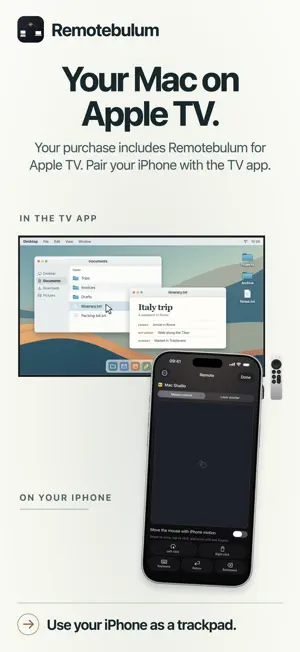
Control your Mac from your iPhone or iPad. Open documents, move windows, or switch between your Mac’s displays. The glass keyboard keeps your document visible as you type. On the transparent trackpad, tap with two fingers to right-click or drag with three to move a window. Set your iPhone Duo half open on the table to use it in laptop mode. Your Mac desktop appears on the top half, with a keyboard and trackpad below. Open the Duo all the way and your desktop fills the display. Your purchase includes Remotebulum for Apple TV. Open it on your Apple TV and pair your iPhone or iPad with the TV app. Your TV shows your Mac desktop while your iPhone or iPad serves as the trackpad and keyboard. Turn on Screen Sharing on your Mac. Remotebulum finds it on the local network and connects to it. Remotebulum connects directly, with no separate account, relay servers, or tracking. Apple, Mac, iPhone, iPad and Apple TV are trademarks of Apple Inc., registered in the U.S. and other countries and regions.
What’s new
Version 3.3 · Updated November 20, 2026
Minor improvements and bug fixes
App privacy
The developer, Klaus Neuendorf, reported these privacy practices to Apple.
Data Not Collected
The developer does not collect any data from this app.
Alternatives to Remotebulum
Looking for apps like Remotebulum? Here are 6 similar apps on the App Store. The highest rated is PosKVM - Remote Desktop VNC (5.0/5), and all 6 are free to download.
-
 KVM Remote
-
 PosKVM - Remote Desktop VNC
5.0
-
 Baccarat Queen: Road Tracker
-
 Duo Keyboard
-
 Tabletop: Mac Remote Desktop
-
 FreeVNC
| App | Rating | Price | Last updated | Compare |
|---|---|---|---|---|
| Remotebulum | 5.0 / 5 (1 rating) | Free | November 20, 2026 | |
| KVM Remote | – | Free | Nov 23, 2026 | Compare |
| PosKVM - Remote Desktop VNC | 5.0 / 5 (1) | Free | Nov 24, 2026 | Compare |
| Baccarat Queen: Road Tracker | – | Free | Nov 23, 2026 | Compare |
| Duo Keyboard | – | Free | Nov 5, 2026 | Compare |
| Tabletop: Mac Remote Desktop | – | Free | Nov 20, 2026 | Compare |
| FreeVNC | – | Free | Oct 26, 2026 | Compare |
Compare Remotebulum with the top alternatives: ratings, updates, ASO score and keyword gaps →