

PosKVM - Remote Desktop VNC
Aribada Inc. Utilities iPhoneiPadiPod touchMac
PosKVM - Remote Desktop VNC is a free Utilities app for iPhone and iPad by Aribada Inc. Requires iOS 17.0. Updated October 30, 2026.
- Price
- Free
- on the App Store
- Size
- 17 MB
- Age 4+
- Updated
- Oct 30
- 2026 · v1.1.1
Screenshots


About PosKVM - Remote Desktop VNC
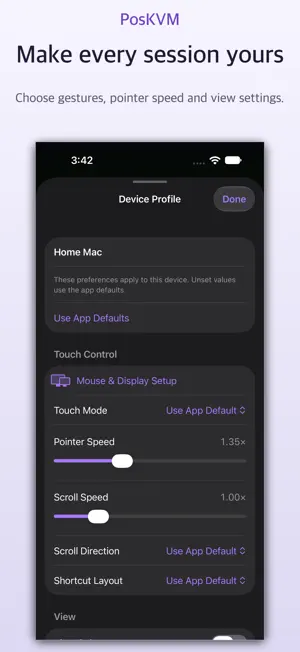
Your computers and IP KVM devices, together in one place. PosKVM brings VNC, RDP, SSH and supported IP KVM connections to iPhone, iPad and Mac. Keep home computers, workstations and lab machines in one device library, with clear connection choices for each device. CONNECT YOUR WAY • Connect to VNC servers, Windows Remote Desktop (RDP), and supported NanoKVM devices. • Keep multiple connection methods together on one device card. • Discover nearby devices with Bonjour and a local network scan. • Save Tailscale addresses, or link a read-only Tailnet device list. A separate Tailscale VPN connection is required. CONTROL COMFORTABLY • Touch controls, virtual trackpad, pinch to zoom, pan and inertial scrolling. • Hardware keyboard and mouse support, with remote shortcuts on Mac. • Full screen, docked or floating tools, and per-device preferences. • Display selection and image-quality controls where supported by the remote server. • Automatic reconnection after an interrupted connection. SSH TERMINAL • Open a terminal on Macs, Linux servers, Raspberry Pi, routers and other SSH hosts. • Sign in with a password, or with an Ed25519, ECDSA or RSA key generated in the app or imported. • Private keys stay in the Keychain, with optional iCloud Keychain sync. • Verify each server's host key on first connection; a changed key stops the connection. • Terminal themes and font sizes, plus a special-key bar with Esc, Tab, Ctrl, Alt and arrows on iPhone and iPad. KEEP YOUR DEVICES ORGANIZED • Grid and list views, tags, favorites and recently connected devices. • Optional previews of the last visible remote screen. • Optional iCloud sync for saved devices, credentials and screen previews. • App lock and an IP-address masking option for the device library. FREE TO START Download for free and use PosKVM without connection time limits for 14 days. After that, each new connection includes 15 free minutes. When the session ends, choose a paid plan for unlimited connection time or return to your device library. The free period does not start a subscription and does not charge automatically. POSKVM PRO Choose a monthly subscription, yearly subscription or Lifetime one-time purchase. Local prices are displayed before purchase. Monthly and yearly subscriptions renew automatically unless canceled at least 24 hours before the current period ends. Payment is charged to your Apple Account. Manage or cancel subscriptions in your App Store account settings. Purchases are available on supported devices using the same Apple Account. A reachable remote computer with a compatible server, or a supported IP KVM device, is required. PosKVM does not provide a VPN or a hosted relay. Features vary by protocol, server and device. PiKVM and JetKVM support is experimental. Support: [email protected] Privacy Policy: https://aribada.com/0v0/privacy/ Terms of Use (EULA): https://www.apple.com/legal/internet-services/itunes/dev/stdeula/
What’s new
Version 1.1.1 · Updated October 30, 2026
• Switch between up to four open connections in one window from … > Sessions, without reconnecting. • Reach VNC and RDP computers through one of your saved SSH servers with SSH Tunnel in the device profile. • Smart Connect picks a reachable address when a device has more than one, trying your local network first and then Tailscale. • Macros send saved key combinations, text and pauses to the remote computer. • Lock & Disconnect sends the lock shortcut to a remote Mac or Windows PC before closing the connection. You can also choose whether each device's screen preview is synced, kept on this device only, or not saved. • Auto VNC quality adjusts to the connection while the screen is busy and sends a sharper update when it settles. • Show the remote screen on an external display, either the whole screen or the area you're zoomed into. • Browse and transfer files with SFTP in SSH sessions, including folders. A transfer list keeps unfinished transfers so you can resume them after reconnecting, even after restarting the app. • Send files to and receive files from Windows during RDP sessions. • Type Korean and emoji directly when connected to a Mac over VNC. • Connection Help checks whether a device is reachable, and a notice appears before a free session ends. • If a NanoKVM's certificate changes, for example after a firmware update, you can compare and replace it right from the session. • Fixed VNC sessions that could run out of memory in the background. • Opening the keyboard now keeps a zoomed-in remote screen where you left it.
App privacy
The developer, Aribada Inc., reported these privacy practices to Apple.
Data Not Collected
The developer does not collect any data from this app.
Alternatives to PosKVM - Remote Desktop VNC
Looking for apps like PosKVM - Remote Desktop VNC? Here are 6 similar apps on the App Store. The highest rated is re:timer – a modern timer (5.0/5), and 5 of the 6 are free to download.
-
 re:timer – a modern timer
5.0
re:timer – a modern timer
5.0
-
 Orvyniq: VNC Remote Desktop
-
 Farroom: Remote Desktop
-
 Argly Remote Desktop
4.0
Argly Remote Desktop
4.0
-
 Telkino: VNC Remote Desktop
5.0
Telkino: VNC Remote Desktop
5.0
-
 HT-203H
1.0
HT-203H
1.0
| App | Rating | Price | Last updated | Compare |
|---|---|---|---|---|
| PosKVM - Remote Desktop VNC | – | Free | October 30, 2026 | |
| re:timer – a modern timer | 5.0 / 5 (7) | 1.99 USD | Jun 1, 2026 | Compare |
| Orvyniq: VNC Remote Desktop | – | Free | Sep 2, 2026 | Compare |
| Farroom: Remote Desktop | – | Free | Oct 22, 2026 | Compare |
| Argly Remote Desktop | 4.0 / 5 (2) | Free | Feb 7, 2026 | Compare |
| Telkino: VNC Remote Desktop | 5.0 / 5 (2) | Free | Oct 27, 2026 | Compare |
| HT-203H | 1.0 / 5 (1) | Free | Jul 11, 2026 | Compare |