

REM.DAW – Music Studio
Paa Kobina Bartels Cudjoe Music iPad
REM.DAW – Music Studio is a paid Music app for iPad by Paa Kobina Bartels Cudjoe. Rated 4.9/5 from 10 ratings. Requires iOS 17.6. Updated November 19, 2026.
- Rating
- 4.9
- 10 ratings
- Price
- 5.99 USD
- on the App Store
- Size
- 451 MB
- Age 4+
- Updated
- Nov 19
- 2026 · v1.3.1
Screenshots



About REM.DAW – Music Studio
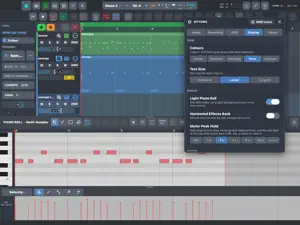
REM.DAW aims to bridge the gap between desktop and iPadOS DAWs. The DAW comes with a lot of features but more still needs to be implemented. Features: The list is much more that the stated below: * Audio and midi clips editing: copy, paste, duplicate, trim, move, split, stretch. Convert stereo to mono. Fades curves, crossfade. Stem splitting. * MIDI editing: press all buttons in the editor to find current editing capabilities. Including ghost tracks, scale, snap to scale. * Audio editor: 1. Warp audio. 2.Select a portion of audio and can be dragged and drop on timeline, samplers, drum pads. And a lot more in the editor. * Audio comping: loop record audio, then tap on audio clip and choose to extend the takes. Slide finger across each take to select the comp you want playing. * Clip launcher and record onto timeline. You can also record directly in the launcher and this also creates audio/midi clip onto timeline. You can drag and drop audio /midi from files app, timeline or browser into the launcher. * Drum pad plugin with chopping and step sequencer. Drag and drop or import a folder, REM will load the samples to the pads in alphabetical order. Not the best step sequencer at the moment an updated version will come soon. * Wavetable synth * Sampler to play one shots samples * Multi sampler: 1. build your own instrument by importing audio files or folders from files app which creates zones. 2. You can load exs24 and sfz files. 2.1 EXS14 and SFZ files with presets can also be loaded and you can switch between presets. * Multi output drum pads, multi out AUv3 support. * Effects: very steamed as most of you will have your favourite AUv3 plugins. Currently REM contains Eq, Compressor, Reverb, Delay, Limiter, Chorus, Filter, Distortion. * Advance audio track routing: Bus, groups, aux. You can routed almost any track to any track for audio. * Side chain * Midi routing: make a track control other tracks. If you have AUv3 apps like fuge machine, you can set each play heads to different channel and set a midi track to receive midi these channels . * Midi learn: 1. you can pretty much choose almost any button, slider in the app and map it to a controller. 2. If an AUv3 app exposes its parameters, you can learn/ map it to a controller. 3. Mackie and HUI implemented also. * Automation: You can automate built in instruments, effects, fades, pan, AUv3 apps. Automation editor is where you can edit your recorded automation or create new. * Global tracks: Tempo, markers, chord. * Onscreen keyboard including scale and pads. * Export: 1. Whole project. 2. Loop region. 3. Stems and more (Dawproject) * Import: 1. Import DAWproject. 2. Drag and drop files (audio and midi) from files app into the timeline. * Project template: 1. Select a pre-made template. 2. Create your own template from a project. Here you can choose to save the template with audio and midi clips etc. * Browser: 1. MIDI clips preview. Select a midi track with instrument and tap play on the midi file. 2. Audio preview with tempo detection so you can preview files with groove on timeline. 3. Link folders so you don’t have to leave the app to find samples. * External drive support: you can create and save project and instruments directly on your external drive once linked to the app. * MIDI capture. Just played a melody on the keyboard and don’t remember what you played? Don’t worry. REM MIDI captures the last 30 second of what you played on the onscreen keyboard or midi controller. * There is pitch correction editor. However, this is in a very early stage more fine ruining needed. But hey, you can try it if you want. * Mixer: 1. you can link tracks together. 2.expand group tracks. * Multicore processing. 3. Pan law. 4.VCA fader. 5. Loudness tool. 6. Mixer snapshot.
Ratings & reviews
4.9
10 ratings
What’s new
Version 1.3.1 · Updated November 19, 2026
NEW: AUTO FILTER • A filter that moves on its own: an LFO sweeps the cutoff in time with your song (4 bars to 1/16, triplets and dotted) or at a free rate, in six shapes including Random. • Envelope: let the sound's own level open or close the filter, for auto-wah and ducking effects. • An EQ-style display: see the sweep and the cutoff moving live over the spectrum, and drag the handles to set cutoff, resonance and depth. INSTRUMENT STACKS • Up to four instruments on one track, played together by the same clips and keys, through the same effects. • Splits and layers: each instrument has its own key range, velocity range, transposition, level and pan. • Flexible MIDI effect routing: put each MIDI effect on all instruments, a pair, or just one, such as an arpeggiator on one sound while a pad holds the chords. BRING IN SOUNDS FROM OTHER APPS • Share audio to REM.DAW from Splice, Files, Voice Memos and more, or copy it and choose Paste Audio. • Choose where it goes: the timeline, the next free Kinetic pad, a Strata zone or the Sampler. KINETIC • Select several pads and change them together: gain, tune, pan, filter, envelope, output and more. • Loop and Ping-Pong for held pads. • Chop: Clear Cuts in one tap, Stretch the whole chopped sample, and Live Chop that puts each slice on its pad as you hit it, also from a MIDI controller. PANNING • Choose Balance or the Stereo Panner for each track in the mixer. The Stereo Panner sets pan and width with two handles, from mono to wider than recorded. EFFECT CHAINS • Save chains in categories (Vocals, Drums, Mastering and more). • Audition chains: tap the ear to hear a chain on your track before you load it, in the inspector or the Browser. AUDIO • Extract Chords: turn an audio clip's chords into a MIDI track. • Split to Stems: seven stems (kick, and snare & hats, separately), Smooth Highs to tame fizz around 10 kHz, and Fast or Best quality. TRANSPORT • Back scrolls the timeline to the playhead, and a second tap goes past the loop to bar 1. • Touch and hold Play to choose whether Stop returns to where you started. ALSO • Show or hide the clips on group track rows. • Each MIDI loop take keeps its own aftertouch, pitch bend and controllers. • EQ: the band sliders move out of the way when you drag a point under them. • Projects stay smaller: unused drum-synth renders and kit samples are cleaned up. • Smoother resizing of the mixer and editors, a faster audio editor, and smoother launcher scrolling. • Steps: Nudge and Repeat apply to every selected step. • Strata: delete several selected zones at once. • Stability fixes, including a crash when the audio setup changed while chopping.
App privacy
The developer, Paa Kobina Bartels Cudjoe, reported these privacy practices to Apple.
Data Not Collected
The developer does not collect any data from this app.
Alternatives to REM.DAW – Music Studio
Looking for apps like REM.DAW – Music Studio? Here are 6 similar apps on the App Store. The highest rated is Ambient Architect (5.0/5).
-
 Ambient Architect
5.0
-
 FAC Gravity
4.9
-
 STPZMX Synth
5.0
-
 BATTUTA 8
4.5
-
 STPZAMB Generative Ambient
5.0
-
 CORRODE
5.0
| App | Rating | Price | Last updated | Compare |
|---|---|---|---|---|
| REM.DAW – Music Studio | 4.9 / 5 (10 ratings) | 5.99 USD | November 19, 2026 | |
| Ambient Architect | 5.0 / 5 (4) | 9.99 USD | Nov 18, 2026 | Compare |
| FAC Gravity | 4.9 / 5 (9) | 9.99 USD | Oct 9, 2026 | Compare |
| STPZMX Synth | 5.0 / 5 (1) | 9.99 USD | Nov 19, 2026 | Compare |
| BATTUTA 8 | 4.5 / 5 (4) | 7.99 USD | Nov 3, 2026 | Compare |
| STPZAMB Generative Ambient | 5.0 / 5 (1) | 5.99 USD | Nov 19, 2026 | Compare |
| CORRODE | 5.0 / 5 (2) | 2.99 USD | Nov 6, 2026 | Compare |