

STPZMX Synth
Theeraphat Sritharathikhun Music iPadMac
STPZMX Synth is a paid Music app for iPad and Mac by Theeraphat Sritharathikhun. Rated 5.0/5 from 1 ratings. Requires iOS 15.0. Updated November 19, 2026.
- Rating
- 5.0
- 1 ratings
- Price
- 9.99 USD
- on the App Store
- Size
- 10 MB
- Age 4+
- Updated
- Nov 19
- 2026 · v1.0.3
Screenshots


About STPZMX Synth
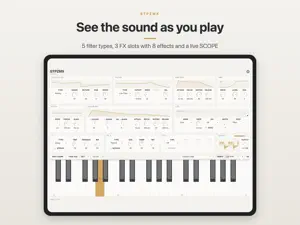
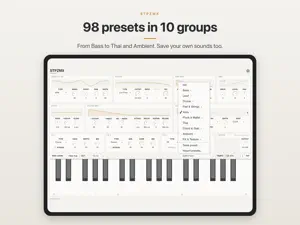
STPZMX is a polyphonic synth from STPZ LAB, built to be played. Pick one of 17 sound models, shape it with a filter, envelopes and an LFO, then finish it with three effect slots. Play it as an app on its own, or load it as an Audio Unit (AUv3) instrument in GarageBand, AUM, Logic Pro and other AUv3 hosts on iPad and Mac, and in Ableton Live on the Mac. SOUND • 17 sound models: Analog, Dual, Ring/Cross, Noise, Sync, Unison, Chord, Comb, VPM, Additive, Formant, Perc, Metal, Wavefold, FM FB, Modal (struck bars and gongs) and Bowed (fiddles). Two EDIT knobs change what each model does, plus a sub oscillator. • Filter: Low Pass, High Pass, Band Pass, Notch and Morph, with its own envelope and velocity amount. • Amp envelope, pitch envelope, glide, stereo width and drive. • LFO with sine, triangle, saw, square, sample & hold and Drift (smooth random, for tape wow and flutter), free or in time with the tempo. Send it to pitch, cutoff, amp or an EDIT knob. • Up to 16 voices. VOICE: Poly, Mono (one note at a time, gliding into every note) or Legato (glides only when you play over a held key). • OUTPUT knob: the final level after the effects. EFFECTS • Three FX slots in a chain: Delay, Repeat (a tempo-synced stutter), Distortion, Decimator, Chorus, Reverb, Phaser and Tremolo / Auto-pan. PRESETS • 99 factory presets in 10 groups, plus Init: Bass, Lead, Drums, Pad & Strings, Keys, Pluck & Mallet, Thai, Chord & Stab, Ambient, FX & Texture. • Thai instruments: ranat ek and thum, khong wong, khim, khlui, khaen, pin, saw u and saw duang. • Save your own sounds, in folders if you like. They appear in the host's preset menu after the factory presets: a preset you named My Pad shows as "User: My Pad", or "User: Pads / My Pad" in a folder called Pads. • Import and export presets, or Export all for a preset pack. Open .stpzmx files from Files, AirDrop or a chat. • Presets on every device: choose a folder in your iCloud Drive, and the sounds you save follow you between iPad and Mac. PLAY • On-screen keyboard: 37 wide keys with OCT − / +, or 88 keys, opening in each preset's range. In the Mac app, your computer keyboard plays too. • A live SCOPE draws the waveform as you play, with a level meter. • Mod wheel (CC 1): more LFO, up to half a semitone of vibrato on Pitch and more depth everywhere else. • MIDI Learn: link a knob on the screen to a knob or fader on your MIDI controller. • Bluetooth MIDI: in the app, pair a wireless MIDI keyboard from Settings. • Follows the host's tempo. In the app, set TEMPO by 0.1, type it, or TAP it. • On iPad, drag a knob up or down with your finger, and slide sideways for finer steps. • Two looks: Paper and Night. WORKS WITH • iPad: the STPZMX app, and AUv3 hosts such as GarageBand, AUM and Logic Pro for iPad. • Mac: the STPZMX app, and AUv3 hosts such as Logic Pro, GarageBand and Ableton Live (11.3 or later). Open the STPZMX app once after installing, so your Mac finds the instrument. Buy once and use it on both iPad and Mac. iPad only (not iPhone), iPadOS 15 or later. macOS 12 or later. No account, no ads, no data collected.
What’s new
Version 1.0.3 · Updated November 19, 2026
• VOICE: Poly, Mono or Legato. Mono plays one note at a time and glides into every note; Legato glides only when you press over a held key, with no new attack. • Six presets now play one note at a time: 808 Sub (Mono); Acid Line, Soft Flute, Khlui, Saw U and Saw Duang (Legato). • The mod wheel (CC 1) adds more LFO: up to half a semitone of vibrato on Pitch, more depth everywhere else. A knob you MIDI-learned to CC 1 still wins. • The preset bar sits in the title line with bigger arrow buttons for fingers. A * shows the sound has changed; Save and Revert are right beside it. • Folders for your presets: save into a folder, make a new one, move a preset with "Move to folder…", import a preset pack straight into its own folder. Folders sync to your other devices. • New preset: Vinyl Dust (FX & Texture), single soft clicks of record dust. • Water Drop now opens its keyboard at C4–C7, where it sounds best. • Reverb's DAMP knob is now called TONE, to match what it does. The sound is unchanged. • iPad: the screen no longer shifts down after you pick a preset.
App privacy
The developer, Theeraphat Sritharathikhun, reported these privacy practices to Apple.
Data Not Collected
The developer does not collect any data from this app.
Alternatives to STPZMX Synth
Looking for apps like STPZMX Synth? Here are 6 similar apps on the App Store. The highest rated is STATES MIDI (5.0/5).
-
 STATES MIDI
5.0
-
 Microvolt 3901
5.0
-
 Kleio Generative Instrument
5.0
-
 Additive Synth
5.0
-
 Atavism: Cinematic Pad Effect
5.0
-
 SpectraPad
5.0
| App | Rating | Price | Last updated | Compare |
|---|---|---|---|---|
| STPZMX Synth | 5.0 / 5 (1 rating) | 9.99 USD | November 19, 2026 | |
| STATES MIDI | 5.0 / 5 (2) | 7.99 USD | Nov 14, 2026 | Compare |
| Microvolt 3901 | 5.0 / 5 (6) | 24.99 USD | Nov 16, 2026 | Compare |
| Kleio Generative Instrument | 5.0 / 5 (2) | 5.99 USD | Nov 14, 2026 | Compare |
| Additive Synth | 5.0 / 5 (5) | 6.99 USD | Nov 9, 2026 | Compare |
| Atavism: Cinematic Pad Effect | 5.0 / 5 (1) | 4.99 USD | Nov 3, 2026 | Compare |
| SpectraPad | 5.0 / 5 (1) | 9.99 USD | Nov 11, 2026 | Compare |
Compare STPZMX Synth with the top alternatives: ratings, updates, ASO score and keyword gaps →