

ATPlayer
Andrey Torlopov Music iPhoneiPadiPod touch
ATPlayer is a free Music app for iPhone and iPad by Andrey Torlopov. Requires iOS 26.0. Updated November 15, 2026.
- Price
- Free
- on the App Store
- Size
- 14 MB
- Age 4+
- Updated
- Nov 15
- 2026 · v1.5.0
Screenshots
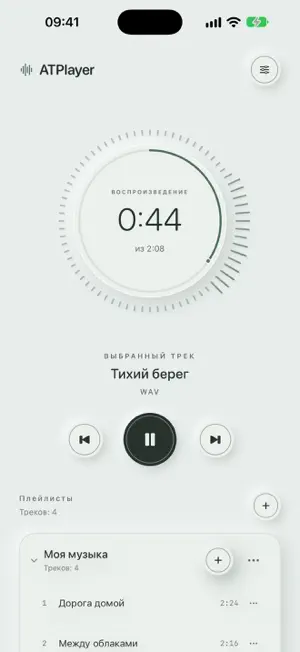


About ATPlayer
Press play. Just listen. ATPlayer plays your own audio files on iPhone and iPad. Build playlists or open a folder of music and press play. Available local files can be played offline. No ads, account, usage analytics, or tracking. The app does not collect data for the developer or send them your audio files, listening history, or library information. Playlists, settings, and file-access permissions stay on your device. Playlists and folders • Create and rename playlists, and add your audio through the system Files picker. • Drag to reorder playlists and tracks. The current track keeps playing from the same position. • Switch to Folders mode, browse subfolders, and play music without adding it to a playlist. • Folder playback includes only audio files in the current directory. Browsing elsewhere does not change the queue already playing. • Only selected root folders are remembered between launches. Contents are read again, and branches without supported audio are hidden. • Importing a folder into a playlist also adds audio from its subfolders. Playback • Play in order, repeat the current playlist or folder, shuffle, or repeat one track. • Keep listening in the background and control playback from the Lock Screen. • See the current track and controls in Live Activities on supported devices. • Adjust the sound with a 10-band equalizer and preamp. • Use layouts for iPhone and iPad, with light, dark and system appearance. Supports DRM-free MP3, M4A, AAC, WAV, AIFF, FLAC, ALAC, and CAF files when their audio codec is supported by the device. Music is not included. Local files can play without the internet. Reading directories and downloading audio from iCloud Drive, network storage, or other Files providers may require a network connection. Folders mode prepares audio from the open directory in a temporary local cache, prioritizing the selected track. The cache is cleared automatically and is not a permanent offline library. Playlists keep references to the originals, so those files must remain accessible. Removing an entry from the player does not delete the original audio file. Playlist export creates JSON containing names and file paths, not audio recordings. The interface is available in English and Russian. Choose EN or RU in Settings. Optional radio effect Add a radio-like texture to your own music. Two linked controls set the effect strength and the minimum background noise. Interference rises and fades smoothly; track changes remain ordinary. Radio is off by default and can be enabled in Settings below Equalizer. This is a local sound effect, not an internet radio service. Your files. Your order. Press play and listen.
What’s new
Version 1.5.0 · Updated November 15, 2026
Turn your own music into a radio-like listening experience with a soft background and smoothly changing interference. • Radio is off by default. Enable it in Settings below Equalizer. • Two linked controls set the effect strength and minimum background level. Set the effect to zero to turn it off. • Interference fades smoothly, with ordinary track changes. • Russian and English interfaces, plus light, dark and system appearance. • Improved headset playback controls and Live Activity playback state.
App privacy
The developer, Andrey Torlopov, reported these privacy practices to Apple.
Data Not Collected
The developer does not collect any data from this app.
Alternatives to ATPlayer
Looking for apps like ATPlayer? Here are 6 similar apps on the App Store. The highest rated is Dirplay — Music & Video Player (5.0/5), and all 6 are free to download.
-
 PulsePlay: Music Player
-
 Dirplay — Music & Video Player
5.0
-
 CX Music Player
-
 iMusify
-
 Stow Player
4.0
-
 Offline Music Player: Ad-Free
| App | Rating | Price | Last updated | Compare |
|---|---|---|---|---|
| ATPlayer | – | Free | November 15, 2026 | |
| PulsePlay: Music Player | – | Free | Nov 18, 2026 | Compare |
| Dirplay — Music & Video Player | 5.0 / 5 (1) | Free | Oct 18, 2026 | Compare |
| CX Music Player | – | Free | Aug 31, 2026 | Compare |
| iMusify | – | Free | Nov 16, 2026 | Compare |
| Stow Player | 4.0 / 5 (5) | Free | Nov 17, 2026 | Compare |
| Offline Music Player: Ad-Free | – | Free | Jul 8, 2026 | Compare |
Compare ATPlayer with the top alternatives: ratings, updates, ASO score and keyword gaps →