

CX Music Player
Coetic X LLC Music iPhoneiPadiPod touch
CX Music Player is a free Music app for iPhone and iPad by Coetic X LLC. Requires iOS 16.4. Updated August 31, 2026.
- Price
- Free
- on the App Store
- Size
- 46 MB
- Age 4+
- Updated
- Aug 31
- 2026 · v1.1.0
Screenshots


About CX Music Player
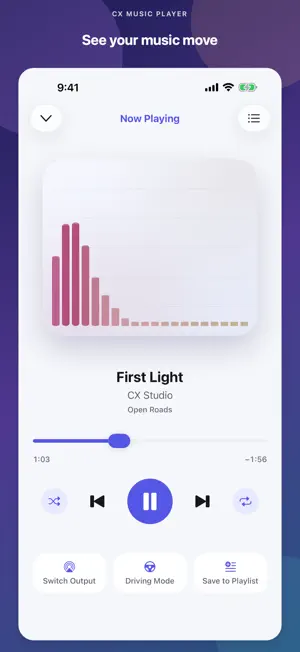
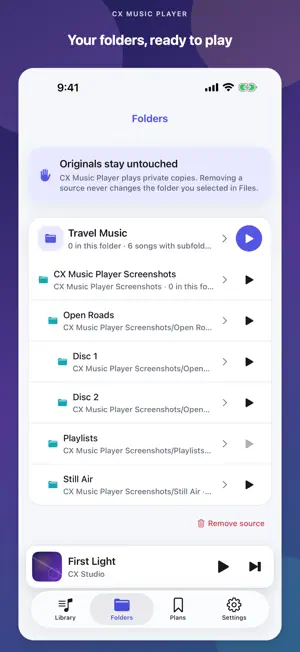
CX Music Player is a simple, free music player for audio files you already keep in Files. Choose a folder, review the music found inside it, skip subfolders that contain podcasts or sound effects, and import only the tracks you want. After import, it reads common MP3 ID3, M4A/MP4 atoms, and FLAC/Vorbis tags locally on your device. Compatible local M3U8 playlists can keep your chosen order. YOUR FOLDERS, YOUR CHOICE • Choose a directory through Apple's Files picker • Find supported audio in nested subfolders • Exclude any folder before importing • Keep an organized local library on your iPhone BROWSE YOUR LIBRARY • Browse Songs, Artists, Albums, and Genres when available • Import ordered local M3U8 playlists • Keep the Folders view for your original organization • Play albums in disc and track order • Display compatible embedded JPEG or PNG cover art COMPLETE PLAYBACK • Play one folder alone or include its enabled subfolders • Play, pause, seek, skip, and go back • Remove individual songs from Up Next without deleting Library music • Shuffle and repeat your music • Continue listening in the background • Use lock-screen and Control Center playback controls PLAN MUSIC FOR LATER • Keep non-playable song ideas in Finds and Planned Playlists • Search your imported Library and saved plans locally • Add a title or save a public music link without downloading it • Share or import a metadata-only CX Music Player JSON file • Keep playable Library playlists separate from planning lists LOW-DISTRACTION CONTROLS • Manually switch to large Previous, Play/Pause, and Next controls • Reach Up Next or your Folders without scrolling • Set up music while parked and prefer car controls or Siri when available PARKED CAR-AUDIO HELP • See the current playback output reported by iOS • Run a silent connection check • Open Apple's system playback-route picker • Review pairing and auto-connect checks for your radio PRIVATE BY DESIGN CX Music Player has no account, ads, subscriptions, in-app purchases, analytics, or backend. Audio, filenames, embedded tags, cover art, imported M3U8 data, Library data, Finds, and Plans are processed locally. A shared planning JSON contains metadata, notes, public source links, and portable IDs—not audio, local file paths, or API keys—and goes only to the iOS destination you choose. Current output names and types are displayed only in memory. Imported audio and its cover art are marked excluded from device backups; iOS may back up small non-audio app data. GOOD TO KNOW iOS does not let apps silently scan the whole phone. CX Music Player scans only the Files folder you explicitly choose. M3U8 playlists may reference only relative files inside that folder; web addresses and other arbitrary URIs are not loaded. The app does not access Apple Music or MusicKit, stream music, download from media services, or share your audio files. Importing creates a local copy and therefore uses device storage. Direct MusicBrainz and Last.fm search is disabled in this release pending terms and privacy review. Optional Google and YouTube actions open a fixed search in Safari; CX Music Player does not scrape results, embed those sites, or download media. Driving Mode is an in-app screen, not a CarPlay app. CX Music Player cannot pair a radio, force a Bluetooth connection, change the radio source or priority, or configure automatic reconnection. Pair and configure your car through iPhone Settings and the radio while parked. Supported file extensions: MP3, M4A, AAC, WAV, AIFF, AIF, CAF, and FLAC. Playback depends on the file's codec and integrity. Playlist format: UTF-8 M3U8 with local relative paths. Choose your folder and press play. That's it.
What’s new
Version 1.1.0 · Updated August 31, 2026
• Added a floating visualizer with Picture in Picture, including Driving Mode support. • Added song sorting by title, duration, and date added. • Improved visualizer playback, Picture in Picture controls, and layout reliability. • Included additional navigation and performance refinements.
App privacy
The developer, Coetic X LLC, reported these privacy practices to Apple.
Data Not Collected
The developer does not collect any data from this app.
Alternatives to CX Music Player
Looking for apps like CX Music Player? Here are 6 similar apps on the App Store. The highest rated is Kenopsia (5.0/5), and all 6 are free to download.
-
 Kenopsia
5.0
Kenopsia
5.0
-
 Trove-Local Music Player
5.0
Trove-Local Music Player
5.0
-
 Futureown - Local Music Player
-
 Plus Media Player
4.3
Plus Media Player
4.3
-
 Meow Music Player
-
 Stow Player
5.0
Stow Player
5.0
| App | Rating | Price | Last updated | Compare |
|---|---|---|---|---|
| CX Music Player | – | Free | August 31, 2026 | |
| Kenopsia | 5.0 / 5 (1) | Free | Sep 22, 2026 | Compare |
| Trove-Local Music Player | 5.0 / 5 (2) | Free | Oct 17, 2026 | Compare |
| Futureown - Local Music Player | – | Free | Sep 30, 2026 | Compare |
| Plus Media Player | 4.3 / 5 (6) | Free | Aug 28, 2026 | Compare |
| Meow Music Player | – | Free | Sep 10, 2026 | Compare |
| Stow Player | 5.0 / 5 (3) | Free | Sep 7, 2026 | Compare |
Compare CX Music Player with the top alternatives: ratings, updates, ASO score and keyword gaps →