

Roomy for Duo: Full Width
Julian Christopher Siebert Utilities iPhoneiPadiPod touch
Roomy for Duo: Full Width is a paid Utilities app for iPhone and iPad by Julian Christopher Siebert. Rated 5.0/5 from 2 ratings. Requires iOS 27.1.
- Rating
- 5.0
- 2 ratings
- Price
- 0.99 USD
- on the App Store
- Size
- 1 MB
- Age 4+
- Updated
- Nov 22
- 2026 · v1.0.8
Screenshots
Save to Pinterest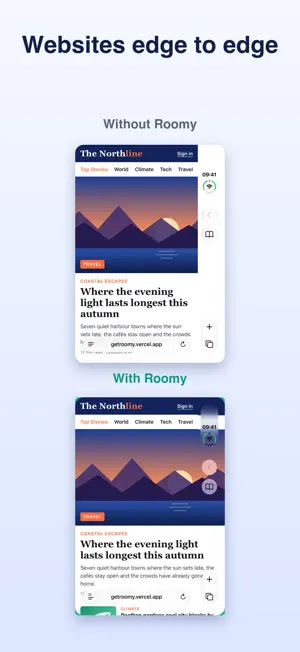


About Roomy for Duo: Full Width
Give websites room on the iPhone Duo front screen. On the iPhone Duo front screen, Safari 27.1 shows its controls in a sidebar — and most websites leave the space beside it empty. Roomy is a Safari extension that lets you change that, one website at a time. THREE OPTIONS, CHOSEN PER WEBSITE Open the extensions menu in Safari, tap Roomy and switch on what the current site needs: • Use full width — the page extends into the space beside Safari's controls instead of leaving it blank. • Hide bars while reading — fixed headers and footers slide away as you scroll down and return as soon as you scroll up. • Stretch narrow columns — lifts narrow width limits so articles use the whole width of the screen. Roomy remembers your choice for each website, so it looks the way you like it the next time you visit. A website that should stay untouched? Switch Roomy off for it with one tap. And when you like a combination, make it the default for all websites right from Safari. MADE FOR THE IPHONE DUO • Folded: Roomy works on the front screen, where Safari's sidebar takes room away from websites. • Unfolded: on the large inner screen, websites already have plenty of space — Roomy steps aside automatically, so scrolling stays smooth. If you like, bars can keep hiding while you read there. • Fold your iPhone Duo again and Roomy is right back, no reload needed. • Keep your place: fold, unfold or rotate, and the page stays on the paragraph you were reading. YOUR WEBSITES, IN ONE PLACE The Roomy app is where you keep track of everything: • See every website you've adjusted, with its saved options • Edit a site's options or reset it with a tap • Choose default options for websites you haven't configured yet • A short setup guide shows how to turn on the extension, and the app tells you whether it has been active • Language (Auto, English, Deutsch) and appearance (Auto, Light, Dark) settings PRIVATE BY DESIGN Roomy collects no data. No accounts, no analytics, no network requests. Your settings — just website names and the options you picked — stay on your iPhone. The extension needs Safari's website access permission only to change how pages are displayed; it does not store or send page content or your browsing history. GOOD TO KNOW • Designed for the iPhone Duo front screen. Roomy also works on any other iPhone; there, "Use full width" mainly makes a difference in landscape. • Every website is built differently. Some have fixed elements or their own layout limits, so results vary from site to site. One-time purchase. No subscription. Install Roomy on your iPhone Duo, turn on the extension, and let your favorite websites use the whole front screen.
What’s new
Version 1.0.8 · Updated November 22, 2026
• Websites whose header appears a moment after the page starts loading (many online shops) now fill the full width beside Safari's buttons. • Roomy is now available in Traditional Chinese.
App privacy
The developer, Julian Christopher Siebert, reported these privacy practices to Apple.
Data Not Collected
The developer does not collect any data from this app.
Alternatives to Roomy for Duo: Full Width
Looking for apps like Roomy for Duo: Full Width? Here are 6 similar apps on the App Store. The highest rated is Hingeworthy : Fold Counter (4.6/5), and 5 of the 6 are free to download.
-
 SiteShift: Unfolded Browsing
3.3
-
 FoldTick: Fold Counter
4.5
-
 Widen
4.5
-
 OutSpan - Fullscreen Browsing
3.8
-
 Hingeworthy : Fold Counter
4.6
-
 Wider - Fullscreen Browsing
1.8
| App | Rating | Price | Last updated | Compare |
|---|---|---|---|---|
| Roomy for Duo: Full Width | 5.0 / 5 (2 ratings) | 0.99 USD | November 22, 2026 | |
| SiteShift: Unfolded Browsing | 3.3 / 5 (6) | Free | Nov 18, 2026 | Compare |
| FoldTick: Fold Counter | 4.5 / 5 (4) | 0.99 USD | Nov 23, 2026 | Compare |
| Widen | 4.5 / 5 (12) | Free | Nov 23, 2026 | Compare |
| OutSpan - Fullscreen Browsing | 3.8 / 5 (23) | Free | Nov 24, 2026 | Compare |
| Hingeworthy : Fold Counter | 4.6 / 5 (9) | Free | Nov 6, 2026 | Compare |
| Wider - Fullscreen Browsing | 1.8 / 5 (93) | Free | Oct 31, 2026 | Compare |