

Widen
Challis & Company Pty Limited Utilities iPhone
Widen is a free Utilities app for iPhone by Challis & Company Pty Limited. Rated 4.5/5 from 12 ratings. Requires iOS 26.2. Updated November 23, 2026.
- Rating
- 4.5
- 12 ratings
- Price
- Free
- on the App Store
- Size
- 5 MB
- Age 4+
- Updated
- Nov 23
- 2026 · v1.0.12
Screenshots
Save to Pinterest


About Widen
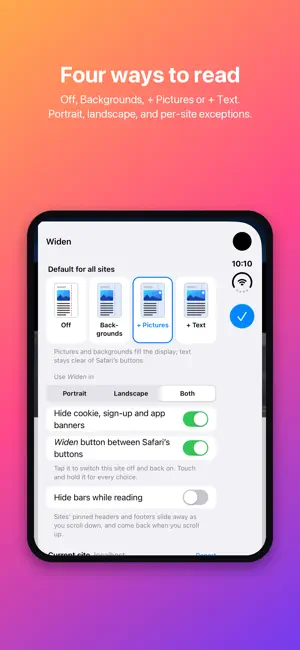
For iPhone Duo. Widen is the best way to use Safari on iPhone Duo's outer display, and on the inner screen in Split View. It's the extension that pioneered the choice between pictures alone and pictures with text. Close your iPhone Duo and Safari keeps a column down the side of the outer display for its buttons. Web pages stop where that column begins, so a strip of the screen goes unused on every site you visit. Open it with Safari beside another app, and Safari keeps the same column there. Web designers can't use that space themselves: Safari doesn't let a page extend beneath its buttons without scrolling sideways. Widen gives that width back. Photos, maps, tables and backgrounds stretch to the very edge, beneath Safari's buttons. Text and site menus stop just short of them, so nothing you need to read or tap is hidden. FOUR WAYS TO READ • Off: Safari as Apple made it. • Backgrounds: the page's colours and pinned bars fill the screen; pictures and text keep Safari's usual width. • + Pictures (the default): pictures and backgrounds fill the screen; text stays clear of the buttons. • + Text: every line runs the full width too. MADE FOR THE WAY YOU BROWSE • Works in portrait, in landscape or both, plus Split View on the inner screen. • The Widen button beside Safari's buttons switches the site you're reading with one tap. Touch and hold it to choose any layout, or open the settings. • Give any site its own setting, and see every exception in one list. • Widen a site's desktop layout as well, when you want to. • Hides the cookie, sign-up and app banners that cover the page on a small screen (switch it off any time). • Hide bars while reading: sites' pinned headers and footers slide away as you scroll down, and come back when you scroll up. • A Control Center button switches between Off, Backgrounds, + Pictures and + Text. • Shortcuts actions to set or toggle Widen, so it can follow a Focus or the Action button. • Works in Private Browsing, and alongside your favourite ad blocker. • Pages don't drift sideways as you scroll, and pinching and Safari's Page Zoom work as usual. ALWAYS IMPROVING Every website is built differently, and some do unexpected things. Widen is updated regularly with new features and fixes for the sites you read. If one doesn't look right, tap Report in Widen's panel in Safari: it sends us the details, and we'll do our best to fix it. PRIVATE BY DESIGN Widen collects nothing. There is no account, no analytics and no network activity of its own. It changes how pages are laid out on your phone and never reads, records or sends what is on them. PRICE Free to download and free for 7 days from the first page it widens. Then keep Widen with a single purchase: US$3.99 for lifetime access at the launch price. No subscription. SETTING UP Open Widen and tap Open Safari Settings; switch on Allow Extension; set All Websites to Allow; and switch on Private Browsing too. Then choose Widen from the menu in Safari's address bar. Widen is an independent app, not affiliated with or endorsed by Apple. Handtuned in Sydney, Australia.
Ratings & reviews
4.5
12 ratings
What’s new
Version 1.0.12 · Updated November 23, 2026
Thank you to our dedicated users who send us Reports and suggestions. Every website is built a little differently, and we want Widen to work well with as many as possible. • Improvements for more sites.
App privacy
The developer, Challis & Company Pty Limited, reported these privacy practices to Apple.
Data Not Collected
The developer does not collect any data from this app.
Alternatives to Widen
Looking for apps like Widen? Here are 6 similar apps on the App Store. The highest rated is Widezilla Browser (5.0/5), and 3 of the 6 are free to download.
-
 Sidefill: Wide View for Safari
-
 Widezilla Browser
5.0
-
 FoldCounter: Fold Stats
4.8
-
 Foldboard
2.6
-
 Lens: Simple, Private Browser
4.9
-
 Desky - Desktop Mode Switching
3.0
| App | Rating | Price | Last updated | Compare |
|---|---|---|---|---|
| Widen | 4.5 / 5 (12 ratings) | Free | November 23, 2026 | |
| Sidefill: Wide View for Safari | – | 0.89 USD | Nov 23, 2026 | Compare |
| Widezilla Browser | 5.0 / 5 (10) | 0.49 USD | Nov 24, 2026 | Compare |
| FoldCounter: Fold Stats | 4.8 / 5 (42) | Free | Nov 25, 2026 | Compare |
| Foldboard | 2.6 / 5 (5) | Free | Nov 25, 2026 | Compare |
| Lens: Simple, Private Browser | 4.9 / 5 (125) | Free | Nov 25, 2026 | Compare |
| Desky - Desktop Mode Switching | 3.0 / 5 (2) | 1.99 USD | Nov 21, 2026 | Compare |
Compare Widen with the top alternatives: ratings, updates, ASO score and keyword gaps →