

Lens: Simple, Private Browser
Maximos Angelakis Utilities iPhoneiPadiPod touchMac
Lens: Simple, Private Browser is a free Utilities app for iPhone and iPad by Maximos Angelakis. Rated 4.9/5 from 125 ratings. Requires iOS 26.0.
- Rating
- 4.9
- 125 ratings
- Price
- Free
- on the App Store
- Size
- 50 MB
- Age 17+
- Updated
- Nov 25
- 2026 · v1.2.3
Screenshots
Save to Pinterest

About Lens: Simple, Private Browser
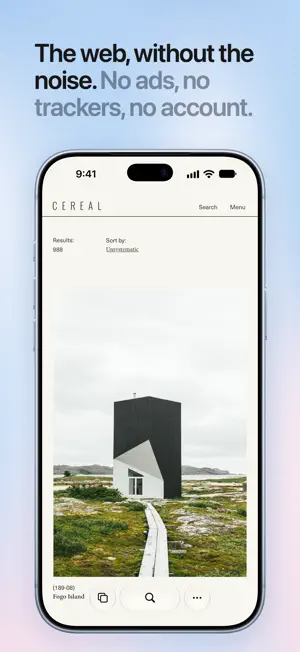
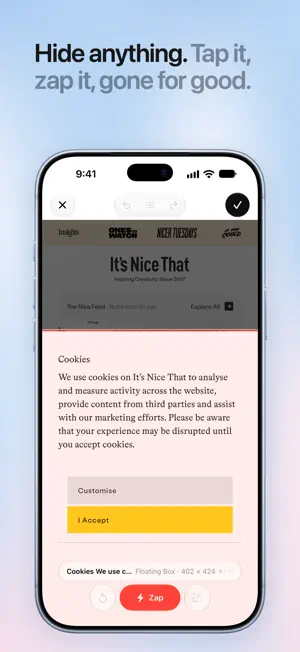
Lens is a web browser that stays out of your way. Open it and type: search comes first, your favourite sites are one tap away, and there's nothing else to learn. No ads, no trackers, no account, and nothing collected about you. Free. SEARCH FIRST • Lens opens straight to search, with your pinned sites one tap away. • Pick your search engine: DuckDuckGo, Brave, Kagi, Ecosia, Google or Bing. • Site Search: type a site's name and tap space twice to search inside it. THE WEB, WITHOUT THE NOISE • Ads, trackers and most cookie pop-ups don't load. • Hide anything that bothers you on a page, and it stays hidden next time. PRIVATE ON ITS OWN • No account, no analytics, no tracking. Lens doesn't know who you are. • Lock private tabs with Face ID. • Forget This Website clears everything a site saved. • Secure connections everywhere, and tracking codes are cleaned from links. TABS THAT TIDY THEMSELVES • Tabs you haven't opened in a day move to the Archive. Nothing is lost. • A tab with a half-filled form stays open until you send it. • Pinch a page to see your tabs, swipe along the bar to switch, flick a tab up to close it. BOOKMARKS, IN SPACES • Keep sites in folders and spaces, for work, home or anything else. Swipe past your last tab to find them. • Bring your bookmarks over from other browsers, folders and all. They sync between your iPhone and iPad through iCloud, end-to-end encrypted. SMALL THINGS THAT HELP • Summaries: read a page in a few lines, written by Apple Intelligence, only when you ask. • Mini Player: keep listening while you browse, with Picture in Picture. • Downloads that keep going in the background. • Reader, in seven soft colours. • Translate pages right on your iPhone. • Press and hold a link to preview it, and scroll it, before you open it. • Buttons for Reader, Translate, video and Downloads show up only when you need them. • Zoom, fullscreen, desktop site and blocking, set for each site. • Swipe anywhere on a page to go back or forward. • Copy an article as clean Markdown. MADE FOR iPHONE DUO • Open, the page gets the whole big screen, with the bar down the side. • Half-fold it in landscape, and Reader becomes a book you turn page by page. • Closed, it's the same Lens you know from iPhone. WORKS WITH YOUR iPHONE • Make Lens your default browser. • iCloud Passwords, passkeys, one-time codes, Apple Pay and Wallet passes. • iCloud sync for pins, history and tabs, end-to-end encrypted. • Buttons for Control Center and the Lock Screen, and Siri and Shortcuts. FOR DESIGNERS AND DEVELOPERS Select any text to see which font draws it. Tap anything to see its box, colours and contrast, measure the gap between two elements, or pause the page to look at a menu. Turn on Developer Tools in Settings. LENS FOR MAC A free menu bar app with your pins, your iPhone's tabs and the pages you send from your iPhone. No feeds, no clutter, no AI you didn't ask for. If you like Lens, you can leave a tip or become a supporter with an optional monthly or yearly subscription. Either unlocks extra app icons; nothing else is behind a purchase. Terms of Use: https://www.apple.com/legal/internet-services/itunes/dev/stdeula/
Ratings & reviews
4.9
125 ratings
What’s new
Version 1.2.3 · Updated November 25, 2026
New • Lock a bookmark space with Face ID, from the space’s menu. Its bookmarks open in private tabs. • Custom Site Search shortcuts, like “yt”: tap a site in Settings › Search › Site Search. • Always open in private mode, in Settings › Private Browsing. • Keep no history at all: Settings › History › Auto-Delete › Don’t Keep. • Don’t use bookmarks? Turn them off in Settings › Bookmarks. • What’s New in Settings, to see what changed in each version. Improvements • “Always Fullscreen” is now called “Hide Toolbar”, which says what it does. • Turning off a lock now asks for Face ID. • Locked private tabs wait for you to tap Unlock, instead of opening as soon as you look at your phone. • Search in Settings finds every setting, by everyday words too. • Privacy & Security explains each kind of blocking and the lists behind it, on a new About Blocking page. • All banners and notices share one look, and all swipe away. Finished downloads show Save and Share right on their banner. • The bookmarks panel opens more smoothly. • One more AI service to ask, and more preloaded sites in Site Search. • Force Dark Mode reaches more sites. • Links that open a new tab go to their app, when you have it. You can turn this off in Settings › Features › Open Links in Apps. • iPhone Duo: half-folded like a laptop, a fullscreen page hides the clock and the bar too. Fixes • Reader’s fonts and themes in the page menu work again. • Reload brings a zoomed-in page back to its normal size. • Summaries no longer show stray headings. • Photo galleries on some shopping sites work again. • iPhone Duo: text on some sites is no longer oversized when it’s open. • iPhone Duo: Lens no longer freezes when you tap search with the phone folded. • iPhone Duo: half folded and upright, Full-Width Design keeps its buttons in the corner. • Sites that only answer at www. open when you type them without it. • Two rare crashes, when pinching into your tabs and when pasting. • Plus many smaller fixes.
App privacy
The developer, Maximos Angelakis, reported these privacy practices to Apple.
Data Not Collected
The developer does not collect any data from this app.
Alternatives to Lens: Simple, Private Browser
Looking for apps like Lens: Simple, Private Browser? Here are 6 similar apps on the App Store. The highest rated is Vanilla - Private Browser (5.0/5), and all 6 are free to download.
-
 Halfsheet Browser
4.6
-
 Crest Browser
4.4
-
 Wider - Fullscreen Browsing
1.8
-
 Brim Browser
4.5
-
 Vanilla - Private Browser
5.0
-
 OutSpan - Fullscreen Browsing
3.8
| App | Rating | Price | Last updated | Compare |
|---|---|---|---|---|
| Lens: Simple, Private Browser | 4.9 / 5 (125 ratings) | Free | November 25, 2026 | |
| Halfsheet Browser | 4.6 / 5 (7) | Free | Nov 24, 2026 | Compare |
| Crest Browser | 4.4 / 5 (23) | Free | Nov 24, 2026 | Compare |
| Wider - Fullscreen Browsing | 1.8 / 5 (93) | Free | Oct 31, 2026 | Compare |
| Brim Browser | 4.6 / 5 (20) | Free | Nov 24, 2026 | Compare |
| Vanilla - Private Browser | 5.0 / 5 (7) | Free | Nov 14, 2026 | Compare |
| OutSpan - Fullscreen Browsing | 3.8 / 5 (23) | Free | Nov 24, 2026 | Compare |