

Lume - Retro Camera
丹丹 张 Photo & Video iPhoneiPadiPod touch
Lume - Retro Camera is a free Photo & Video app for iPhone and iPad by 丹丹 张. Requires iOS 17.0. Updated November 18, 2026.
- Price
- Free
- on the App Store
- Size
- 21 MB
- Age 4+
- Updated
- Nov 18
- 2026 · v1.0.4
Screenshots



About Lume - Retro Camera
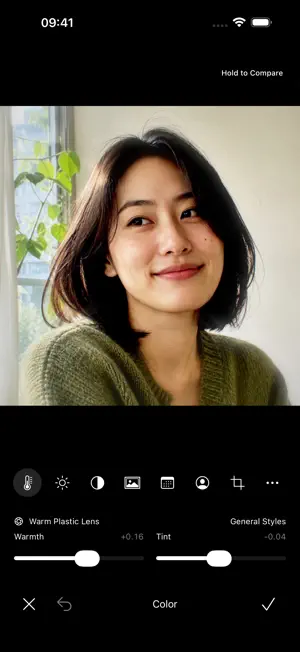
Lume. Catch the soft light. Give everyday moments a softer, nostalgic feel. Choose a camera style, adjust its color and accessories, then take the shot. Or import a photo and build your own film look at your own pace. FIND YOUR CAMERA • Browse photo and video styles on a two-row camera shelf. Keep exploring after each selection, then tap the down arrow to return to the viewfinder. • Choose supported color profiles, date stamps, aspect ratios and frames. Favorite cameras and organize the shelf. • Use front and rear cameras, tap to focus and meter, adjust exposure, set a timer and compose with guides. SHAPE THE LOOK • Browse, search and favorite film filters, with previews and adjustable intensity on your image. • Add grain, vignette, light leaks, halation, dust and chromatic effects. • Explore star, prism, fisheye, color-flash and digital dimming accessories. Availability varies by camera. • Crop, rotate and adjust color; add date stamps and original frames. Keep presets, drafts and saved edit versions. GO BEYOND A SINGLE PHOTO • Shoot retro-style video, or import a clip to adjust its look, trim and speed. • Arrange photos into collages or create stacked-photo animations from video and Live Photo sources. • Use RAW, Live Photos and depth photography on supported devices and camera configurations. Available formats and physical lenses depend on your hardware. KEEP YOUR WORK CLOSE • Photos and videos are processed on your device. No account required. • View, favorite and edit your work in the local library. Save to Photos or use system sharing to export finished work and originals. • Back up your library and merge it back later. Export a backup before removing the app. • Available in English, Simplified Chinese and Traditional Chinese, with camera widgets and Shortcuts. All features are free. No ads, subscriptions or in-app purchases. Camera and microphone permissions are requested when needed. Saving capture locations is off by default and requests a location only after you enable it. Unmodified originals may retain their original location metadata. Digital dimming darkens the image; it does not extend sensor exposure. Retro looks are original digital simulations and do not promise an exact match to any physical film or camera.
What’s new
Version 1.0.4 · Updated November 18, 2026
Compare tones on photo samples in the camera shelf and viewfinder before choosing a look. Preview frames, lens accessories, date stamps, and light leaks. Try a look on the photo you are editing or on the selected video frame. The beginner tutorial now shows examples of warm café tones, double exposure, and photo collage.
App privacy
The developer, 丹丹 张, reported these privacy practices to Apple.
Data Not Collected
The developer does not collect any data from this app.
Alternatives to Lume - Retro Camera
Looking for apps like Lume - Retro Camera? Here are 6 similar apps on the App Store. The highest rated is Pixel Camera (0.004MP) (5.0/5), and all 6 are free to download.
-
 FilmRue
-
 Sable: Film Camera
-
 ManualCam – Pro Camera
-
 NoCam Film
-
 Pixel Camera (0.004MP)
5.0
-
 VitaCam: Vintage Camera Filter
| App | Rating | Price | Last updated | Compare |
|---|---|---|---|---|
| Lume - Retro Camera | – | Free | November 18, 2026 | |
| FilmRue | – | Free | Nov 18, 2026 | Compare |
| Sable: Film Camera | – | Free | Nov 12, 2026 | Compare |
| ManualCam – Pro Camera | – | Free | Nov 17, 2026 | Compare |
| NoCam Film | – | Free | Nov 11, 2026 | Compare |
| Pixel Camera (0.004MP) | 5.0 / 5 (1) | Free | Nov 11, 2026 | Compare |
| VitaCam: Vintage Camera Filter | – | Free | Sep 19, 2026 | Compare |