

ManualCam – Pro Camera
Ghost Collective LLC Photo & Video iPhoneiPadiPod touch
ManualCam – Pro Camera is a free Photo & Video app for iPhone and iPad by Ghost Collective LLC. Requires iOS 17.0. Updated November 9, 2026.
- Price
- Free
- on the App Store
- Size
- 4 MB
- Age 4+
- Updated
- Nov 9
- 2026 · v2.1
Screenshots



About ManualCam – Pro Camera
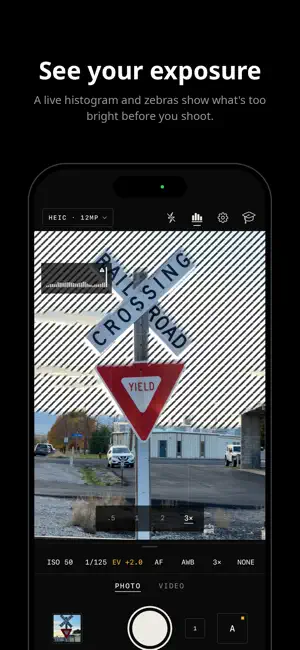
ManualCam gives you full control of your iPhone camera, and teaches you how to use it. Set shutter speed, ISO, focus, white balance, exposure and zoom on smooth dials. Set only the shutter and ISO follows, or only ISO and the shutter follows. Values you set show in amber, so you always know what's manual, and the A button puts everything back on auto. Built like a camera The Darkroom design keeps the screen dark and quiet, so your eyes stay on the picture. Settings read in crisp mono type, like the markings on a lens. Dials tick as you turn them, with a firmer click on key stops. Controls are square, with thin outlines and nothing glassy in the way. Learn as you shoot A built-in guide explains every setting in plain words, with recipes you can load in one tap. A teacher line offers one tip for the scene in front of you, and practice challenges tick themselves when your shots show you've done them. Looks and frames • Six film looks built on real film stocks, saved so Photos can undo them • Live look shows the look on the whole picture as you frame • Crop to 3:2, 16:9, 1:1, 4:5 or a panorama • Open a photo in ManualEdit to keep adjusting its look and crop Tools • Focus peaking and a punch-in, Zones with a spot meter, focus and exposure lock • A level, five grids and video frame guides • Live histogram, zebra stripes and an exposure meter One press, more pictures • Self-timer, intervals and test strips that step a setting across five frames • Long exposures for silky water and light trails • Scene setups, and four of your own Photos • HEIC, JPEG, RAW and ProRAW, up to 48 MP • Full-quality 2× from 48 MP cameras Video • 1080p or 4K, up to 240 fps for slow motion • SDR, HDR or Apple Log, in HEVC, H.264 or ProRes • View assist shows Apple Log with normal contrast while you shoot (HEVC) Hardware • Volume down takes the picture; Camera Control works as a dial on iPhones that have it Private by design No account, no ads, no tracking. Your photos and videos stay in your own Photos library. ManualCam never uploads or collects them. Requires iOS 17 or later. ProRAW, ProRes, Apple Log and 48 MP need a supported iPhone. Formats your iPhone doesn't support won't appear in the menu.
What’s new
Version 2.1 · Updated November 9, 2026
ManualCam 2.1 • Film looks, rebuilt. The six looks now use real film stocks, each with its own curve, color and grain. Silver 400 is true black and white. • Looks you can undo. A photo taken with a look or a frame is saved as a Photos edit, with the original kept underneath. Edit › Revert brings it back. • Works with ManualEdit. Open a ManualCam photo in ManualEdit to keep adjusting its look and crop. • Your look shows on the thumbnail the moment you take a photo. • A new app icon, and softer corners on buttons and previews. • Fixes a crash on some iPhones when switching to 4K HDR video.
App privacy
The developer, Ghost Collective LLC, reported these privacy practices to Apple.
Data Not Collected
The developer does not collect any data from this app.
Alternatives to ManualCam – Pro Camera
Looking for apps like ManualCam – Pro Camera? Here are 6 similar apps on the App Store. The highest rated is Cavo Camera (5.0/5), and all 6 are free to download.
-
 Cavo Camera
5.0
-
 DragSelfie: Self Timer Camera
-
 Burst Photo Share
-
 Promptos
5.0
-
 ProCamera+: Manual RAW Camera
5.0
-
 PerClick: Self Timer Camera
| App | Rating | Price | Last updated | Compare |
|---|---|---|---|---|
| ManualCam – Pro Camera | – | Free | November 9, 2026 | |
| Cavo Camera | 5.0 / 5 (1) | Free | Sep 25, 2026 | Compare |
| DragSelfie: Self Timer Camera | – | Free | Sep 14, 2026 | Compare |
| Burst Photo Share | – | Free | Nov 5, 2026 | Compare |
| Promptos | 5.0 / 5 (1) | Free | Jan 9, 2026 | Compare |
| ProCamera+: Manual RAW Camera | 5.0 / 5 (1) | Free | Nov 6, 2026 | Compare |
| PerClick: Self Timer Camera | – | Free | Oct 21, 2026 | Compare |