

Draft Prompt: Prompts & Notes
Laronge Intellectual Property Development, LLC Productivity iPhoneiPadiPod touch
Draft Prompt: Prompts & Notes is a free Productivity app for iPhone and iPad by Laronge Intellectual Property Development, LLC. Requires iOS 17.4.
- Price
- Free
- on the App Store
- Size
- 11 MB
- Age 4+
- Updated
- Nov 10
- 2026 · v1.0.1
Screenshots
Save to Pinterest


About Draft Prompt: Prompts & Notes
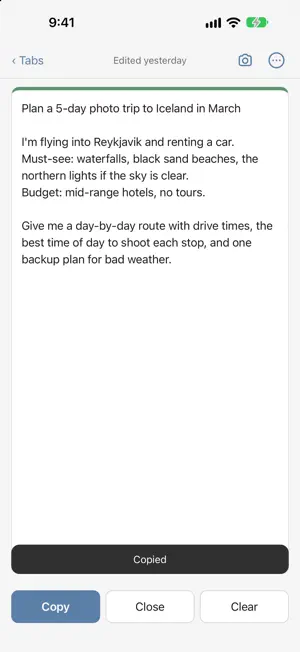
Draft Prompt is where you write prompts and notes before they go into Claude, ChatGPT or Copilot. Enter makes a new line and never sends. When the prompt is done, copy it or share it to the chat app in one move. It isn't an AI and it doesn't write prompts for you. It's the place you write them. WHY IT HELPS In most AI chats, Enter sends. Hit it halfway through a thought and the AI starts answering half a prompt. In Draft Prompt you write, reread and fix it, then send it when you decide it's done. WHAT YOU GET - Enter makes a new line. That's the whole idea. - Tabs keep each project separate. - Sections break a long prompt into parts you can find again. - Copy puts the whole prompt on the clipboard without selecting anything. Share sends it straight to the chat app. - Scan Text: take a picture of a page, a whiteboard or a screenshot and pull the text into your note. - Photos and attachments stay with the note they belong to. - Sync between your iPhone and Draft Prompt on Mac and Windows. Start a prompt on the computer and finish it on your iPhone. FREE AND PRO - Free: one tab, on this iPhone. No account needed, and it doesn't run out. - Pro Local, a one-time purchase: as many tabs as you want on this iPhone, without sync. - Pro Everywhere, a yearly subscription: the full app plus sync on every device you sign in on. Pro Everywhere starts with a 2-week free trial. After that it's $12.99 a year and renews until cancelled. Cancel anytime in Settings, under your Apple Account, in Subscriptions, at least 24 hours before the trial ends to avoid being charged. Terms of Use: https://www.apple.com/legal/internet-services/itunes/dev/stdeula/ Privacy Policy: https://draftprompt.app/privacy.html Questions or problems: [email protected]
What’s new
Version 1.0.1 · Updated November 10, 2026
Lists keep going: start a line with - or 1. and Return starts the next item. New optional format bar above the keyboard (Account > Format bar while typing): lists, headings and code, typed as plain text. Signatures: save lines you add to lots of prompts, like Make sure to use a plugin, skill or preference, and add them with one tap.
App privacy
The developer, Laronge Intellectual Property Development, LLC, reported these privacy practices to Apple.
Data Linked to You
The following data, which may be collected and linked to your identity, may be used for the following purposes:
- Purchases: Purchase History
- Contact Info: Email Address
- User Content: Photos or Videos, Other User Content
- Identifiers: User ID, Device ID
- Other Data: Other Data Types
Used for: App Functionality
Alternatives to Draft Prompt: Prompts & Notes
Looking for apps like Draft Prompt: Prompts & Notes? Here are 6 similar apps on the App Store. The highest rated is Gravity Notes - Smart Notes (5.0/5), and all 6 are free to download.
-
 MTplans LiDAR Plan Point Cloud
-
 Daily Trax Routine Planner
4.8
-
 Tether: ADHD Planner & Focus
4.6
-
 Promptty - AI Prompt Manager
-
 Gravity Notes - Smart Notes
5.0
-
 Quick Note: Sticky Notes Menu
4.4
| App | Rating | Price | Last updated | Compare |
|---|---|---|---|---|
| Draft Prompt: Prompts & Notes | – | Free | November 10, 2026 | |
| MTplans LiDAR Plan Point Cloud | – | Free | Sep 8, 2026 | Compare |
| Daily Trax Routine Planner | 4.8 / 5 (4) | Free | Nov 16, 2026 | Compare |
| Tether: ADHD Planner & Focus | 4.6 / 5 (5) | Free | Oct 30, 2026 | Compare |
| Promptty - AI Prompt Manager | – | Free | Oct 8, 2026 | Compare |
| Gravity Notes - Smart Notes | 5.0 / 5 (14) | Free | Nov 8, 2026 | Compare |
| Quick Note: Sticky Notes Menu | 4.4 / 5 (7) | Free | Nov 17, 2026 | Compare |