

Dricast: Car TV & IPTV
Ozmert Group Utilities iPhoneiPadiPod touch
Dricast: Car TV & IPTV is a free Utilities app for iPhone and iPad by Ozmert Group. Rated 4.3/5 from 3 ratings. Requires iOS 18.0. Updated November 26, 2026.
- Rating
- 4.3
- 3 ratings
- Price
- Free
- on the App Store
- Size
- 45 MB
- Age 4+
- Updated
- Nov 26
- 2026 · v1.2.5
Screenshots
Save to Pinterest


About Dricast: Car TV & IPTV
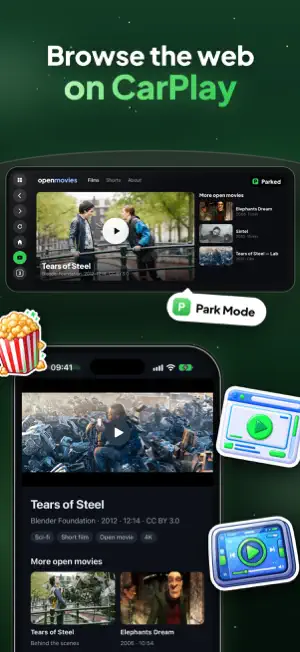
Your playlists, your videos, your route. One app. Dricast plays your own IPTV playlists, media servers and videos beautifully on iPhone, iPad, Mac and Apple TV. In the car it is also your navigation: search a place and drive with spoken turn-by-turn directions on your iPhone and car screen, with nearby charging stations when you need them. When you're parked, Park Mode brings your media to the car screen; video closes as soon as the car moves. YOUR IPTV AND MEDIA • M3U / M3U8 playlists and Xtream Codes • Jellyfin, Emby and Plex media servers • Groups, categories, search, favourites and a program guide (EPG) • Official live streams from broadcasters, curated for your region • Your videos from Photos, Files or your Mac (Finder) • Web video from the browser with "Send to Car", and screen mirroring (some sites and copy-protected content can't be shown) • Videos from other apps on your network (DLNA) CAR NAVIGATION • Search for a place, or pick Home, Work, a saved or a recent destination • Pin Home and Work on the map • Route preview with up to three alternatives: time, distance and toll notes • Turn-by-turn guidance with maneuver arrows, remaining distance and arrival time • Spoken directions that lower your audio while they speak • Automatic rerouting • Full-screen guidance on iPhone, and "Send to Car" puts the route on your car screen • Home, Work and nearest charger shortcuts on the Dashboard Works with CarPlay. NEARBY CHARGING STATIONS • Nearby charging stations on the map and in a list • Distance, maximum power (kW), connector types and operator • "Fast charging (50 kW+)" filter Coverage and detail vary by country. PARK MODE: SAFETY FIRST • While you're parked, your playlists, servers, videos, web video and mirroring on the car screen • Video on the car screen opens only after you confirm "I'm Parked" and the car is stationary (measured from your location's speed). It closes as soon as the car moves; audio keeps playing. • On-screen keyboard and dictation in the car browser • This can't be turned off on any plan. No ads are ever shown on the car screen. ON ALL YOUR DEVICES iPhone, iPad, Mac and Apple TV, synced with iCloud; navigation is on iPhone and the car screen. Sign-in is optional. YOUR LOCATION Used while you use the app; in the background only during guidance. Maps, search and routes come from Apple Maps. Dricast only gets a location rounded to about 1 km, for nearby chargers: cached up to 5 minutes, not stored, not linked to you, not logged. WHAT DRICAST DOESN'T DO No real-time charger availability, no payment or starting a charge, no lane guidance, no offline maps and no navigation on Apple TV. Arrival times are estimates. DRICAST PRO • Unlimited sources and videos • Unlimited Park Mode time on the car screen • No ads • Mini player and Picture in Picture Weekly, yearly or a one-time Lifetime option. IMPORTANT: Dricast is a player. Apart from the official broadcaster streams above, it does not provide any channels or content, and it does not sell IPTV subscriptions. Only add sources you have the right to watch. Never watch video while driving; follow traffic laws. Charging data: Bundesnetzagentur, data.gouv.fr (IRVE), Open Charge Map and points of interest from Apple Maps. Screenshots include images from Big Buck Bunny, Sintel, Tears of Steel and Elephants Dream (© Blender Foundation, CC BY). SUBSCRIPTION INFORMATION • Payment is charged to your Apple Account at confirmation of purchase. • Subscriptions renew automatically unless cancelled at least 24 hours before the end of the current period; renewal is charged within the 24 hours before the period ends. • When an introductory offer ends, the standard price applies. • Manage or cancel subscriptions in your Apple Account settings. • Lifetime is a one-time purchase and does not renew. Privacy Policy: https://dricast.app/privacy Terms of Use: https://dricast.app/terms Apple Standard EULA: https://www.apple.com/legal/internet-services/itunes/dev/stdeula/
What’s new
Version 1.2.5 · Updated November 26, 2026
Bug fixes and performance improvements.
App privacy
The developer, Ozmert Group, reported these privacy practices to Apple.
Data Used to Track You
The following data may be used to track you across apps and websites owned by other companies:
- Purchases: Purchase History
- Location: Coarse Location
- Identifiers: Device ID
- Usage Data: Product Interaction, Advertising Data
Data Linked to You
The following data, which may be collected and linked to your identity, may be used for the following purposes:
- Location: Coarse Location
- Identifiers: Device ID, User ID
- Usage Data: Product Interaction, Advertising Data
- Diagnostics: Other Diagnostic Data, Performance Data
- Purchases: Purchase History
- Contact Info: Email Address, Name
Used for: Third-Party Advertising, Analytics, App Functionality
Data Not Linked to You
The following data, which may be collected but is not linked to your identity, may be used for the following purposes:
- Search History: Search History
- Browsing History: Browsing History
- Diagnostics: Crash Data
- Other Data: Other Data Types
Used for: Analytics, App Functionality
Alternatives to Dricast: Car TV & IPTV
Looking for apps like Dricast: Car TV & IPTV? Here are 6 similar apps on the App Store. The highest rated is AutoCinema: Car IPTV Player (5.0/5), and all 6 are free to download.
-
 LeyTV: IPTV & Media Player
3.7
-
 CarCast: Cast M3U TV Player
4.2
-
 AutoCinema: Car IPTV Player
5.0
-
 toCar: Cast & M3U IPTV Player
-
 CarFlix: Autoplay
-
 asCar – Car Browser & IPTV
5.0
| App | Rating | Price | Last updated | Compare |
|---|---|---|---|---|
| Dricast: Car TV & IPTV | 4.3 / 5 (3 ratings) | Free | November 26, 2026 | |
| LeyTV: IPTV & Media Player | 3.7 / 5 (3) | Free | Nov 24, 2026 | Compare |
| CarCast: Cast M3U TV Player | 4.2 / 5 (53) | Free | Oct 19, 2026 | Compare |
| AutoCinema: Car IPTV Player | 5.0 / 5 (1) | Free | Nov 25, 2026 | Compare |
| toCar: Cast & M3U IPTV Player | – | Free | Nov 26, 2026 | Compare |
| CarFlix: Autoplay | – | Free | Nov 13, 2026 | Compare |
| asCar – Car Browser & IPTV | 5.0 / 5 (2) | Free | Oct 26, 2026 | Compare |